- Joined
- Jan 21, 2021
- Messages
- 69
- Reaction score
- 15
3CX PBX - 18.0 Update 1
W80DM on firmware - 103.83.0.109
W80B on firmware - 103.83.0.109
Provisioning Method - STUN
Referring to my previous post:
https://www.3cx.com/community/threads/no-audio-on-w80dm.84780/
The service provider logged a ticket with the Yealink, and after a lot of troubleshooting and R&D they finally came up with a solution for the audio issues.
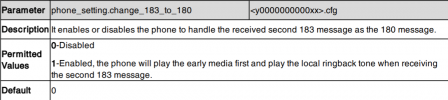
The following parameter on the phone template fixes the issue:
phone_setting.change_183_to_180 =1
(uploading a CFG file with this parameter to the Yealink device works, but my concern is auto provisioning removing the setting again after power failures or base reset)
I am on 3CX Settings > Template settings (trying to follow a 3CX guide) but I am unsure which template to edit for the Yealink W80DM / Yealink W80B. I am also concerned that making this change will affect the other devices on 3CX.
Can anyone provide some clarity on this?
W80DM on firmware - 103.83.0.109
W80B on firmware - 103.83.0.109
Provisioning Method - STUN
Referring to my previous post:
https://www.3cx.com/community/threads/no-audio-on-w80dm.84780/
The service provider logged a ticket with the Yealink, and after a lot of troubleshooting and R&D they finally came up with a solution for the audio issues.
The following parameter on the phone template fixes the issue:
phone_setting.change_183_to_180 =1
(uploading a CFG file with this parameter to the Yealink device works, but my concern is auto provisioning removing the setting again after power failures or base reset)
I am on 3CX Settings > Template settings (trying to follow a 3CX guide) but I am unsure which template to edit for the Yealink W80DM / Yealink W80B. I am also concerned that making this change will affect the other devices on 3CX.
Can anyone provide some clarity on this?