


- Joined
- May 3, 2022
- Messages
- 4
- Reaction score
- 0
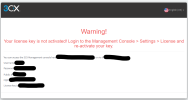
Hi Guys, installed 3CX on azure server as per the instruction (https://www.3cx.com/docs/pbx-azure-marketplace/) but got the below error, "Warning, Your license key is not activated! Login to Managent console>Settings>license and reactivate your key". I tried recreating Azure server but still same. When I log in to 3CX and under settings, it shows as "3CX failed to establish a TCP connection to activate.3cx.com. Ensure that the local or border firewalls are configured to allow outbound traffic to activate.3cx.com"
Can anyone please advise where I can configure outbound traffic?
Can anyone please advise where I can configure outbound traffic?


