Zendesk serversite integration does not work

Status
Not open for further replies.

Torsten Menze

Joined
May 7, 2018
Messages
8
Reaction score
3
Hi,

Access to Zendesk works, but no phone numbers and associated users are found. If the generated URL is entered in the browser, there are no results.

Torsten
 
Hello @Torsten Menze,

What do you see when you press the Test button? Can you show here the logs of that test run?

Kind regards.
 
Hi,

here is the result of a test. The requested number is available in the system.

Kind regards
Torsten
upload_2018-8-24_15-7-26.png
 
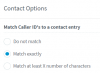
Try changing the lookup configuration from the 3CX Console > Contacts > Options > Match Caller ID's to a contact entry > Match exactly (instead of Match at least X number of characters = 6).
upload_2018-8-24_23-24-38.png
 
This setting was already active. See my last post, Request Text: ...
 
In the log you sent, I can see that the query is being made using the number "196530". That means that only the last 6 digits are being used. If you changed the setting to "match exactly", then repeat the test in the 3CX Console > Settings > CRM Integration > Server side tab > Test, and send us the updated log so we check it.
 
The test now brings the right result but when a call comes in, the client (Windows and Web) displays only the number.
 
In that case, enable verbose logs from the 3CX Console > Dashboard > Activity Logs > Settings, then restart the 3CX services, make a test call and check what you have in the 3cxSystemService.log file.
 
here is the log entry:
2018/09/04 22:07:41.441|3588|0010|Info|CRM: Synchronize(...) called
2018/09/04 22:07:41.453|3588|0010|Verb|Enqueue Inserted.CONNECTION.4211
2018/09/04 22:07:41.454|3588|0004|Verb|Dequeue Inserted.CONNECTION.4211
2018/09/04 22:07:41.470|3588|0019|Info|CRM: maxConcurrency=16
2018/09/04 22:07:41.495|3588|0019|Info|CRM: making request to CRM. Number=01723862021
2018/09/04 22:07:41.531|3588|0019|Verb|Processing scenario 'Default'.
2018/09/04 22:07:41.533|3588|0019|Verb|Creating new HttpClient for Basic authentication
2018/09/04 22:07:41.554|3588|0019|Verb|Performing GET request 'https://if-bi.zendesk.com/api/v2/users/search.json?query=%01723862021'.
2018/09/04 22:07:42.681|3588|0026|Verb|The response is: '{"users":[],"next_page":null,"previous_page":null,"count":0}'
2018/09/04 22:07:42.719|3588|0026|Verb|No matchings found.
2018/09/04 22:07:42.721|3588|0026|Verb|Removed from processing. Number=01723862021
2018/09/04 22:07:42.721|3588|0026|Info|CRM: processing of 01723862021 has been finished
 
You need to check the format you need, so the CRM returns results. And then configure your SIP Trunk to reformat the caller ID accordingly. Please check this guide on that:
https://www.3cx.com/docs/cid-reformatting/
 
Status
Not open for further replies.