Zoho Call Journaling with custom fields

Status
Not open for further replies.

Brucy

Customer
Joined
Mar 30, 2023
Messages
16
Reaction score
1
Hi,

I need your help.

We use the Zoho interface to assign the phone number to a contact. Everything is working fine.

However, we still have a problem with fields we have created ourselves. For example, we have created the field Secondary_Phone in Zoho. We have changed the following section in the standard code:


XML:
    <Scenario Type="REST" EntityId="Contacts" EntityOrder="[LookupOrder]">
      <Request SkipIf="[IIf([FoundRecordCount]&gt;0,True,False)]" Url="[ApiDomain]/crm/v2.1/Contacts/search?criteria=((Phone:equals:[Number]) or (Secondary_Phone:equals:[Number]) or (Mobile:equals:[Number]) or (Home_Phone:equals:[Number]) or (Other_Phone:equals:[Number]) or (Fax:equals:[Number]))&amp;fields=Account_Name,id,First_Name,Last_Name,Phone,Mobile,Secondary_Phone,Home_Phone,Asst_Phone,Other_Phone,Email,Fax" MessagePasses="0" RequestEncoding="UrlEncoded" RequestType="Get" ResponseType="Json" />
      <Rules>
        <Rule Type="Any">data.id</Rule>
      </Rules>
      <Variables>
        <Variable Name="Id">data.id<Filter /></Variable>
        <Variable Name="FirstName">data.First_Name<Filter /></Variable>
        <Variable Name="LastName">data.Last_Name<Filter /></Variable>
        <Variable Name="Email">data.Email<Filter /></Variable>
        <Variable Name="Phone">data.Phone<Filter /></Variable>
        <Variable Name="Secondary_Phone">data.Secondary_Phone<Filter /></Variable>       
        <Variable Name="HomePhone">data.Home_Phone<Filter /></Variable>
        <Variable Name="OtherPhone">data.Other_Phone<Filter /></Variable>
        <Variable Name="MobilePhone">data.Mobile<Filter /></Variable>
        <Variable Name="Fax">data.Fax<Filter /></Variable>
        <Variable Name="AssistantPhone">data.Asst_Phone<Filter /></Variable>
        <Variable Name="AccountName">data.Account_Name.name<Filter /></Variable>
      </Variables>
      <Outputs AllowEmpty="false">
        <Output Type="ContactUrl" Passes="0" Value="[Domain]/crm/EntityInfo.do?module=Contacts&amp;id=[Id]" />
        <Output Type="FirstName" Passes="0" Value="[FirstName]" />
        <Output Type="LastName" Passes="0" Value="[LastName]" />
        <Output Type="Email" Passes="0" Value="[Email]" />
        <Output Type="PhoneBusiness" Passes="0" Value="[Phone]" />
        <Output Type="PhoneBusiness2" Passes="0" Value="[AssistantPhone]" />
        <Output Type="PhoneHome" Passes="0" Value="[HomePhone]" />
        <Output Type="PhoneOther" Passes="0" Value="[OtherPhone]" />
        <Output Type="PhoneMobile" Passes="0" Value="[MobilePhone]" />
        <Output Type="FaxBusiness" Passes="0" Value="[Fax]" />
        <Output Type="CompanyName" Passes="0" Value="[AccountName]" />
        <Output Type="EntityType" Passes="0" Value="Contacts" />
        <Output Type="EntityId" Passes="0" Value="[Id]" />
      </Outputs>
    </Scenario>


So we have added the query (Secondary_Phone:equals:[Number]). However, the matching does not work here yet. I query the telephone number 555-1234, which is also stored in the contact.

When I query the phone number, I get the following message back:


Code:
Started scenario with empty id

Started Auth

Request text: https://accounts.zoho.eu/oauth/v2/token

Request form value refresh_token set to XXXXXXX

Request form value grant_type set to refresh_token

Request form value client_id set to XXXXXXXXX

Request form value client_secret set to XXXXXXXXX

Response text: {"access_token":"XXXXXXX","scope":"zohocrm.modules.tasks.CREATE zohocrm.modules.accounts.READ zohocrm.modules.contacts.READ zohocrm.modules.contacts.CREATE zohocrm.modules.calls.CREATE zohocrm.users.READ zohocrm.modules.leads.READ zohocrm.modules.leads.CREATE","api_domain":"https://www.zohoapis.eu","token_type":"Bearer","expires_in":3600}

Response finished

Variable AccessToken set to XXXXXXXXX

Variable ApiDomain set to https://www.zohoapis.eu

Finished Auth

Response text: {"data":[{"First_Name":"Test","Asst_Phone":null,"Home_Phone":null,"Email":"[email protected]","Last_Name":"555-1234","Phone":"123456789000","Other_Phone":null,"Secondary_Phone":"555-1234","Account_Name":null,"id":"299205000011074223","Fax":null,"Mobile":null}],"info":{"per_page":200,"count":1,"page":1,"sort_by":"id","sort_order":"desc","more_records":false}}

Response finished

Variable Id set to 299205000011074223

Variable FirstName set to Test

Variable LastName set to 555-1234

Variable Email set to [email protected]

Variable Phone set to 123456789000

Variable Secondary_Phone set to 555-1234

Variable HomePhone set to

Variable OtherPhone set to

Variable MobilePhone set to

Variable Fax set to

Variable AssistantPhone set to

Variable AccountName set to

Finished scenario with empty id

Started scenario with empty id

Request text: https://www.zohoapis.eu/crm/v2.1/Leads/search?criteria=((Phone:equals:551234) or (Mobile:equals:551234) or (Fax:equals:551234))&fields=id,First_Name,Last_Name,Phone,Mobile,Fax,Email,Company

Response text:

Response finished

Finished scenario with empty id

Started scenario with empty id

Request text: https://www.zohoapis.eu/crm/v2.1/Accounts/search?criteria=((Phone:equals:551234) or (Fax:equals:551234))&fields=id,Phone,Fax,Account_Name

Response text:

Response finished

Finished scenario with empty id

Started CreateContactRecord

Response finished

Finished CreateContactRecord

Result obtained


Here you can see that the query for the Secondary_Phone is present, you can also see that the phone number can be read from Zoho, but no match takes place. The general field message is also: The CRM integration is correct, but the phone number could not be assigned to a contact. Please check the error log for previously undetected problems and warnings, and use a different phone number.

If I enter the same phone number in the Phone field, the contact can be found directly.

Is there anything that needs to be changed in the overall code? So that the self-created field can be matched?
 
You didn't set the Secondary_Phone variable in the output, so it's ignored.

Set it as PhoneBusiness2 output.
 
Hi, many thanks for the answer. With the following output it worked perfectly aabout the API test.

XML:
<Output Type="PhoneBusiness2" Passes="0" Value="[Secondary_Phone]" />

I still have two question. If you try the following code, it no longer works.

XML:
<Output Type="PhoneBusiness3" Passes="0" Value="[Secondary_Phone]" />

1. Do you know why PhoneBusiness3 doesn't work but PhoneBusiness2 does?

2. When I call with the phone, 3CX cannot assign the number. Only the number is displayed but not the contact. Why does the API test works great and when I call over the phone it does not work?
 
Last edited:
1. Do you know why PhoneBusiness3 doesn't work but PhoneBusiness2 does?
PhoneBusiness3 is not a valid output. Here you have the outputs you can use:
https://www.3cx.com/docs/server-side-crm-template-xml-description/#h.sby5dun21u5a

2. When I call with the phone, 3CX cannot assign the number. Only the number is displayed but not the contact. Why does the API test works great and when I call over the phone it does not work?
The information retrieved from the CRM is immediately available to the Web Client and Desktop App. If you use a desk phone, you will need to enable contact synchronization, so contacts are added to the 3CX phonebook. Then the first call from a customer will add the number to the phonebook, and in the seconds call from this customer you will see the name in the desk phone's display.
 
  • Like
Reactions: Evolute IT
Hello and thank you for your answer to my two questions. So the first question is answered for me and I know which variables I have to work with.

Regarding my second question, I had forgotten to write that we only use the 3CX Web Client and Desktop App.

Is there any other part of the code that needs to be adapted? So that the contact is displayed directly in the 3CX software.

Here is an excerpt from the code:


XML:
    <Scenario Type="REST" EntityId="Contacts" EntityOrder="[LookupOrder]">
      <Request SkipIf="[IIf([FoundRecordCount]&gt;0,True,False)]" Url="[ApiDomain]/crm/v2.1/Contacts/search?criteria=((Phone:equals:[Number]) or (Secondary_Phone:equals:[Number]) or (Mobile:equals:[Number]) or (Home_Phone:equals:[Number]) or (Other_Phone:equals:[Number]) or (Fax:equals:[Number]))&amp;fields=Account_Name,id,First_Name,Last_Name,Phone,Mobile,Secondary_Phone,Home_Phone,Asst_Phone,Other_Phone,Email,Fax" MessagePasses="0" RequestEncoding="UrlEncoded" RequestType="Get" ResponseType="Json" />
      <Rules>
        <Rule Type="Any">data.id</Rule>
      </Rules>
      <Variables>
        <Variable Name="Id">data.id<Filter /></Variable>
        <Variable Name="FirstName">data.First_Name<Filter /></Variable>
        <Variable Name="LastName">data.Last_Name<Filter /></Variable>
        <Variable Name="Email">data.Email<Filter /></Variable>
        <Variable Name="Phone">data.Phone<Filter /></Variable>
        <Variable Name="Secondary_Phone">data.Secondary_Phone<Filter /></Variable>       
        <Variable Name="HomePhone">data.Home_Phone<Filter /></Variable>
        <Variable Name="OtherPhone">data.Other_Phone<Filter /></Variable>
        <Variable Name="MobilePhone">data.Mobile<Filter /></Variable>
        <Variable Name="Fax">data.Fax<Filter /></Variable>
        <Variable Name="AssistantPhone">data.Asst_Phone<Filter /></Variable>
        <Variable Name="AccountName">data.Account_Name.name<Filter /></Variable>
      </Variables>
      <Outputs AllowEmpty="false">
        <Output Type="ContactUrl" Passes="0" Value="[Domain]/crm/EntityInfo.do?module=Contacts&amp;id=[Id]" />
        <Output Type="FirstName" Passes="0" Value="[FirstName]" />
        <Output Type="LastName" Passes="0" Value="[LastName]" />
        <Output Type="Email" Passes="0" Value="[Email]" />
        <Output Type="PhoneBusiness" Passes="0" Value="[Phone]" />
        <Output Type="PhoneBusiness3" Passes="0" Value="[AssistantPhone]" />
        <Output Type="PhoneBusiness2" Passes="0" Value="[Secondary_Phone]" />       
        <Output Type="PhoneHome" Passes="0" Value="[HomePhone]" />
        <Output Type="PhoneOther" Passes="0" Value="[OtherPhone]" />
        <Output Type="PhoneMobile" Passes="0" Value="[MobilePhone]" />
        <Output Type="FaxBusiness" Passes="0" Value="[Fax]" />
        <Output Type="CompanyName" Passes="0" Value="[AccountName]" />
        <Output Type="EntityType" Passes="0" Value="Contacts" />
        <Output Type="EntityId" Passes="0" Value="[Id]" />
      </Outputs>
    </Scenario>


Here with pleasure the API test directly from 3cx. The contact is found directly:

Code:
[
  {
    "UnparsedOutputs": {
      "ContactUrl": "https://crm.zoho.eu/crm/EntityInfo.do?module=Contacts&id=299205000011074223",
      "FirstName": "Test",
      "LastName": "555-1234",
      "Email": "[email protected]",
      "PhoneBusiness": "123456789000",
      "PhoneBusiness3": "",
      "PhoneBusiness2": "+4917612345678",
      "PhoneHome": "",
      "PhoneOther": "",
      "PhoneMobile": "",
      "FaxBusiness": "",
      "CompanyName": "",
      "EntityType": "Contacts",
      "EntityId": "299205000011074223"
    },
    "FirstName": "Test",
    "LastName": "555-1234",
    "Email": "[email protected]",
    "ContactUrl": "https://crm.zoho.eu/crm/EntityInfo.do?module=Contacts&id=299205000011074223",
    "CompanyName": "",
    "PhotoUrl": null,
    "ContactType": 0,
    "PhoneBusiness": "123456789000",
    "PhoneBusiness2": "+4917612345678",
    "PhoneHome": "",
    "PhoneHome2": null,
    "PhoneMobile": "",
    "PhoneMobile2": null,
    "PhoneOther": "",
    "FaxBusiness": "",
    "FaxHome": null,
    "Pager": null,
    "ContactRawData": "299205000011074223|Contacts"
  }
]

However, when I call with the phone number, only the number is displayed in 3CX and the contact is not used. Maybe I have to change something in one of the other scenarios like LookupFromCFD_Contacts_LookupNumber.

I hope for your help
 
Are you calling from your mobile number by any chance? And having this number configured as the mobile number of an extension? If that's the case, try calling from a different number, or remove the number from the user's page.
 
Hi, my mobile number is not stored in 3CX. My number is only stored in Zoho for a contact in the Secondary_Phone field. The match works fine via the API test. Unfortunately, it does not work when you call directly. We have also tried other numbers.

If I store my mobile phone number in the Phone field, everything works perfectly.

So I suspect that something is still wrong with the code.
 
Well, in order to investigate this, you should do the following:
1) Enable verbose logs from the 3CX Console > Dashboard > Activity Log > Settings.
2) Then make a test call where you reproduce the issue.
3) Check the 3cxSystemService.log file that you can download from the 3CX Console > Dashboard > Activity Log > Logs button > Instance folder. Here you need to verify if the contact lookup is returning the appropriate result.
4) If the contact is returned by the CRM, check if the Web Client / Desktop App shows the contact name and card icon.
 
  • Like
Reactions: Evolute IT
Hi, many thanks for the detailed instructions.

I would be happy to send you the 3cxSystemService.log file.
I have only changed some private data.

If I see it correctly, it also finds the contact with the ID 299205000011074223.

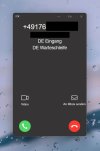
Now in the 3CX, no contact or card icon can be recognised. I would also like to show you a picture of it here.


Code:
2023/05/12 15:36:28.000|29490|0010|Verb|Enqueue Inserted.CONNECTION.3116
2023/05/12 15:36:28.000|29490|0010|Verb|CRM: Not processed. Number=+4917612345678, connection=3116, state=Dialing
2023/05/12 15:36:28.000|29490|0010|Verb|CRM: Add to processing. Number=+4917612345678, connection=3116, state=Dialing
2023/05/12 15:36:28.000|29490|0010|Info|CRM: ProcessActiveConnections(). Attached entries to connection: 
2023/05/12 15:36:28.000|29490|0010|Verb|CRM: LocalMatches=. Number=+4917612345678, connection=3116, state=Dialing
2023/05/12 15:36:28.000|29490|0010|Info|CRM: Synchronize(...) called
2023/05/12 15:36:28.000|29490|0004|Verb|Dequeue Inserted.CONNECTION.3116
2023/05/12 15:36:28.000|29490|0035|Info|CRM: maxConcurrency=16
2023/05/12 15:36:28.000|29490|0035|Info|CRM: making request to CRM. Number=+4917612345678
2023/05/12 15:36:28.001|29490|0035|Trac|CRM: Obtaining scenario entity order for entity 'Contacts'
2023/05/12 15:36:28.001|29490|0035|Trac|CRM: Obtained scenario entity order '0' for entity 'Contacts'
2023/05/12 15:36:28.001|29490|0035|Trac|CRM: Obtaining scenario entity order for entity 'Leads'
2023/05/12 15:36:28.001|29490|0035|Trac|CRM: Obtained scenario entity order '1' for entity 'Leads'
2023/05/12 15:36:28.001|29490|0035|Trac|CRM: Obtaining scenario entity order for entity 'Accounts'
2023/05/12 15:36:28.001|29490|0035|Trac|CRM: Obtained scenario entity order '2' for entity 'Accounts'
2023/05/12 15:36:28.001|29490|0035|Verb|CRM: Processing scenario 'Default'.
2023/05/12 15:36:28.001|29490|0035|Verb|CRM: Executing scenario 'Auth' for authentication.
2023/05/12 15:36:28.001|29490|0035|Verb|CRM: Processing scenario 'Auth'.
2023/05/12 15:36:28.001|29490|0035|Verb|CRM: Creating new HttpClient with no authentication
2023/05/12 15:36:28.001|29490|0035|Verb|CRM: Performing POST request to 'https://accounts.zoho.eu/oauth/v2/token' with following form values:
2023/05/12 15:36:28.001|29490|0035|Verb|CRM:    'refresh_token' = '1000.XXXXXX.XXXXXXX'
2023/05/12 15:36:28.001|29490|0035|Verb|CRM:    'grant_type' = 'refresh_token'
2023/05/12 15:36:28.001|29490|0035|Verb|CRM:    'client_id' = '1000.XXXXXXX'
2023/05/12 15:36:28.001|29490|0035|Verb|CRM:    'client_secret' = '05ce8f13e5c92ebf833e774c9cb94b555a408f0e22'
2023/05/12 15:36:28.082|29490|0035|Info|TryGetLocalIpListOsDependent
2023/05/12 15:36:28.082|29490|0035|Info|TryGetLocalIpListOsDependent. Result = [{"Description":"eth0 (eth0)","HasDefaultGateway":true,"IsIpv6":false,"IpAddressStr":"104.248.39.254"},{"Description":"eth0 (eth0)","HasDefaultGateway":true,"IsIpv6":false,"IpAddressStr":"10.19.7.76"},{"Description":"eth0 (eth0)","HasDefaultGateway":true,"IsIpv6":true,"IpAddressStr":"2a03:b0c0:3:d0::1322:c001"}]
2023/05/12 15:36:28.084|29490|0035|Verb|CRM: The response is: '{"access_token":"1000.XXXXXXX.XXXXXXX","scope":"zohocrm.modules.tasks.CREATE zohocrm.modules.accounts.READ zohocrm.modules.contacts.READ zohocrm.modules.contacts.CREATE zohocrm.modules.calls.CREATE zohocrm.users.READ zohocrm.modules.leads.READ zohocrm.modules.leads.CREATE","api_domain":"https://www.zohoapis.eu","token_type":"Bearer","expires_in":3600}'
2023/05/12 15:36:28.084|29490|0035|Verb|CRM: Filtered variables for matching:
2023/05/12 15:36:28.084|29490|0035|Verb|CRM:    'ApiDomain' = 'https://www.zohoapis.eu'
2023/05/12 15:36:28.084|29490|0035|Verb|CRM:    'AccessToken' = '1000.XXXXXXX.XXXXXXX'
2023/05/12 15:36:28.084|29490|0035|Verb|CRM: Creating new HttpClient for Scenario authentication.
2023/05/12 15:36:28.084|29490|0035|Verb|CRM:    Header 'Authorization' = 'Zoho-oauthtoken 1000.XXXXXXX.XXXXXXX'
2023/05/12 15:36:28.084|29490|0035|Verb|CRM: Performing GET request 'https://www.zohoapis.eu/crm/v2.1/Contacts/search?criteria=((Phone:equals:12345678) or (Secondary_Phone:equals:12345678) or (Third_Phone:equals:12345678) or (Mobile:equals:12345678) or (Home_Phone:equals:12345678) or (Other_Phone:equals:12345678) or (Fax:equals:12345678))&fields=Account_Name,id,First_Name,Last_Name,Phone,Mobile,Home_Phone,Asst_Phone,Other_Phone,Email,Fax'.
2023/05/12 15:36:28.087|29490|0010|Verb|Enqueue Inserted.CONNECTION.3117
2023/05/12 15:36:28.438|29490|0004|Verb|Dequeue Updated.CONNECTION.3117
2023/05/12 15:36:28.535|29490|0030|Verb|CRM: The response is: '{"data":[{"First_Name":"Test","Asst_Phone":null,"Home_Phone":null,"Email":"[email protected]","Last_Name":"555-1234","Phone":"123456789000","Other_Phone":null,"Account_Name":null,"id":"299205000011074223","Fax":null,"Mobile":null}],"info":{"per_page":200,"count":1,"page":1,"sort_by":"id","sort_order":"desc","more_records":false}}'
2023/05/12 15:36:28.535|29490|0030|Verb|CRM: Unknown path element: name. Null value is returned.
2023/05/12 15:36:28.535|29490|0030|Verb|CRM: Filtered variables for matching:
2023/05/12 15:36:28.535|29490|0030|Verb|CRM:    'Id' = '299205000011074223'
2023/05/12 15:36:28.535|29490|0030|Verb|CRM:    'AccountName' = ''
2023/05/12 15:36:28.535|29490|0030|Verb|CRM:    'Phone' = '123456789000'
2023/05/12 15:36:28.535|29490|0030|Verb|CRM:    'Email' = '[email protected]'
2023/05/12 15:36:28.535|29490|0030|Verb|CRM:    'FirstName' = 'Test'
2023/05/12 15:36:28.535|29490|0030|Verb|CRM:    'LastName' = '555-1234'
2023/05/12 15:36:28.535|29490|0030|Verb|CRM:    'Fax' = ''
2023/05/12 15:36:28.535|29490|0030|Verb|CRM:    'MobilePhone' = ''
2023/05/12 15:36:28.535|29490|0030|Verb|CRM:    'OtherPhone' = ''
2023/05/12 15:36:28.535|29490|0030|Verb|CRM:    'HomePhone' = ''
2023/05/12 15:36:28.535|29490|0030|Verb|CRM:    'AssistantPhone' = ''
2023/05/12 15:36:28.535|29490|0030|Verb|CRM: Processing scenario 'Default'.
2023/05/12 15:36:28.535|29490|0030|Verb|CRM: Creating new HttpClient for Scenario authentication.
2023/05/12 15:36:28.535|29490|0030|Verb|CRM:    Header 'Authorization' = 'Zoho-oauthtoken 1000.XXXXXXX.XXXXXXX'
2023/05/12 15:36:28.535|29490|0030|Verb|CRM: Performing GET request 'https://www.zohoapis.eu/crm/v2.1/Leads/search?criteria=((Phone:equals:12345678) or (Mobile:equals:12345678) or (Fax:equals:12345678))&fields=id,First_Name,Last_Name,Phone,Mobile,Fax,Email,Company'.
2023/05/12 15:36:28.711|29490|0030|Verb|CRM: The response is: ''
2023/05/12 15:36:28.711|29490|0030|Verb|CRM: No matchings found.
2023/05/12 15:36:28.711|29490|0030|Verb|CRM: Processing scenario 'Default'.
2023/05/12 15:36:28.711|29490|0030|Verb|CRM: Creating new HttpClient for Scenario authentication.
2023/05/12 15:36:28.711|29490|0030|Verb|CRM:    Header 'Authorization' = 'Zoho-oauthtoken 1000.XXXXXXX.XXXXXXX'
2023/05/12 15:36:28.711|29490|0030|Verb|CRM: Performing GET request 'https://www.zohoapis.eu/crm/v2.1/Accounts/search?criteria=((Phone:equals:12345678) or (Fax:equals:12345678))&fields=id,Phone,Fax,Account_Name'.
2023/05/12 15:36:28.873|29490|0030|Verb|CRM: The response is: ''
2023/05/12 15:36:28.873|29490|0030|Verb|CRM: No matchings found.
2023/05/12 15:36:28.873|29490|0030|Verb|CRM: Processing scenario 'CreateContactRecord'.
2023/05/12 15:36:28.873|29490|0030|Verb|CRM: Creating new HttpClient for Scenario authentication.
2023/05/12 15:36:28.873|29490|0030|Verb|CRM:    Header 'Authorization' = 'Zoho-oauthtoken 1000.XXXXXXX.XXXXXXX'
2023/05/12 15:36:28.873|29490|0030|Verb|CRM: Skipping request...
2023/05/12 15:36:28.873|29490|0030|Verb|CRM: No matchings found.
2023/05/12 15:36:28.873|29490|0030|Verb|CRM: Removed from processing. Number=+4917612345678
2023/05/12 15:36:28.873|29490|0030|Info|CRM: processing of +4917612345678 has been finished
2023/05/12 15:36:38.000|29490|0010|Verb|Enqueue Updated.REGISTRAR.299
2023/05/12 15:36:38.000|29490|0010|Verb|Enqueue Updated.REGISTRATION.299
2023/05/12 15:36:38.000|29490|0004|Verb|Dequeue Updated.REGISTRAR.299
2023/05/12 15:36:38.000|29490|0004|Verb|Dequeue Updated.REGISTRATION.299
2023/05/12 15:36:41.006|29490|0010|Verb|Enqueue Inserted.CONNECTION.3118
2023/05/12 15:36:41.198|29490|0004|Verb|Dequeue Updated.CONNECTION.3119
2023/05/12 15:36:41.198|29490|0024|Info|Sending PUSH call-started for dn=12, replaces=ztDzKYc-NY0ZoAyoQgq3Yw..;from-tag=be42a670;to-tag=9bb9342f, callerid=+4917612345678, callername=+4917612345678:DE Eingang:DE Warteschleife, callid=1098, image=
2023/05/12 15:36:41.199|29490|0024|Info|Sending VAPID PUSH to extension 12 device Firefox on Windows
2023/05/12 15:36:47.260|29490|0045|Info|CRM: about to report 1 calls at maxConcurrency 16
2023/05/12 15:36:47.260|29490|0045|Verb|CRM: Triggering Call Journaling with values - CallType='Inbound' - PhoneNumber='+4917612345678' - ContactName='' - AgentExtension='80' - AgentFirstName='' - AgentLastName='' - AgentEmail='' - ContactRawData='' - StartTime='5/12/2023 1:36:28 PM' - EndTime='5/12/2023 1:36:47 PM' - EstablishedTime='5/12/2023 1:36:28 PM'
2023/05/12 15:36:47.260|29490|0045|Verb|CRM: Processing scenario 'ReportCall'.
2023/05/12 15:36:47.260|29490|0045|Verb|CRM: Creating new HttpClient for Scenario authentication.
2023/05/12 15:36:47.260|29490|0045|Verb|CRM:    Header 'Authorization' = 'Zoho-oauthtoken 1000.XXXXXXX.XXXXXXX'
2023/05/12 15:36:47.260|29490|0045|Verb|CRM: Skipping request...
2023/05/12 15:36:47.260|29490|0045|Verb|CRM: Continue with empty matching.
2023/05/12 15:36:47.260|29490|0045|Verb|CRM: Processing scenario 'CreateCall'.
2023/05/12 15:36:47.260|29490|0045|Verb|CRM: Creating new HttpClient for Scenario authentication.
2023/05/12 15:36:47.260|29490|0045|Verb|CRM:    Header 'Authorization' = 'Zoho-oauthtoken 1000.XXXXXXX.XXXXXXX'
2023/05/12 15:36:47.260|29490|0045|Verb|CRM: Skipping request...
2023/05/12 15:36:47.260|29490|0045|Verb|CRM: No matchings found.
 

Attachments

  • 2023-05-12 15_48_31-.jpg
    2023-05-12 15_48_31-.jpg
    27 KB · Views: 5
The contact is not being matched. The returned contact doesn't have the phone being searched. You're searching for the number 12345678:
2023/05/12 15:36:28.084|29490|0035|Verb|CRM: Performing GET request 'https://www.zohoapis.eu/crm/v2.1/Contacts/search?criteria=((Phone:equals:12345678) or (Secondary_Phone:equals:12345678) or (Third_Phone:equals:12345678) or (Mobile:equals:12345678) or (Home_Phone:equals:12345678) or (Other_Phone:equals:12345678) or (Fax:equals:12345678))&fields=Account_Name,id,First_Name,Last_Name,Phone,Mobile,Home_Phone,Asst_Phone,Other_Phone,Email,Fax'.

And the returned contact contains the phone number 123456789000, which is a different number:
2023/05/12 15:36:28.535|29490|0030|Verb|CRM: Filtered variables for matching:
2023/05/12 15:36:28.535|29490|0030|Verb|CRM: 'Id' = '299205000011074223'
2023/05/12 15:36:28.535|29490|0030|Verb|CRM: 'AccountName' = ''
2023/05/12 15:36:28.535|29490|0030|Verb|CRM: 'Phone' = '123456789000'
2023/05/12 15:36:28.535|29490|0030|Verb|CRM: 'Email' = '[email protected]'
2023/05/12 15:36:28.535|29490|0030|Verb|CRM: 'FirstName' = 'Test'
2023/05/12 15:36:28.535|29490|0030|Verb|CRM: 'LastName' = '555-1234'
2023/05/12 15:36:28.535|29490|0030|Verb|CRM: 'Fax' = ''
2023/05/12 15:36:28.535|29490|0030|Verb|CRM: 'MobilePhone' = ''
2023/05/12 15:36:28.535|29490|0030|Verb|CRM: 'OtherPhone' = ''
2023/05/12 15:36:28.535|29490|0030|Verb|CRM: 'HomePhone' = ''
2023/05/12 15:36:28.535|29490|0030|Verb|CRM: 'AssistantPhone' = ''

As a consequence, this contact is discarded. Then 3CX tries to create a contact, because there is not a valid match:
2023/05/12 15:36:28.873|29490|0030|Verb|CRM: Processing scenario 'CreateContactRecord'.
2023/05/12 15:36:28.873|29490|0030|Verb|CRM: Creating new HttpClient for Scenario authentication.
2023/05/12 15:36:28.873|29490|0030|Verb|CRM: Header 'Authorization' = 'Zoho-oauthtoken 1000.XXXXXXX.XXXXXXX'
2023/05/12 15:36:28.873|29490|0030|Verb|CRM: Skipping request...

But contact creation is disabled, so this is skipped.

In order to have a match, the number in the CRM must be exactly the number being searched.
 
Sorry for the late feedback. Somehow the matching was wrong. Now everything works fine. Thanks for the help.
 
Status
Not open for further replies.

Members Online Now

No members online now.

Forum statistics

Threads
111,843
Messages
589,327
Members
164,679
Latest member
SamadMYK