- Joined
- Apr 1, 2020
- Messages
- 3
- Reaction score
- 0
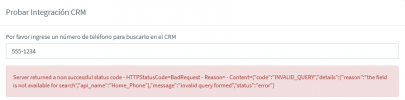
When we perform the test, this error appear:
Server returned a non successful status code - HTTPStatusCode=BadRequest - Reason= - Content={"code":"INVALID_QUERY","details":{"reason":"the field is not available for search","api_name":"Home_Phone"},"message":"invalid query formed","status":"error"}
Logs:
Finished Auth
Request text: https://www.zohoapis.com/crm/v2/Contacts/search?criteria=((Phone:equals:551234) or (Mobile:equals:551234) or (Home_Phone:equals:551234) or (Other_Phone:equals:551234) or (Fax:equals:551234))&fields=Account_Name,id,First_Name,Last_Name,Phone,Mobile,Home_Phone,Asst_Phone,Other_Phone,Email,Fax
System.Exception: Server returned a non successful status code - HTTPStatusCode=BadRequest - Reason= - Content={"code":"INVALID_QUERY","details":{"reason":"the field is not available for search","api_name":"Home_Phone"},"message":"invalid query formed","status":"error"}
at CrmIntegration.ScenarioProcessorBase.ProcessRequest(ScenarioRequest request, IValueManager customManager, HttpClient client, CancellationToken token)
at CrmIntegration.ScenarioProcessorBase.ProcessScenario(ProtocolScenario scenario, IValueManager customManager, CancellationToken token)
at CrmIntegration.ScenarioProcessorBase.Execute(ProtocolScenario scenario, CancellationToken token)
at CrmIntegration.CrmProcessor.GetContactInfoFromCrm(String contactNumber, Boolean isInboundCall, String destinationEmail, Boolean createIfNotFound, CancellationToken token)
Problems
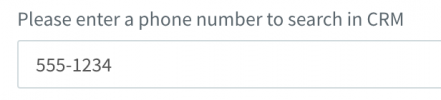
- The test phone was 555-1234 and the query only have 551234
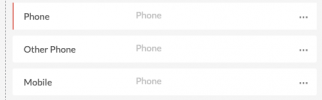
- The integration is requesting a bad field name.
Server returned a non successful status code - HTTPStatusCode=BadRequest - Reason= - Content={"code":"INVALID_QUERY","details":{"reason":"the field is not available for search","api_name":"Home_Phone"},"message":"invalid query formed","status":"error"}
Logs:
Finished Auth
Request text: https://www.zohoapis.com/crm/v2/Contacts/search?criteria=((Phone:equals:551234) or (Mobile:equals:551234) or (Home_Phone:equals:551234) or (Other_Phone:equals:551234) or (Fax:equals:551234))&fields=Account_Name,id,First_Name,Last_Name,Phone,Mobile,Home_Phone,Asst_Phone,Other_Phone,Email,Fax
System.Exception: Server returned a non successful status code - HTTPStatusCode=BadRequest - Reason= - Content={"code":"INVALID_QUERY","details":{"reason":"the field is not available for search","api_name":"Home_Phone"},"message":"invalid query formed","status":"error"}
at CrmIntegration.ScenarioProcessorBase.ProcessRequest(ScenarioRequest request, IValueManager customManager, HttpClient client, CancellationToken token)
at CrmIntegration.ScenarioProcessorBase.ProcessScenario(ProtocolScenario scenario, IValueManager customManager, CancellationToken token)
at CrmIntegration.ScenarioProcessorBase.Execute(ProtocolScenario scenario, CancellationToken token)
at CrmIntegration.CrmProcessor.GetContactInfoFromCrm(String contactNumber, Boolean isInboundCall, String destinationEmail, Boolean createIfNotFound, CancellationToken token)
Problems
- The test phone was 555-1234 and the query only have 551234
- The integration is requesting a bad field name.