


- Joined
- Apr 7, 2020
- Messages
- 4
- Reaction score
- 1
Good Afternoon,
We are trying to link our ZoHo CRM to the 3CX Pro 16.0.4.504, we seem to have successfully created the API link between the two programs. However when we test by searching a known phone number in our CRM we get the following error.
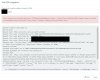
at CrmIntegration.ScenarioProcessorBase.ProcessRequest(ScenarioRequest request, IValueManager customManager, HttpClient client, CancellationToken token)
at CrmIntegration.ScenarioProcessorBase.ProcessScenario(ProtocolScenario scenario, IValueManager customManager, CancellationToken token)
at CrmIntegration.ScenarioProcessorBase.Execute(ProtocolScenario scenario, CancellationToken token)
at CrmIntegration.CrmProcessor.GetContactInfoFromCrm(String contactNumber, String destinationEmail, Boolean createIfNotFound, CancellationToken token)
Also it seems to only search for last 6 numbers rather than the full mobile, any pointers to solve the test error would be most welcome.
Thanks in advance..
Dan
We are trying to link our ZoHo CRM to the 3CX Pro 16.0.4.504, we seem to have successfully created the API link between the two programs. However when we test by searching a known phone number in our CRM we get the following error.
at CrmIntegration.ScenarioProcessorBase.ProcessRequest(ScenarioRequest request, IValueManager customManager, HttpClient client, CancellationToken token)
at CrmIntegration.ScenarioProcessorBase.ProcessScenario(ProtocolScenario scenario, IValueManager customManager, CancellationToken token)
at CrmIntegration.ScenarioProcessorBase.Execute(ProtocolScenario scenario, CancellationToken token)
at CrmIntegration.CrmProcessor.GetContactInfoFromCrm(String contactNumber, String destinationEmail, Boolean createIfNotFound, CancellationToken token)
Also it seems to only search for last 6 numbers rather than the full mobile, any pointers to solve the test error would be most welcome.
Thanks in advance..
Dan


