ZOHO Integration, help.

Status
Not open for further replies.

ostrov65

Customer
Joined
Feb 1, 2019
Messages
4
Reaction score
1
No registration of incoming and outgoing calls.

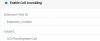
ZOHO
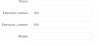
10040

3cx

10041

3cxSystemService.log

2019/03/30 15:46:15.050|624|0036|Erro|Exception during call reporting: Server returned a non successful status code - HTTPStatusCode=BadRequest - Reason= - Content={"code":"INVALID_QUERY","details":{"reason":"the field is not available for search","api_name":"Extension_number"},"message":"invalid query formed","status":"error"}

What did I do wrong?
 
I wanted to add to the above that when an incoming call comes from a new contact, a lead is created. But if this contact calls again, then nothing changes in the activity, it is empty.
 
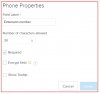
Please remove the field with visible name "Extension_number". Just use "Extension number", and then the field ID will be "Extension_number" (replacing the space with an underscore).

The error is not complaining about an invalid field name. It's just saying that "the field is not available for search". That means that Zoho somehow can't use that field when it tries to search for the agent having that extension number. Please check if your custom field has some configuration to avoid searching by that field.
 
I did everything as you said, but nothing has changed. Activity is empty, no call logging. What do you mean by "custom field has some configuration"? I created and deleted this field several times with default settings.
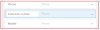
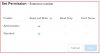
10067

10068

10069

10070
 
If you deleted and re-created the field several times, that will explain the issue. When you delete the field, the ID is taken by Zoho, and a new field created with the same name will have a different ID. So, "Extension_number" is the ID for a deleted field, and can't be used anymore. In order to identify the ID of this field, you need to use a REST API call that retrieves all the fields and IDs. This is a complex operation for non technical users, so a simpler approach will be creating a field, but using a different name. For example:
Agent Extension Number

Then the ID will become:
Agent_Extension_Number

Please note that the case is important. Please try creating this new field, and let us know if that fixes the issue.
 
  • Like
Reactions: ostrov65
Thank you, everything worked. :)
Lack of this information cost me 3 sleepless nights :eek:
 
  • Like
Reactions: edossantos
Thanks for your feedback, we will improve the documentation.
 
Status
Not open for further replies.