Zoho integration, No popup

Status
Not open for further replies.

pmterp

Gold Partner
Advanced Certified
Joined
Jun 13, 2017
Messages
420
Reaction score
249
Hello,
I'm getting no screen popup on incoming calls. It does give the CRM contact icon within the call dialer window and I can click it before or after answering the call and it will provide the contact's page but it doesn't happy automatically.
I've updated the 3CX system to v18u7beta. I've removed the Zoho CRM integration and added it back. I've tested using the web client in Edge and Chrome and I've tested with the Edge web app and get the same results each time. On Edge, I've gone to the site's permissions and marked popups as allowed.
Any other suggestions or recommendations for troubleshooting this?
 
Hello @pmterp

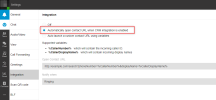
Is the option "Automatically open contact URL when CRM integration is enabled" checked in the Webclient under Settings > Integration?


1685025499065.png
 
You are welcome, happy to assist.
 
hello
i checked this features but stil doen't get pop up window ... any help? thanks
also not call has been recorded on zoho
 
Did you follow the steps described in the guide?
https://www.3cx.com/docs/pbx-crm-integration-zoho/

Do you see any error when you test the integration from the Management Console > Settings > CRM > Test button?
Hello,

I am experiencing issues with the Popup CRM not appearing when an incoming call arrives, and I am unable to send the call journal to the CRM. This problem only arises when the caller's number is new and has not been previously entered into the Zoho CRM database.

Upon examining the 3cxSystemService.log with Verbose settings, I found that the create contact scenario is successful, but it didn't get the Contact ID of the newly created Contact. I then attempted to simulate the Create Contact and Query Contact scenarios using the same API and endpoint with the Postman application. The result was that, after successfully creating a contact from the API, I immediately attempted a Contact Query, but it took 30-60 seconds to receive an API Query Contact response for a previously created contact.

Do you have any suggestions for resolving this issue? I have encountered it not only in Zoho CRM but also in Zohodesk. Thank you for your assistance.
 
Hello,

I am experiencing issues with the Popup CRM not appearing when an incoming call arrives, and I am unable to send the call journal to the CRM. This problem only arises when the caller's number is new and has not been previously entered into the Zoho CRM database.

Upon examining the 3cxSystemService.log with Verbose settings, I found that the create contact scenario is successful, but it didn't get the Contact ID of the newly created Contact. I then attempted to simulate the Create Contact and Query Contact scenarios using the same API and endpoint with the Postman application. The result was that, after successfully creating a contact from the API, I immediately attempted a Contact Query, but it took 30-60 seconds to receive an API Query Contact response for a previously created contact.

Do you have any suggestions for resolving this issue? I have encountered it not only in Zoho CRM but also in Zohodesk. Thank you for your assistance.
Hello @iluni,

Are you using 3CX v18 Update 8? In this version, contacts are not automatically created anymore, you need to create them from the Web Client / Desktop App.

Also, please note that the integration with Zoho Desk is not developed or maintained by 3CX, so we can't provide any help on that. We only provide an integration with Zoho CRM.
 
Status
Not open for further replies.

Members Online Now

Forum statistics

Threads
111,852
Messages
589,385
Members
164,691
Latest member
Daz1964