Missing Agents Reports - Grafana Dashboards Templates

syadmins

Premier Customer
Basic Certified
Joined
Jan 13, 2026
Messages
33
Reaction score
12
Hi dears,

We are using V20 Update 7 and we integrated data connectors with MySQL to offload data. We installed Grafana and 3CX plugin (v1.0.4) and the reports looks great so far.

However we are wondering why the Agents statistics is not part of this Grafana reports? is it because Grafana relies on CDR data and the agents stats are non-CDR?

Can you suggest a method to get our hands on the reports directly from 3CX through the database or other type of access?

Appreciate your support
 
Last edited:
  • Like
Reactions: Evolute IT
It would be nice if we could get access to the built-in 3CX report definitions so we could duplicate and modify them to our needs. The Grafana integration is absolutely a step in that direction and I applaud 3CX for their efforts. I suspect part of the challenge is the business logic used to perform the calculations you see in the reports. We have been building real-time dashboards for 3CX for more than a decade and I can tell you that the business logic behind some of these calculations is very, very complex with countless edge-cases that affect the final total. It's really hard to duplicate their business logic when working with real-time events.

Going directly to the new CDR data exposed through the Grafana integration simplifies the process of creating custom reports, but there is more data needed particularly in regards to queue statistics. Our solution, over 10 years ago, was to create an automated data replication tool (3CX Exporter) that provides access to ALL the internal 3CX data, so you have access to the exact same data 3CX uses for their built in reports. You may consider taking a look at our tool.

1768509125256.png
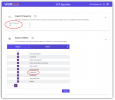
As you can see, we offer far more data than what is provided by the single CDR table provided through the Grafana integration. Further, we offer a more frequent replication schedule (example 30 seconds above).
 
  • Like
Reactions: Evolute IT
May I ask which specific report you are referring to? Agent in Queue Statistics?
 
May I ask which specific report you are referring to? Agent in Queue Statistics?

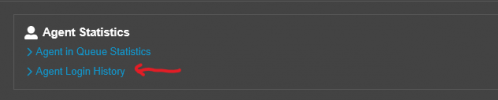
Below two reports are neither in grafana nor in the CDR tables that we are offloading from the database connectors.

Are we missing something?

1769114899551.png
 
Hello,

The Login history element indeed does not got to the exported data. Other elements of the Agent in Queue Statistics do go, and a table/visualisation for that is possible. In the "03. Queues" dashboard the Queue Call Statistics has the basic call counts, you could expand this to be showing the durations as per the build in report, if that's what you need.
 
  • Like
Reactions: Evolute IT
Noted.

Since there is such limitation and our preference is to unify the data source (i.e using the same MySQL DB), then we will query the Agents Login API and insert the results into another table for this purpose (on hourly bases). Any concern? Or better way to achieve this?
 
Hi,

The Grafana plugins are quite easy to extend. You can watch the linked video guide that goes through the steps.


Using the MySQL version as it is the one I am most familiar with, I took the query from "Queue Call Statistics" and made some edits to create a new report table that pulls Agent Ring and Talk times, using the query attached.

Please note this has not undergone QA and it is given just as an example of what can be done - also note that the PBX Queue Manager service uses build in logic to calculate time intervals, and therefore the numbers pulled from the CDRs will have some slight differences, again this is a general example.
 
Hi,

The Grafana plugins are quite easy to extend. You can watch the linked video guide that goes through the steps.


Using the MySQL version as it is the one I am most familiar with, I took the query from "Queue Call Statistics" and made some edits to create a new report table that pulls Agent Ring and Talk times, using the query attached.

Please note this has not undergone QA and it is given just as an example of what can be done - also note that the PBX Queue Manager service uses build in logic to calculate time intervals, and therefore the numbers pulled from the CDRs will have some slight differences, again this is a general example.
Point taken, we will consider extending the plugin queries for sure, however actually I was referring to the Agents Login History Report integration with MySQL using the API, what do you think?

1769177237482.png
 
  • Like
Reactions: Evolute IT
The current Grafana integration only exports one specific table. If you need access to more tables, and you want a reliable solution that has been doing 3CX replications for more than 10 years, you may want to take a look at our 3CX Exporter tool. We automate the replication of many 3CX tables on a frequency you specify -- the default is every 60 second, but you can adjust as needed.

1769191047877.png
Note that we replicate the same table as 3CX plus many more, and do so on a more frequent schedule. If you need access to more 3CX data in an automated way, we can help!
 
The current Grafana integration only exports one specific table. If you need access to more tables, and you want a reliable solution that has been doing 3CX replications for more than 10 years, you may want to take a look at our 3CX Exporter tool. We automate the replication of many 3CX tables on a frequency you specify -- the default is every 60 second, but you can adjust as needed.

View attachment 50742
Note that we replicate the same table as 3CX plus many more, and do so on a more frequent schedule. If you need access to more 3CX data in an automated way, we can help!

I can see that you guys trying to push for your product heavily and we understand that since we have seen many handy features you have in your portfolio, and I respect that really, Our tendency is to first understand every aspect of the system and try to develop our own tools and integrations before we start looking for third party tools.

Still, if you allow me to ask how do you access or replicate the internal tables from 3CX while we came across some discussion in the forum that anyone trying to access those tables will void 3CX support? Do you have special authority to gain such access to the internal engine and DB of 3CX.

Thanks.
 
Still, if you allow me to ask how do you access or replicate the internal tables from 3CX while we came across some discussion in the forum that anyone trying to access those tables will void 3CX support? Do you have special authority to gain such access to the internal engine and DB of 3CX.
While I'm not matthew nor do I work for VT, I can give you the answer. What every single 3rd party tool that accesses the database this way is doing voids support from 3CX. No one is special, no one has a way to do it that 3CX supports, etc.

Couple things to note here:
1. You can uninstall VT relay and in theory be back in support (in theory). Fairly quick to do so.
2. You can always build another 3CX server and restore a complete backup and be fully back up and running exactly like you were with the backup in 10 minutes. So if you really need support from 3CX you could always do this if #1 doesn't work for some reason.
3. As a VT partner I've never had their relay cause an issue.
4. It's just reading the postgresql database in read only mode from localhost. Just be careful with your queries to not lock any tables if you want to try to replicate.
5. Matthew is about to chime in saying he used to run 3CX's first line support years ago and has tons of experience doing it correctly.

End of the day, if you find an issue and you think it's related to 3CX, what I as a partner do is replicate the issue in our stock unmodified 3CX NFR instance, the file a bug report. Only happened 1x in the past 16 years I've been supporting 3CX (that I found a bug that no one else had also found).
 
We do appreciate such detailed response and thanks for your advice about the tables' lock also.
 
3CX does not provide support for, nor endorse any 3rd party tools (I wish they did). However, I have personally met with multiple 3CX support engineers over the years where we reviewed how our Exporter tool works and the special care we put into ensuring we do not impact the functioning of 3CX. We even offered to discontinue selling Exporter if that would be helpful. The answer to that question is that we are still here, 10+ years later, offering Exporter because it works.

There are other ways of replicating data from PostgreSQL to another database but they all require making changes to the configuration of PostgreSQL and THAT IS PROHIBITED by 3CX. The message has been clear from 3CX -- do not make even the smallest changes to the PostgreSQL configuration. Technically, Exporter does not connect directly to the PostgreSQL database, instead it uses APIs provided by our Relay to obtain the data.
 
  • Like
Reactions: syadmins
At this time we are not exporting this specific information.
We wish the Agent login/logout data along with Available/DND/Away/etc Statuses will be exposed part of the data connector in the upcoming version.

Definitely these are very useful/needed KPI for the call center supervisors.
 
We can provide all the information you need -- log in/out times, presence status changes, etc.
 
  • Like
Reactions: Evolute IT

Members Online Now

No members online now.

Forum statistics

Threads
111,832
Messages
589,285
Members
164,662
Latest member
DejanMDS