Backup Restore Fails Between Identical 3CX Versions During License Migration

vikassr

Customer
Joined
Jun 20, 2026
Messages
4
Reaction score
0
Hi everyone,

We're attempting to migrate our existing 3CX installation to a new license as advised by our 3CX partner.

Our environment:

  • Source version: 3CX v20.0.9.995
  • Target version: 3CX v20.0.9.995
  • Backup created immediately before migration
  • Backup file successfully generated and contains the expected XML/configuration files
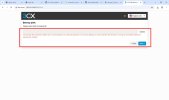
However, when attempting to restore the backup on the new installation, 3CX rejects the backup ZIP file and does not proceed with the restore.

We've already verified that:

  • The source and target installations are running the same version (20.0.9.995)
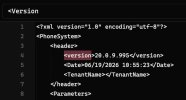
  • The backup metadata also reflects the same version
  • The backup file is not password protected
Has anyone encountered a situation where a backup from the same 3CX version is rejected during restore?

Are there any known compatibility checks, backup validation requirements, or logs that we should review to identify the cause?

Any guidance would be greatly appreciated, as this issue is currently blocking our license migration.

Thank you.
 

Attachments

  • WhatsApp Image 2026-06-19 at 9.25.38 PM.jpeg
    WhatsApp Image 2026-06-19 at 9.25.38 PM.jpeg
    69.5 KB · Views: 15
  • WhatsApp Image 2026-06-19 at 9.59.43 PM.jpeg
    WhatsApp Image 2026-06-19 at 9.59.43 PM.jpeg
    31.9 KB · Views: 14
Did you change anything in the backup file? That would explain the error.
 
No, we didn't change anything in the file.
 
Then try opening it with 7-Zip or something similar. If that doesn't work either, the file is corrupt.
 
We checked and we were able to extract the zip successfully but it fails with the above shown error when tried to upload the backup file
 
We're attempting to migrate our existing 3CX installation to a new license as advised by our 3CX partner
You mentioned this action as well, did you manually added any information in the backup file?
 
No, we did not add anything manually in the backup file. We tried to upload as is and it is failing.

Our Partner shared a new license key. Are we supposed to update it in the backup file before uploading it?
 
No the backup should not be edited and has to be restored as it was created.
It can be related to a corrupted file as @bitn2 also mentioned, however you might also need to contact your partner to check or open a case to our Support Team to check.
 

Members Online Now

Forum statistics

Threads
111,831
Messages
589,277
Members
164,660
Latest member
RJenkinsROCK