- Joined
- Jun 24, 2021
- Messages
- 62
- Reaction score
- 6
Hi everyone,
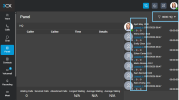
A few years back (roughly 3+ years ago) we had a small automation script that clicked through a page in the 3CX admin console to re-add agents to their call queues whenever they got automatically logged out of the queue on their own.
I'm now trying to find that same page/feature in the admin console and can't locate it anymore, it's possible the UI has changed since then, or the feature has moved/been renamed.
Does anyone know:
Any pointers to the right menu/page (or a screenshot) would be hugely appreciated. Thanks!
A few years back (roughly 3+ years ago) we had a small automation script that clicked through a page in the 3CX admin console to re-add agents to their call queues whenever they got automatically logged out of the queue on their own.
I'm now trying to find that same page/feature in the admin console and can't locate it anymore, it's possible the UI has changed since then, or the feature has moved/been renamed.
Does anyone know:
- Where in the current admin console I can manage which agents are logged in/out of a queue?
- Whether this moved to a different section (e.g. under Queues, under individual extensions, or under a reports/monitoring page)?
- Whether this functionality still exists as a clickable admin page, or if it's now only available via the API?
Any pointers to the right menu/page (or a screenshot) would be hugely appreciated. Thanks!