POPUP BY ID

Soli

Platinum Distributor
Advanced Certified
Joined
Feb 14, 2016
Messages
167
Reaction score
42
Hi Everyone,

I have a project where I need to trigger a CRM pop-up based on an ID number entered by the caller (via DTMF), rather than the caller's phone number. Has anyone successfully implemented something like this before?

I was thinking of a potential workaround: taking the entered ID number, injecting it into the %CallerDisplayName% variable somehow, and then letting the standard Integration pop-up handle it.

Is this possible to achieve, or is there a better way to approach this?
 
Hi Everyone,

I have a project where I need to trigger a CRM pop-up based on an ID number entered by the caller (via DTMF), rather than the caller's phone number. Has anyone successfully implemented something like this before?

I was thinking of a potential workaround: taking the entered ID number, injecting it into the %CallerDisplayName% variable somehow, and then letting the standard Integration pop-up handle it.

Is this possible to achieve, or is there a better way to approach this?
CFD to grab the ID + the trick to fake CRM attached data.

We can help if needed.
 
Hello,

I am sure others might offer much better assistance, but since you will need a C# Call Script to capture the DTMF, triggering an API call from there should be the best option. Now it will get a bit more complicated if you need it to pop up to e.g. a queue agent that happens to take the call, as there you need to monitor the call progress via some intermediary system, and fire it off for the correct workstation when the call is answered.
 
  • Like
Reactions: Soli and Evolute IT
CFD to grab the ID + the trick to fake CRM attached data.

We can help if needed.
This is the way to go. You will also need to add the details to the 3CX database to make it work with the latest update of 3CX.
 
  • Like
Reactions: Soli and Evolute IT
This is the way to go. You will also need to add the details to the 3CX database to make it work with the latest update of 3CX.
Only if you want the data to be in the ReportCall scenario. Otherwise it still works without the database.

This change has been the most problematic for us, since we can't access that database from the CFD (not in a supported way at least, too much risk of causing corruption.)
 
Only if you want the data to be in the ReportCall scenario. Otherwise it still works without the database.

This change has been the most problematic for us, since we can't access that database from the CFD (not in a supported way at least, too much risk of causing corruption.)
Yes, you're correct. So it's safe if you just need the popup, just attaching the data to the call from the CFD app.
 
  • Like
Reactions: Soli and Evolute IT
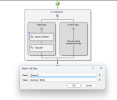
it should be something like this:
1783831895850.png
and then I need to uses the integration for each user to pop up the CRM?
 
It's a bit more complex than that. With the User Input component you will get the ID. Then you need to query the CRM to get the actual customer name. Once you have the name, you must attach 2 properties to the call: public_lookup_displayname_override and public_crm_contact.

Check this:

If you think this is too much for DIY, I recommend contacting @Evolute IT for help.
 
  • Like
Reactions: Evolute IT and Soli
one more thing regarding this issue is there a way to send in the CRM template this ID ?

p.s
is there a Unique like CHID I can send in the CRM TEMPLATE ?
 
one more thing regarding this issue is there a way to send in the CRM template this ID ?

p.s
is there a Unique like CHID I can send in the CRM TEMPLATE ?
Nope not in the templates, but you can generate one with something like '[CallStartTimeUTC]+[CallDirection]+[Agent]+[Number]'.
 
got it thanks
 

Members Online Now

No members online now.

Forum statistics

Threads
111,831
Messages
589,277
Members
164,660
Latest member
RJenkinsROCK