Improve Auto Firmware Upgrades for Router Phone Deployments

ebrowne_sts

Platinum Partner
Advanced Certified
Joined
Jul 22, 2020
Messages
98
Reaction score
43
I've noticed the auto firmware upgrade feature only works when a phone is provisioned behind an SBC in a self-hosted 3CX cloud deployment.

Could this be extended to Router Phone-capable Yealink models so they can automatically download the 3CX firmware first, then register using their built-in SBC functionality?

This would simplify initial deployments and avoid having to designate one Router Phone as the SBC just to onboard other Router Phone-capable devices.

We've recently run into this with a small, fully Wi-Fi deployment of fewer than 10 phones. Allowing Router Phone-capable models to automatically upgrade to the 3CX SBC-enabled firmware would eliminate the need for a dedicated SBC device and simplify deployments across multiple Wi-Fi networks.
 
Hi,

This already applies to router phones too, but keep in mind we don't support WiFi + router mode on Yealinks.
(The only exceptions are the WiFi-only models AX83H and AX86R)

I have successfully upgraded a router phone from the box, straight into router mode, but while using LAN.
 
Hi,

This already applies to router phones too, but keep in mind we don't support WiFi + router mode on Yealinks.
(The only exceptions are the WiFi-only models AX83H and AX86R)

I have successfully upgraded a router phone from the box, straight into router mode, but while using LAN.
I've tried wired and it didn't work. Blinked the red light like it was downloading its config but never started the firmware upgrade. I'm guessing 3CX being hosted in the cloud (lightsail) may have something to do with it.
When you say not support in Wifi + Router phone, you mean as long as it's configured this way and an issue happens, 3CX can't help? Or, that there's no official guarantee from 3CX that it will work in this way? These are just setup as router phones for themselves.

Thanks for the reply.
 
i've had one not auto firmware update (initially) that was on hosted. in my trying various things since that customer was multiple states away, i unchecked "block remote non-tunnel connections" and the phone started downloading firmware. as soon as it rebooted, rechecked the box to require tunnel use and it's been fine to this day. it was a t85w. no clue why that worked but it did.
 
  • Like
Reactions: ebrowne_sts
When you say not support in Wifi + Router phone, you mean as long as it's configured this way and an issue happens, 3CX can't help?

I mean that it was never tested or certified this way. The certified way is over ethernet, using the MAC on the sticker (not the WiFi MAC). Whether it works or not is another matter ;)

Oh do keep in mind though, the auto-upgrade feature relies on the fact that your phones current FW is not so old that it rejects the latest for being too new. In that case, you will have to contact Yealink, and install the in between version they give you first.

Sometimes older stock phones might have a firmware that is a bit too old and it will refuse the newer file we provide at the time. All manufacturers have this safeguard to avoid bricking the phones when changes are too large, or rely on previous changes to be in place first.
 
i've had one not auto firmware update (initially) that was on hosted. in my trying various things since that customer was multiple states away, i unchecked "block remote non-tunnel connections" and the phone started downloading firmware. as soon as it rebooted, rechecked the box to require tunnel use and it's been fine to this day. it was a t85w. no clue why that worked but it did.

Might have been a fluke that one. The option will only prevent WAN SIP registration for security, but not config and firmware download. Otherwise no router or SBC-based phones would ever provision xD

I would put that down to likely be networking / DNS if it ended up working without any other intervention.
 
I mean that it was never tested or certified this way. The certified way is over ethernet, using the MAC on the sticker (not the WiFi MAC). Whether it works or not is another matter ;)

Oh do keep in mind though, the auto-upgrade feature relies on the fact that your phones current FW is not so old that it rejects the latest for being too new. In that case, you will have to contact Yealink, and install the in between version they give you first.

Sometimes older stock phones might have a firmware that is a bit too old and it will refuse the newer file we provide at the time. All manufacturers have this safeguard to avoid bricking the phones when changes are too large, or rely on previous changes to be in place first.
I was not aware the manufacturers did that firmware wise. Thanks for the info.
 
  • Like
Reactions: JohnS_3CX
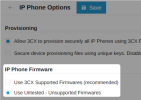
No worries, let us know how it goes. If you have too many to upgrade one by one, you could get the required file from Yealink and send it to your phones using the new feature we have for adding your own. You can enable it here:

1784789357438.png

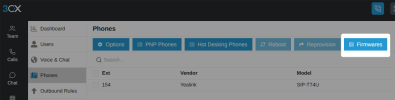
And then add your firmware here:
1784789431542.png

Then you can send them the intermediate firmware build. Once done, you can disable the feature, and 3CX will download the official FW from the updates page, which you can then deploy once the phones are ready to accept it.
 
No worries, let us know how it goes. If you have too many to upgrade one by one, you could get the required file from Yealink and send it to your phones using the new feature we have for adding your own. You can enable it here:

View attachment 52084

And then add your firmware here:
View attachment 52085

Then you can send them the intermediate firmware build. Once done, you can disable the feature, and 3CX will download the official FW from the updates page, which you can then deploy once the phones are ready to accept it.
Unfortunately, I never got this to work without the phone first showing in 3CX under phones, unless I'm doing something wrong. I have a phone (T43U) I setup as router phone. Configure the phone in 3CX, then connect it. I get the initial blinking red light then the extension info shows on the phone. Phone doesn't show in 3CX so I can't push the intermediate firmwareo_O.
Appreciate the help and guidance.
 
That is correct, you need to provision it first as a normal phone, via an SBC (like maybe another router that already works fine). You can then upgrade it as mentioned earlier and when done you can reset and add it as originally intended to the user you want as a router.

Otherwise you need to upgrade each one manually by logging onto its web UI, and uploading the firmware. If your phones came with 108.86.X.X firmware this will be the only way. Because in V87 firmware Yealink introduced significant changes under the hood.

I'm gonna guess that they are currently running a version that does not contain the router function, and this is why they are not working as intended.
 
That is correct, you need to provision it first as a normal phone, via an SBC (like maybe another router that already works fine). You can then upgrade it as mentioned earlier and when done you can reset and add it as originally intended to the user you want as a router.

Otherwise you need to upgrade each one manually by logging onto its web UI, and uploading the firmware. If your phones came with 108.86.X.X firmware this will be the only way. Because in V87 firmware Yealink introduced significant changes under the hood.

I'm gonna guess that they are currently running a version that does not contain the router function, and this is why they are not working as intended.
Ok that makes sense. That would be the way to go (provision normal first, push firmware, reconfigure as router phone). I would just have to unbox and make 1 a router phone initially and then I can reconfigure the others behind it remotely once they are onsite and connected.

Thanks.
 
  • Like
Reactions: Evolute IT
Ok that makes sense. That would be the way to go (provision normal first, push firmware, reconfigure as router phone). I would just have to unbox and make 1 a router phone initially and then I can reconfigure the others behind it remotely once they are onsite and connected.

Thanks.
This is one way, but you can also check out the TFTP server method using option 66 within the DHCP server to auto-update firmware on unprovisioned phones.
 
  • Like
Reactions: ebrowne_sts
This is one way, but you can also check out the TFTP server method using option 66 within the DHCP server to auto-update firmware on unprovisioned phones.
Oh interesting, I should be able to make this work. Thanks.
 
  • Like
Reactions: Charles_3CX

Forum statistics

Threads
111,832
Messages
589,280
Members
164,662
Latest member
DejanMDS