Solved 2 digital reception with same IVR

Status
Not open for further replies.

srane.sushant

Silver Partner
Advanced Certified
Joined
Feb 25, 2020
Messages
78
Reaction score
11
Hello Floks

Is it possible to configure multiple digital receptions for an incoming call from two different lines (Different DID) numbers? I'm using an Annual Profesional license.

1589384046622.png

Now what is hapenning is that even if caller call on another number call always goes to extension 109. Both Digital reception has same IVR Dail '0' for operator.
 
What is or is not happening that you would like to occur?
You can have multiple digital receptionist.
DID's can point to anywhere -an extension, a queue, a ring group, an IVR.

A "Digital Receptionist" is basically interchangeable with "IVR".
 
Call are going to extension which i deleted
1589624814725.png

it was digital reception
 
re-create extension
 
Hello

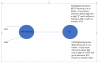
I'll try to repost question with a diagram so that I feel would be easy to understand.

1590484941017.png

In bound rule

1590485108395.png

What hapenning now.

If client call on 3571 number call is going to digital reception 808

What I want

if client call pn 3571 number then call shoudl go to 807 & if client call on 3592 then it should go to 808.

I hope to find solution to get it resolved as soon as possible.
 
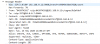
As per packect capture its show that call is going to 807 but the IVR voice I hear is of 808.

1590486661262.png

and even call is going to extension 102
 
What does the 3CX Activity Log show, for the reason, the calls are going to a destination, that you don't want them going? Looking at the log should help in troubleshooting. Could it be that one call is not following a DID Rule because there is not an exact match?
 
3cx activity log showing call is forwarding to extension 808.
 
3CX can only route calls based on what you have told it to do. In this case, making use of the DID information. So, either the DID information is incorrect, or you have not correctly instructed 3CX how to route the call based on that information. Compare the "misdirected" call to the working one. What is different?
 
Can you help me to identify how to get what DID im getting on my 3cx from fxo gw?

as activity log on gui is not of much help
 
If the calls come in via a gateway, then at some point you would have specified what DID number that gateway is to send, for a call coming in on each line, or, 3CX set a default. It may very well not be the actual phone number, but a sequence number (0001, 0002, 0003 , etc.) to simply differentiate each call (PSTN line). Your DID rules must them match those numbers in order to properly direct the calls.

Post the initial Invite, from the log,, of one, or both, of the DID numbers.
 
Last edited:
05/27/2020 11:25:25 AM - L:270.1[Extn:102] Sending: OnSendResp Send 200/INVITE from 0.0.0.0:0 tid=Pj-F5Pubdi-T.h2Ea6z91MHOor9C2dgaMI Call-ID=c5ey-r-FB6vujrR0IKSwPFG4QH1p6KXY: SIP/2.0 200 OK Via: SIP/2.0/UDP 127.0.0.1:5080;branch=z9hG4bK-524287-2---Pj-F5Pubdi-T.h2Ea6z91MHOor9C2dgaMI;rport=5080 Via: SIP/2.0/UDP [::ffff:83.110.153.235]:27256;branch=z9hG4bK-524287-1---tunneltid;rport;tnlid=clnt.1-zmhas9.ntjckymhlnevzpqcu4kyzlunh_13961708 Via: SIP/2.0/TCP 127.0.0.1:50195;rport;branch=z9hG4bKPj-F5Pubdi-T.h2Ea6z91MHOor9C2dgaMI;alias Record-Route: <sip:[email protected]:5080;user=proxy;uri=clnt.1-zmhas9.ntjckymhlnevzpqcu4kyzlunh_13961708> Require: timer Contact: <sip:[email protected]:5060> To: <sip:[email protected];tag3cx=b56raqyj>;tag=46844c6c From: "R.Kamal Reception RK"<sip:[email protected]>;tag=1IzJ8sym8LWBLIRzhZlKuMkk51zGsxFF Call-ID: c5ey-r-FB6vujrR0IKSwPFG4QH1p6KXY CSeq: 2293 INVITE Session-Expires: 1800;refresher=uac Allow: INVITE, ACK, CANCEL, OPTIONS, BYE, REGISTER, SUBSCRIBE, NOTIFY, REFER, INFO, MESSAGE, UPDATE Content-Type: application/sdp Supported: replaces, timer User-Agent: 3CXPhoneSystem 16.0.5.611 (611) Content-Length: 324 v=0 o=3cxPS 30956581201903616 5873556135084033 IN IP4 127.0.0.1 s=3cxPS Audio call c=IN IP4 127.0.0.1 t=0 0 m=audio 8390 RTP/AVP 3 18 0 8 9 101 a=rtpmap:3 GSM/8000 a=rtpmap:18 G729/8000 a=rtpmap:0 PCMU/8000 a=rtpmap:8 PCMA/8000 a=rtpmap:9 G722/8000 a=rtpmap:101 telephone-event/8000 a=fmtp:101 0-15 a=sendrecv
 
This SIP message seems to be an outbound call, not an inbound call:
To: <sip:043xxxx92@xxxxxx.3cx.xx;tag3cx=b56raqyj>;tag=46844c6c
From: "R.Kamal Reception RK"<sip:102@xxxxxx.3cx.xx>

Also for incoming calls from FXO Gateways (I'm assuming PSTN, not ISDN/E1/T1), as far as I am aware, the called number is not transmitted, simply because PSTN lines do not support more than one.
Only the Caller ID is visible.

This means that the best you could to do is configure your Gateway, depending on which FXO port it receives the call on, in the SIP message to the PBX, in the 'To' SIP Field to send a custom number.
This must be unique for calls on different FXO Ports.
Then, you could create Inbound Rules with these custom numbers so that the PBX can recognizes.

This is what we have done for the Patton FXO Gateways we support, just look at the guide to see:
https://www.3cx.com/voip-gateways/patton-smartnode-sn4112/#h.y837i01fynd9
 
but by doing above will caller ID get displayed on 3cx extension ?
 
Hello

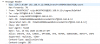
I think this packet capture @NickD_3CX is for incoming call
1590578976031.png
can you please check and help me ?
 
This SIP message seems to be an outbound call, not an inbound call:
To: <sip:043xxxx92@xxxxxx.3cx.xx;tag3cx=b56raqyj>;tag=46844c6c
From: "R.Kamal Reception RK"<sip:102@xxxxxx.3cx.xx>

Also for incoming calls from FXO Gateways (I'm assuming PSTN, not ISDN/E1/T1), as far as I am aware, the called number is not transmitted, simply because PSTN lines do not support more than one.
Only the Caller ID is visible.

This means that the best you could to do is configure your Gateway, depending on which FXO port it receives the call on, in the SIP message to the PBX, in the 'To' SIP Field to send a custom number.
This must be unique for calls on different FXO Ports.
Then, you could create Inbound Rules with these custom numbers so that the PBX can recognizes.

This is what we have done for the Patton FXO Gateways we support, just look at the guide to see:
https://www.3cx.com/voip-gateways/patton-smartnode-sn4112/#h.y837i01fynd9

Can u please check below packect capture ?

1590579061222.png
 
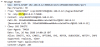
According to this, I think if in the GW settings you add "3571" as a DID, then in the Inbound Rules you create a new DID Rule for this number, it should work, as long as the highligthed valued changes depending on which external number has been dialed.
1590579301658.png
 
According to this, I think if in the GW settings you add "3571" as a DID, then in the Inbound Rules you create a new DID Rule for this number, it should work, as long as the highligthed valued changes depending on which external number has been dialed.
View attachment 16275
According to this, I think if in the GW settings you add "3571" as a DID, then in the Inbound Rules you create a new DID Rule for this number, it should work, as long as the highligthed valued changes depending on which external number has been dialed.
View attachment 16275
Hello Based on your above I did following on 3cx.

1590583925597.png

still calles are going to 880 Digital reception.

If DID need to be created the what should I set under SIP trunk ?

1590584072956.png
 
Previously you said packet were for 807 IVR but you hear 808 audio , stupid question didn't you only mix audio files on IVRs?
if you call directly 807 , do you hear right audio for 807 ?
Same for 808 ?
 
Status
Not open for further replies.

Members Online Now

No members online now.

Forum statistics

Threads
111,832
Messages
589,285
Members
164,662
Latest member
DejanMDS