2 Yealink Phones 1 Extensions not Working

shahrad

Customer
Joined
Dec 19, 2025
Messages
30
Reaction score
1
Hello All,

We currently have a Yealink phone/extension set up as a router phone(T87W). The same extension was previously set up on a T48G. When we did the switch from regular to router, both phones were still working but now the T48G is no connected (No Service) even though in the same wifi network. Is it possible to have both phones set up with the same extension? thank you!
 
Hi @shahrad

It is possible to have 2 phones on the same extension.
Ensure the T48G is using the latest firmware, which is 35.83.0.136, then factory reset the phone, and reprovision it behind the Router Phone. We suggest using a wired connection instead of a Wifi connection. Also note that the T48G is an EOL device.
 
Hi @shahrad

It is possible to have 2 phones on the same extension.
Ensure the T48G is using the latest firmware, which is 35.83.0.136, then factory reset the phone, and reprovision it behind the Router Phone. We suggest using a wired connection instead of a Wifi connection. Also note that the T48G is an EOL device.
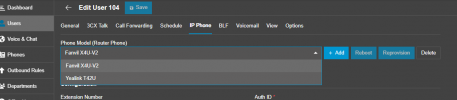
how would it work since the T87W router phone is set as the user in 3CX IP Phone configuration. Wouldn't the + Add phone remove the T87W information or is there another set up I could do?
 
You can click on "+Add" button and the window to configure a phone will open for the User. This will not remove the configuration of the T87W on the User. Then you will see both of them in the drop-down menu.
The User will be able to user the two IP phones.

1769067355660.png

As @NikolasA_3CX suggested, make sure that you are using the latest 3CX Phone Firmware and use a wired connection instead of WiFi for the IP Phone.
 
Side note to the thread: one user cannot have two router phones (which would be great in some cases), but a router phone and a normal phone is OK. (the T48G can't be a router phone)
 
You can click on "+Add" button and the window to configure a phone will open for the User. This will not remove the configuration of the T87W on the User. Then you will see both of them in the drop-down menu.
The User will be able to user the two IP phones.

View attachment 50717

As @NikolasA_3CX suggested, make sure that you are using the latest 3CX Phone Firmware and use a wired connection instead of WiFi for the IP Phone.
Thank you very much. I have applied the settings and the T48G is now connected as the same extension!
 
Side note to the thread: one user cannot have two router phones (which would be great in some cases), but a router phone and a normal phone is OK. (the T48G can't be a router phone)
thank you very much for your feedback on this!
 
Thank you very much. I have applied the settings and the T48G is now connected as the same extension!
We are glad to be of assistance :)
 
  • Like
Reactions: shahrad
Hi @shahrad

It is possible to have 2 phones on the same extension.
Ensure the T48G is using the latest firmware, which is 35.83.0.136, then factory reset the phone, and reprovision it behind the Router Phone. We suggest using a wired connection instead of a Wifi connection. Also note that the T48G is an EOL device.
Thanks again for your assistance on this issue!
 
Side note to the thread: one user cannot have two router phones (which would be great in some cases), but a router phone and a normal phone is OK. (the T48G can't be a router phone)
I'm pretty sure that was only on V18. With V20 you can do this.
 
I'm pretty sure that was only on V18. With V20 you can do this.
Hm, I actually tried before posting to see if it would still not let me and I thought it did not. It is now so not sure what I did. Good to know that changed.
 
  • Like
Reactions: KyriacosS_3CX

Latest Posts

Forum statistics

Threads
111,953
Messages
589,915
Members
164,850
Latest member
masvty