3CX AI for call transcriptions

fraser-t

Silver Partner
Basic Certified
Joined
Nov 4, 2022
Messages
15
Reaction score
6
According to this document, one of the transcription engines available is a free "3CX AI", is there any information on this?
  1. Which, if any cloud/AI Provider does it use on the backend
  2. Where is data processed (same region as 3cx hosted instance? what about self-hosted?)
  3. Does 3cx use the call recordings/transcriptions from our instance to further train their model? or does our data remain private?
Additionally, is there any way we can retrieve call recordings/transcriptions via an API? Or has there been any talk about this becoming a feature?
 
Its our own AI engine using available models. We process it ourselves in our Google Data centers local to Europe or USA whichever location you are in.

The data is not used in anyway and we do not use it to train the models. Its not necessary anyway.

Now in update 8 any 16SC+ customer will be able to process transcriptions themselves using our onboard AI engine similar to our onboard video conferencing engine. The big advantage is that you will keep all the data yourselves.

The transcription data is already available, you just Grafana or Powerbi and you can run all the reports you want on the data
 
  • Like
Reactions: PBX128 and ArneDery
Its our own AI engine using available models. We process it ourselves in our Google Data centers local to Europe or USA whichever location you are in.

The data is not used in anyway and we do not use it to train the models. Its not necessary anyway.

Now in update 8 any 16SC+ customer will be able to process transcriptions themselves using our onboard AI engine similar to our onboard video conferencing engine. The big advantage is that you will keep all the data yourselves.

The transcription data is already available, you just Grafana or Powerbi and you can run all the reports you want on the data
Hi Nick,

Thanks for the info,

Just confirming with the region info, if we are in Aus the data is processed here?
 
If you have such requirements its best to go with OpenAI. Also 3CX transcription is not free, its going to be a paid service its just in beta right now.
 
Now in update 8 any 16SC+ customer will be able to process transcriptions themselves using our onboard AI engine similar to our onboard video conferencing engine. The big advantage is that you will keep all the data yourselves.

Have I unterstood this correct:
With Update 8 as an 16SC+ customer we will get the possibility to host the AI engine for transcriptions on our own on-premise-server? We will get an VM-Installer from you like for 3CX Meeting server? That would be AWESOME! :-)

At the moment we aren't allowed to user any cloud-hosted solution. It would be great if we could use the 3CX-AI-Features in our own network.

Are there any informations about hardware needs? Do we need an GPU for transcriptions? Or would be an 8 vCPU + 32 GB RAM or something like that enough?
 
@ConceptsWeb Thanks for the heads up! Details to follow soon!
@PBX128 Thats exactly how it will work! You will need at least 2 GPU. Without GPU it will go way to slow. But a machine with 2 GPU these days is about 6K
 
Thats exactly how it will work! You will need at least 2 GPU.
may we get pls a little bit more about that tech specs?
 
  • Like
Reactions: PBX128
If you have such requirements its best to go with OpenAI. Also 3CX transcription is not free, its going to be a paid service its just in beta right now.
Thanks for the info! Very much appreciated.

Regarding the second point of the post, will the 3CX API ever allow us to download call recordings/transcriptions programmatically to integrate into other automations?
 
But with the remote archiving and the remote logging all the data is in your database and you can directly query your own database of choice in anyway that you want?
 
But with the remote archiving and the remote logging all the data is in your database and you can directly query your own database of choice in anyway that you want?
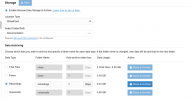
We did look at the remote storage/archive option, it looks like the most frequent interval available is hourly, which is too slow for our usecase, being able to trigger this on demand would be nice or otherwise be able to query/access recordings on demand
 
We did look at the remote storage/archive option, it looks like the most frequent interval available is hourly, which is too slow for our usecase, being able to trigger this on demand would be nice or otherwise be able to query/access recordings on demand
The Data offloading can be every 15 minutes and from that you can get the recording file details whether on the PBX still or archived.
 
  • Like
Reactions: Evolute IT
The Data offloading can be every 15 minutes and from that you can get the recording file details whether on the PBX still or archived.
Sorry, I can't seem to find where to change this setting, this is what I see on my screen when configuring the archiving, I can't find where to specify a 15 minute interval (we're on version 20.0 Update 7)
 

Attachments

  • Screenshot 2025-10-20 at 8.43.55 am.png
    Screenshot 2025-10-20 at 8.43.55 am.png
    71.2 KB · Views: 6
Hi,

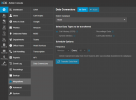
That screen handles File offloading - The database offloading I am referring to is under Integrations -> Data Connectors

1760938827611.png
 
  • Like
Reactions: Evolute IT
Hi,

That screen handles File offloading - The database offloading I am referring to is under Integrations -> Data Connectors

View attachment 49783
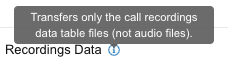
Hi, Sorry for the miscommunication, I am wanting to export the actual recording audio, which this data connector option doesn't support:


Screenshot 2025-10-20 at 4.47.10 pm.png
 
  • Like
Reactions: Evolute IT
Yes, but it includes the path to the recordings, local or remote, so you can automate fetching them via it.
 
  • Like
Reactions: Evolute IT
Yes, but it includes the path to the recordings, local or remote, so you can automate fetching them via it.
So it includes a URI to download the recordings directly over HTTP? Or does it just have the local path from within the linux server itself?
 
It holds the relative path - ext/filename.wav - this should be enough to fetch from wherever it is. The offload_id column should indicate if it is offloaded or local, but in case that is not 100% for any reason, doing an HTTP HEAD to both stores should be enough to locate the file.
 
Is it possible to perform speaker diarization when using OpenAI Whisper?

Is it also possible to have the transcriptions automatically sent to an email address?
 

Forum statistics

Threads
111,973
Messages
590,076
Members
164,895
Latest member
jasonkkrause