3CX and Sennheiser headset D10 - button to answer problem

Status
Not open for further replies.

Evaneo

Forum User
Joined
Aug 23, 2019
Messages
12
Reaction score
0
Hello,

The reception of the society for which I work uses a 3CX solution with a Sennheiser D10 headset phone.
For quite some time, the person at the reception regularly tells me that she can no longer use the headset button to answer the phone.

I have tried everything :

I followed all the prerequisites mentioned in the documentation provided on Sennheiser's website
I reinstall all the programs several times (Headset Pro, Sennheiser Updater and 3CX plugin) and update as soon as possible.
I have run all the programs as administrator.
I changed my headset phone for another D10.
I tried several possible configurations.
I tested on another PC.

Unfortunately the problem persists randomly.

This will sometimes work for a few hours without problems while sometimes it will work only once and then the answer button will not work anymore.

2 solutions to solve the problem, the main one being to close 3CX phone client and to reopen it.
The other (much more rarely) solution is to close 3CX + Headsetup Pro and Sennheiser Updater and restart everything starting with Sennheiser software.

The person working at the reception unfortunately does not always have the possibility of executing these manipulations because of the large number of calls that it receives.
It becomes very annoying :(

Has anyone ever met this problem ?
Would anyone have a solution please ?

Thanking you in advance.
 
Hi,

I have the exact same problem.

This setup is really picky; for some users it's working, for others it's not.
If I tell 3CX to ring on the headset, some people have the base to ring while for others it rings on the headset speaker.

Not sure if it's a Sennheiser problem or 3CX, but since this headset is "3CX approved" I expected everything to work flawlessly.

Hopefully this will get fixed eventually!

Thanks
 
thanks for your return

According to my tests, I would tend to believe that it comes from 3CX because most of the time, a restart of the 3CX client is enough for it to work again.
 
Hello,

If you visit the manufacturers site via the link provided in our guide, you will also see a 3CX Phone Plugin that must be installed https://en-de.sennheiser.com/headset-software-pc#

Please install it and restart your PC (or the Sennheiser software and the 3CX Client).

Upon next launch you should see the green dot:

12059

PS: Please select 3CX as your software client in the Sennheiser software, and also select the headset in the 3CX Client audio options.
 
Hello,

I already apply all your advice and unfortunately, the problem is still there.
Randomly, either the headset no longer works and after verification, the dot goes red for no reason (forced to close 3CX and restart it).
Either the dot is green but the key to answer does not work, the person is forced to use the 3CX interface to answer (and again, a restart of the 3CX client solves the problem for an undefined time)
 
Maybe something is causing a problem on that specific PC, you can also try an alternative way to see if it makes a difference by using your Web Client.

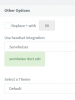
In the webclient setting go to General and enable Sennheiser integration:
12060

Then after using the web client for a day or so, see if you still get problems with the button.

Leave the desktop client disabled during this time.
 
Thanks for your feedback.

Unfortunately, by going on the 3CX web interface, I do not see "Use headset integration".
I only have "Replace + with" and "select a theme".

After a test, the headset is not detected by the web interface.

How to have the option "Use headset integration" please ?
 
What version is your PBX? you can see it in your management console, for example:
12068
 
Unfortunately, this integration is only available in V16 so you will not be able to use it on your version.

If you want you can get a free evaluation key for a PBX and setup a new V16 PBX for testing. I think you will find that this works well.

Also the windows client on V15.5 is not detected by the newer Sennheiser software, it will detect the latest version on V16. You will need to reinstall the sennheiser software from scratch including the additional 3CX plugin, then reboot. It should take a few moments after everything loads and the green dot will appear
 
Last edited:
and so ?

If it works with the evaluation key, it will allow me to rule out a problem with the client 3CX but as mentioned in my first message, I have exactly the same problem with another PC located in another building...

So when you say that this comes from a problem specific to the PC, I have a hard time believing it.
Especially since after doing some research, I came across other people experiencing the same problem but still without solution.

Assuming I did the test with the evaluation key and it works fine, what is the next step to not have a problem with the 3CX client, please ?

As you can imagine, I do not want to work through the 3CX web interface.
 
Hi Evaneo,

After some testing I can replicate the issue you have during boot time. Sometimes it will work ok sometimes it won't.

I disabled the 3CX client to launch during startup, and I launch it after Sennheiser HeadSetup loads. This seems to give more immediate and consistent results and stays working throughout the day until the next reboot.
 
Same problem asked on French forum with same headset D10 and DW1 and 2 PRO models

Something need to be investigate a little bit, don't you think?
 
Hello, i have the exact same problem.
Please, how can we fix this. Or maybe an option for delayed boot for 3CX?
 
Hi,

I disabled 3CX at startup but the problem still the same. An other idea ?
 
It did that to, but no luck, disabled skype but also no fix. After a while the button stops working.
When i press the button, i get to hear: Ten hours talk time, bla bla.
After shutdown 3CX and start again it works again.
 
Hi Evaneo,

Lets try one more thing: Remove the Sennheiser HeadSetup Pro software completely.

Install only the 3CX client and the SDK. You should still be able to Answer and End calls successfully
 
Hi JohnS,

I had this problem already before Sennheiser HeadSetup was installed.
I have a customer with moren then 80 sennheisers, al with the same problem.
 
Hi @Vinnied

Can you confirm whether the Sennheiser 3CX Plugin SDK was installed while the HeadSetup Pro software was not? Was anything else running at the time that might also be using the button? (ie. Skype, or 3CX Webclient?)
 
Hello,

Yes the last version of 3CX Plugin SDK was running, otherwise the button wont work at all. Yes skype for business was running. no 3CX webclient.
 
Status
Not open for further replies.

Latest Posts

Forum statistics

Threads
111,990
Messages
590,161
Members
164,925
Latest member
batarong