Solved 3cx app Android not work - Decline call

Status
Not open for further replies.

edercoser

Free User
Joined
Dec 4, 2019
Messages
12
Reaction score
1
Hi. We are experiencing a problem with our 3cx structure All smartphones with android app do not work calls. We are unable to make or receive calls through the app.
The extension registers in the application, but when trying to make calls, both to internal extensions and to external numbers, in the application it returns as "Decline". There were no configuration changes or updates to the switch.
All android smartphone models are experiencing the problem. We tested it with several different extensions, all having the same issue in the android app. iOS is working normally.
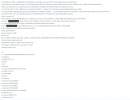
Looking at the 3cx logs in the managemet console returns the following.
Please wait for help...
 

Attachments

  • 3cxApproblem0.png
    3cxApproblem0.png
    127.5 KB · Views: 34
  • 3cxApproblem1.png
    3cxApproblem1.png
    126.4 KB · Views: 32
Just so that we first get a better understanding of your setup, please provide the relevant information mentioned here: https://www.3cx.com/community/threads/information-to-provide-when-requesting-help.67558/

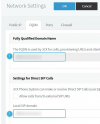
EDIT: Please also go to "Settings >> Network" and check the "Local SIP Domain" field under "Settings for Direct SIP Calls". Make sure that it contains the 3CX PBX's FQDN. Apply the settings and then check if the issue persists.
 
Just so that we first get a better understanding of your setup, please provide the relevant information mentioned here: https://www.3cx.com/community/threads/information-to-provide-when-requesting-help.67558/

EDIT: Please also go to "Settings >> Network" and check the "Local SIP Domain" field under "Settings for Direct SIP Calls". Make sure that it contains the 3CX PBX's FQDN. Apply the settings and then check if the issue persists.
3CX Version, Profissional Perpétua 16.0.8.9
Server OS, e.g. Debian 9
Provisioning Method: Local

Has the Firewall Checker passed: YES
Are custom Phone Templates being used: NO
 
EDIT: Please also go to "Settings >> Network" and check the "Local SIP Domain" field under "Settings for Direct SIP Calls". Make sure that it contains the 3CX PBX's FQDN. Apply the settings and then check if the issue persists.
Have you checked the above as well?
 
Yes I checked, and I applied the settings, problem persists.
Ok so just to confirm, the following two fields, both 1 and 2 have the same exact FQDN in them:

Settings >> Network >> FQDN
1623411344729.png

If yes, try rebooting all 3CX services in "Dashboard >> Services" and then try making a call again.

Important: Do bear in mind that restarting 3CX Services will temporarily render the 3CX PBX non-operational and drop any active calls so we would recommend performing this task during out of office hours to avoid downtime.
 
  • Like
Reactions: jed
Confirm, and they were different, I adjusted and started to work. Thank you very much.
 
  • Like
Reactions: ChrisC_3CX
Excellent! Glad I could help!

Please feel free to start a new thread should you require additional information or assistance.
 
Status
Not open for further replies.

Members Online Now

No members online now.

Forum statistics

Threads
111,831
Messages
589,277
Members
164,660
Latest member
RJenkinsROCK