3CX app [Mac] and phone

Status
Not open for further replies.

biggreyphone

Customer
Joined
Oct 3, 2021
Messages
194
Reaction score
23
I have the 3CX installed on my Macintosh computer and a 3CX Fanvil phone also at my desk. Is it possible to use the computer app to dial, but actually complete the call through my desk phone since I am not using a headset at my computer?
 
Regarding your question, and if you are referring to the 3cx app for Mac (softphone) then this is no longer supported and in any case, this can not be used in CTI mode, to pair with an IP Phone. The 3cx desktop app on the other hand does work and can be used to pair with a supported IP phone (that supports CSTA mode) where calls will be controlled by the desktop app but the audio for the calls will be to and from the IP phone.
 
Yes I am looking to use the 3CX desktop app to pair with a supported IP phone as you describe.
How do I do this?
 
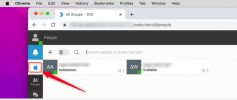
If you log in to the Web Client, you'll see a notification for the download. If you have already skipped that, then you can click the little apple icon on the top left.

1657132474764.png

After you download it, from the bottom of the browser run the downloaded file and choose to pull it to the applications folder when asked.
Then click provision and choose to open the desktop app, this will then appear in the top menu bar and when clicked will open. Click the dialer (telephone icon top right) and from the drop-down arrow choose the IP Phone. That is it.
 
Last edited:
  • Like
Reactions: Charles_3CX
Status
Not open for further replies.

Latest Posts

Forum statistics

Threads
112,280
Messages
591,668
Members
165,400
Latest member
georgi