3CX Azure Install

Status
Not open for further replies.

Naz_TeqdUp

SMB User
Joined
Feb 19, 2021
Messages
9
Reaction score
0
Hi Guys

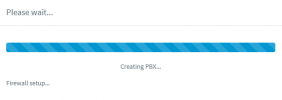
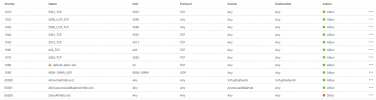
I seem to be experiencing a problem setting up 3CX on Microsoft Azure, After installing the 3CX Market place image. I run through the setup and receive the admin welcome email and the first account email details but when it gets to "Creating PBX" Firewall Setup. It seems to just hang there.
1656666349494.png

I've tried about 6 times and every time get's stuck here. All the FW rules indicated are added
1656666431818.png

Thanks,
Naz
 
Ignore, it seems you just have to leave it for quite some time and eventually it does complete.
 
Hi All

It seems there is some issue that I am having on Microsoft Azure.

After installing and logging in. I seem to lose connectivity to the Admin portal. I get a "Page cannot be displayed" when browsing to the admin console.

In Azure I looked at the virtual machine and see the warning below:
1656706478871.png

(I am running 1 cpu and 1Gb RAM as we literally testing with 2 users)

If I reboot the VM then it comes up and I am able to configure etc however after a while it does the same thing. I am not sure if it's related to a problem with the 3CX market place image. Is anyone else experiencing a similar issue?
 
Hi Guys

I can make and receive calls however cannot log into the Server via the admin console. I get the error below. If I restart the Azure VM then I can log in for a while before getting the same error.
1656928832011.png
 
It would be an issue with permissions or network level configuration. Maybe you should use 3CX Hosted instead. If you want to host on Azure you need to really know how Azure works and you would have to troubleshoot this yourself.
 
It would be an issue with permissions or network level configuration. Maybe you should use 3CX Hosted instead. If you want to host on Azure you need to really know how Azure works and you would have to troubleshoot this yourself.
Would love to use hosted but it's not available in my country/region
 
Most likely swap is not being enabled in the VM.
 
  • Like
Reactions: Evolute IT
try to resize your virtual machine by increasing the memory to 2GB, currently you've got Standard B1s- resize it to B2s which is 2GB memory
 
Thanks Nikos, I've spent days trying to do this. Has anyone got a step by step guide as I am completely unfamiliar with Linux

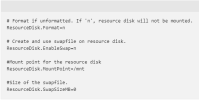
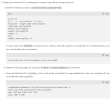
I managed to change the first part configuring the waagent: Using Putty I've logged in with the admin credentials and sudo nano /etc/waagent.conf

1659379616499.png

Below I just can't figure out how to do this as I have 0 Linux skills. I can't find a single guide which runs one through this.

1659379716057.png
 
Status
Not open for further replies.

Forum statistics

Threads
112,149
Messages
590,965
Members
165,170
Latest member
SupportRock