3cx cant hear and talk with STUN remote

Status
Not open for further replies.

ducth

Joined
May 3, 2018
Messages
10
Reaction score
0
Does the 3CX Firewall Checker Pass on all ports?

Does this happen on both outgoing and incoming calls?

The set appears to use port 5067 so I'm going to assume that there are more than one set at this location. In some cases, the particular remote router is unable to keep track of which device should be using which audio port. It may also be a router option, that requires changing. You can try a power down on the router, power up again without any other phones registered. See if it works. You can also set the 3CX extension options to enable PBX delivers audio to see if that helps.
If you do have more than a couple of extensions, I would strongly suggest the use of a 3CX SBC, which may solve this issue.

.https://www.3cx.com/docs/3cx-tunnel-session-border-controller/
https://www.3cx.com/docs/3cx-tunnel-session-border-controller/
 
It's happen on bot outgoing and imcoming calls.

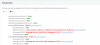
recently, my system server upgrade firewall Fortigate and now i check firewall pass
upload_2019-1-10_12-15-10.png
How to fix this?
 
Definitely a firewall issue here. You need to disable SIP ALG and either (or a combination) of port forwarding and firewall rules which need to be configured for the correct ports: https://www.3cx.com/docs/ports/

Note: If using STUN for your remote phone(s) it is only recommended for 1-2 endpoints, if you plan to add anymore to this site deploy an SBC.
 
Hello @ducth

I will agree that this looks like a firewall issue. You need to make sure that SIP ALG is off and that you pass the firewall checker before proceeding with any other changes.
 
Hi all,

Thanks for helping. I was disable SIP ALG and firewall check is pass. But now my phone is one way audio. I only can hear, and talk not work.
 
One way audio in a STUN environment is normally:

* one of the firewall in the audio path blocking, local or remote.

* maybe a faulty speaker or handset on the endpoint itself (less common however).

* PBX delivers audio on the extension not being enabled.
 
why my firewall check sometime pass and sometime fail :(. that is reason my ip-phone only one way audio.
 
Well if it was constant one way audio, I would say it was firewall rule or port forwarding that was the culprit. If intermittent like you then SIP ALG.

There are other settings sometimes (dependent on make and/or model) such as SIP Helper. I have also known anti-virus software on the server side to exhibit some similar issues also.
 
Please make sure that the option "PBX Delivers Audio" is enabled under all STUN extensions. Then test if extension to extension calls work or if the issue is only with calls coming from the provider. A good way to check if a phone can communicate correctly with the PBX is the echo test. Try dialling *777 and see if you can hear your self talking. If you do then the extension has 2 way audio. If not then the issue us between the PBX and the extension.
I would also recommend trying to provision the phones using the 3CX SBC. Most of the times an SBC can help you bypass firewall issues as it uses a single port for all configuration.
https://www.3cx.com/docs/3cx-tunnel-session-border-controller/
https://www.3cx.com/3cxacademy/videos/intermediate/configuring-remote-extensions/
 
Status
Not open for further replies.

Members Online Now

No members online now.

Forum statistics

Threads
111,832
Messages
589,286
Members
164,662
Latest member
DejanMDS