3CX Debian OS Update Failed

Status
Not open for further replies.
debian@vps-9fdd07e0:~$ cat /etc/debian_version
12.7
 
I need to execute step 5?
 
already installed and updated to v20 finally :)

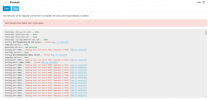
but I have an issue shot_240914_022713.png
 
Yes , change firewall settings ( Ports Forwardings )
 
5060 UDP/TCP
5090 TCP/UDP
5001 or 443 TCP
9000-10999 UDP
 
Last edited:
where i can found firewall settings ( Ports Forwardings )?
 
The settings in the router where the 3CX telephone system is located.

What is the brand and model of the router?
 
i am using cloud server
 
maybe I use in premises installation, which coz this issue?
 

Attachments

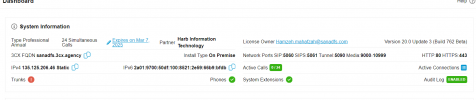
  • shot_240914_032021.png
    shot_240914_032021.png
    32.1 KB · Views: 5
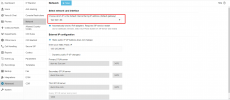
shot_240914_033039.png

must to change default ip interface
 
You have only one interface, right ?
 
3cx server on the cloud and it have a static IP all user connect directly and all ports open their.

i do installation from my laptop not via server
 
OVH is not supported by 3CX, which complicates your setup. You should look into adjusting OVH settings to allow incoming traffic to your server. It appears there are missing configurations related to NAT at OVH.

Here's a link to OVH's guide on configuring NAT

I cannot provide further assistance since this involves troubleshooting OVH-specific issues, and we do not have tools for that. Consider contacting OVH for support or switching to a supported hosting provider.
 
clear.

but before update to v20 it was working perfectly without any setup
also I missed special integration template with the new update :(
 
clear.

but before update to v20 it was working perfectly without any setup

To function, there are two solutions:
Either the VM is not behind a NAT,
or there are configured rules.

This is the foundation of any network.


also I missed special integration template with the new update :(

Please be more specific.
 
Status
Not open for further replies.

Forum statistics

Threads
111,832
Messages
589,284
Members
164,662
Latest member
DejanMDS