- Joined
- Oct 14, 2022
- Messages
- 19
- Reaction score
- 0
I'm really at my wits' end. I've switched from our 3CX Pro to 3CX AI and want to use AI for the front desk.
I’ve been reading through this forum and the documentation for hours, but I can’t find a solution! When I call the reception desk, I just get silence.
OpenAI is configured, I have credit (100€), and everything is set up according to the documentation, but it’s not working.
I hope someone here can help me out—thank you very much.
3XC Version: Version 20.0 Update 9 (Build 995 Release - AI 1.4.48)
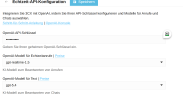
Ist hier alles richtig?
I’ve been reading through this forum and the documentation for hours, but I can’t find a solution! When I call the reception desk, I just get silence.
OpenAI is configured, I have credit (100€), and everything is set up according to the documentation, but it’s not working.
I hope someone here can help me out—thank you very much.
3XC Version: Version 20.0 Update 9 (Build 995 Release - AI 1.4.48)
Ist hier alles richtig?
Last edited: