3cx don't work, only silence!

JochenH

Customer
Joined
Oct 14, 2022
Messages
21
Reaction score
1
I'm really at my wits' end. I've switched from our 3CX Pro to 3CX AI and want to use AI for the front desk.
I’ve been reading through this forum and the documentation for hours, but I can’t find a solution! When I call the reception desk, I just get silence.
OpenAI is configured, I have credit (100€), and everything is set up according to the documentation, but it’s not working.
I hope someone here can help me out—thank you very much.


3XC Version: Version 20.0 Update 9 (Build 995 Release - AI 1.4.48)
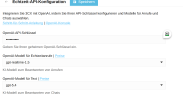
1793355959838.png
Ist hier alles richtig?
 
Last edited:
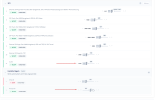
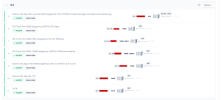
Whats the state of your firewall now cos on the latest grab you've removed 3478 in.

Are you applying the change after you save the rule?

  • Add the new UDP rule.
  • Click Speichern (Save) if prompted.
  • Click Übernehmen (Apply) to activate the updated firewall configuration.
  • Wait for the changes to take effect.
 
Last edited:
Does 3CX firewall checker pass?
 
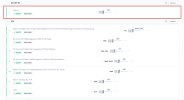
The screenshots suggest that you haven't specified a destination for the port forwards. You need to point them to the 3CX system.
 
Can you do a quick test? Create an inbound rule to allow all UDP in to 3CX and then try your agent?
 
The screenshots suggest that you haven't specified a destination for the port forwards. You need to point them to the 3CX system.
1793697870920.png
No
 
Where is the UDP rule 3478?

**nvm i see it.

have you tested?
 
In the old screenshot, there was an asterisk. Does the 3CX system have the IP 62.X.X.X internally? That looks like the public IP.
 
In the old screenshot, there was an asterisk. Does the 3CX system have the IP 62.X.X.X internally? That looks like the public IP.
Its probably an IONOS VPS.
 
I think what you need to do now, with UDP open and the AI Agent working, you should run a wireshark capture from 3CX, run a test call and then review the capture to see what additional UDP ports are being used.
 
  • Like
Reactions: JochenH
I think what you need to do now, with UDP open and the AI Agent working, you should run a wireshark capture from 3CX, run a test call and then review the capture to see what additional UDP ports are being used.
I tested it, but all UDP connections only come in on port 5090.
I don't understand any of this anymore...
 
Idk mate, i feel like even at this point its more trouble then its worth to continue to try and troubleshoot and it would cost you more to get a partner involved to look only to come to the same conclusion. Trying to put in firewall rules against UDP ports that are likely to change isnt worth the chase. If I were you, i'd look at a supported VPS provider for 3CX or even go with 3CX hosted. Netcup doesnt seem worth the trouble. Maybe try Hetzner? We use OVH and AI Agents work no problem.
 
Okay, yeah. I'm running RustDesk on Hetzner. No problems at all. I think I'll consider moving it over.
 
  • Like
Reactions: Alphabetic

Forum statistics

Threads
112,398
Messages
592,308
Members
165,580
Latest member
j.hereijgers