- Joined
- Oct 8, 2021
- Messages
- 24
- Reaction score
- 2
I posted a few days ago about not being able to get faxing to work with the Polycom OBi202 Google Voice device, and was suggested to try the Grandstream HT801 ATA device instead, however this is nothing new. We were using the HT801 before trying that device, and it wasn't working before and I cannot get it working now. I will try to explain the problem as simply as possible without losing the details.
Basically, there is no rhyme or reason to the way this thing behaves once it's configured. It even seems to behave differently depending on which ethernet drop I'm using and the VLAN I'm on.. But I could be wrong. When testing it, sometimes it seems to send/recieve faxes, and other times it does not. In the past, I've configured it as instructed, and was able to both send and receive faxes on all of my tests, but then after some time passes, it seems to stop working.. I've tested it by sending faxes to other fax machines in the office, and on some of my tests they go through right away, other times they do not and I get a "poor line quality" error on the report. My most recent test, the faxes send, but I cannot receive faxes.. On the receiving end, when sending a fax to the fax machine that the ATA is plugged into, it will just ring like it's receiving a phone call. If I move it to a different ethernet drop and a different fax machine in the office, suddenly it will receive faxes, but not send any.. There's no consistency to any of it. As I said, a few months back, I had it configured and working in my test environment with two different fax machines, but then you put the device in place where it's needed, some time passes, and then people report to me that it's not sending or receiving (or one or the other).
Here is what I'm doing to configure it...
In our 3CX web dashboard, under Advanced > Fax, I create a fax extension by clicking add, the fax authentication ID and Fax extension authentication password are automatically filled in, and then I give it a caller ID of one of our free DID numbers.
Under Advanced > FXS/DECT on the left pane, I click add FXS/DECT. I give it a name, set the provisioning method to Local LAN (in the office), there's a provisioining link to an .XML document (which I upload to the devices web page later), I put in the MAC address of the ATA, for select interface I set it to our 3CX server's IP address, device web page password is already filled in, and the fax transmision mode is set to "Fax in audio G711 (pass through)". The codecs that show up at the bottom are PCMU, PCMA, and G729A/B (these are already there). Under the extensions tab at the top, I select the fax extension I created in the previous step.
I then add an inbound rule.. I give it a name.. I give it the DID I assigned to the fax extension earlier. Route calls section.. Send fax to fax extension I created for both calls during and otuside office hours.
Outbound rules.. Give it a rule name. Apply this rule to these calls. Calls from extension (that I created). Make outbound calls on.. Set route to the ISP name. Strip Digits 0. Prepend box blank, Outbound caller ID is the DID number I assigned to the fax I created.
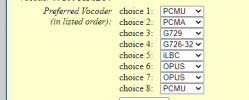
Then, in a web browser, I go to the IP address for the devices configruation page. I log in as admin. I change nothing under the Basic Settings tab. I go to the Advanced Settings tab.. I set 3CX auto provision to No (to avoid my settings being overwritten). Automatic upgrade to No. Always check for new firmware to "Always skip Firmware Check". I hit update. Then apply and wait for it to reboot.
I then log back into it and go to the FXS Port tab at the top of the page. I set the Primary SIP Server and Outbound Proxy IP address fields to our 3CX server's IP address. I set SIP user ID to the fax extension number I created. Authentication ID I set to the Auth ID listed under the Fax extension I created. Same deal with the Authenticate Password field. I then click update, apply, and save my changes.
Then, I go to the 3CX dashboard and to Advanced > FXS/DECT and click on the grandstream device I added earlier. I highlight the provisioning link, right click, and hit save "save link as" and save it as an .XML file. I go back to the devices configruation page, sign in as admin, go to the advanced settings tab, scroll ALL the way to the bottom, where it says "upload configuration" and click that, then I select the .XML file that I just downloaded from th 3CX dashboard and upload it. It takes some time, applies the changes, and reboots.
Then I test it by making phonecalls to and from an analog phone plugged into port 1 on the ATA device. I'm able to make phone calls within the office. I'm able to call my cell phone from the analog phone, and I'm able to make calls to the analog phone from my cell phone...
I then take the ATA device, plug it into a fax machine instead of an analog phone, and I then get the faxing behavior I described above..
What am I missing? what am I doing wrong here?
Basically, there is no rhyme or reason to the way this thing behaves once it's configured. It even seems to behave differently depending on which ethernet drop I'm using and the VLAN I'm on.. But I could be wrong. When testing it, sometimes it seems to send/recieve faxes, and other times it does not. In the past, I've configured it as instructed, and was able to both send and receive faxes on all of my tests, but then after some time passes, it seems to stop working.. I've tested it by sending faxes to other fax machines in the office, and on some of my tests they go through right away, other times they do not and I get a "poor line quality" error on the report. My most recent test, the faxes send, but I cannot receive faxes.. On the receiving end, when sending a fax to the fax machine that the ATA is plugged into, it will just ring like it's receiving a phone call. If I move it to a different ethernet drop and a different fax machine in the office, suddenly it will receive faxes, but not send any.. There's no consistency to any of it. As I said, a few months back, I had it configured and working in my test environment with two different fax machines, but then you put the device in place where it's needed, some time passes, and then people report to me that it's not sending or receiving (or one or the other).
Here is what I'm doing to configure it...
In our 3CX web dashboard, under Advanced > Fax, I create a fax extension by clicking add, the fax authentication ID and Fax extension authentication password are automatically filled in, and then I give it a caller ID of one of our free DID numbers.
Under Advanced > FXS/DECT on the left pane, I click add FXS/DECT. I give it a name, set the provisioning method to Local LAN (in the office), there's a provisioining link to an .XML document (which I upload to the devices web page later), I put in the MAC address of the ATA, for select interface I set it to our 3CX server's IP address, device web page password is already filled in, and the fax transmision mode is set to "Fax in audio G711 (pass through)". The codecs that show up at the bottom are PCMU, PCMA, and G729A/B (these are already there). Under the extensions tab at the top, I select the fax extension I created in the previous step.
I then add an inbound rule.. I give it a name.. I give it the DID I assigned to the fax extension earlier. Route calls section.. Send fax to fax extension I created for both calls during and otuside office hours.
Outbound rules.. Give it a rule name. Apply this rule to these calls. Calls from extension (that I created). Make outbound calls on.. Set route to the ISP name. Strip Digits 0. Prepend box blank, Outbound caller ID is the DID number I assigned to the fax I created.
Then, in a web browser, I go to the IP address for the devices configruation page. I log in as admin. I change nothing under the Basic Settings tab. I go to the Advanced Settings tab.. I set 3CX auto provision to No (to avoid my settings being overwritten). Automatic upgrade to No. Always check for new firmware to "Always skip Firmware Check". I hit update. Then apply and wait for it to reboot.
I then log back into it and go to the FXS Port tab at the top of the page. I set the Primary SIP Server and Outbound Proxy IP address fields to our 3CX server's IP address. I set SIP user ID to the fax extension number I created. Authentication ID I set to the Auth ID listed under the Fax extension I created. Same deal with the Authenticate Password field. I then click update, apply, and save my changes.
Then, I go to the 3CX dashboard and to Advanced > FXS/DECT and click on the grandstream device I added earlier. I highlight the provisioning link, right click, and hit save "save link as" and save it as an .XML file. I go back to the devices configruation page, sign in as admin, go to the advanced settings tab, scroll ALL the way to the bottom, where it says "upload configuration" and click that, then I select the .XML file that I just downloaded from th 3CX dashboard and upload it. It takes some time, applies the changes, and reboots.
Then I test it by making phonecalls to and from an analog phone plugged into port 1 on the ATA device. I'm able to make phone calls within the office. I'm able to call my cell phone from the analog phone, and I'm able to make calls to the analog phone from my cell phone...
I then take the ATA device, plug it into a fax machine instead of an analog phone, and I then get the faxing behavior I described above..
What am I missing? what am I doing wrong here?