Solved 3CX FDQN not Working- Need Help.

Status
Not open for further replies.

Jawad Altaf

Free User
Joined
May 6, 2021
Messages
20
Reaction score
4
Greetings Community Members,
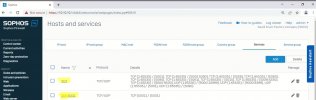
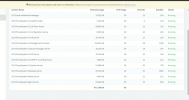
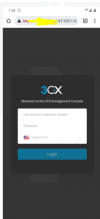
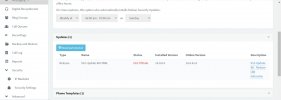
I am Experiencing a Problem accessing my FDQN of 3CX. I am Not able to open it from the Public IP's.However, I can Access it on my Local Subnets. Although my Settings are selected as Access From anywhere. However, Since this Morning, I am Not able to access it through the Public FDQN. In addition to this, I cannot Access the 3CX Mobile Apps. I have Checked from the Port Scanner on my Public IP and the Required SIP Ports Are Open. In addition to this, My 3CX is ON Premises Server. It is Connected With Sophos Firewall. I have Checked the Services for Required Ports Are also Added in the Firewall. I am Attaching the Pictures for the Review. My Local IP of 3CX server is 10.10.10.36 and FDQN is at Port :5001. I have One VPN and Remote Ethernet Devices Connected With 3CX. All the Voice Calls are passing through the Network Without Issue but FDQN is not Responding. Kindly Inform me What Steps I need to Perform. In addition to this, I Don't have a Static WAN IP. I using a Dynamic IP along with DDNS to Run the Remote Ethernet devices connected Main Sophos XG firewall.
 

Attachments
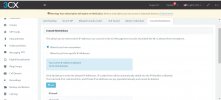
  • 3CX Console Restrictions- SC.jpg
    3CX Console Restrictions- SC.jpg
    158.1 KB · Views: 22
  • 3CX Services Firewall.jpg
    3CX Services Firewall.jpg
    103.6 KB · Views: 21
Last edited:
Below is the Screenshot of the Services running in the 3CX Dashboard.
1647781193662.png
 
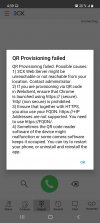
Attached is the Screenshot for the 3CX Dashboard for scanning the QR code.
 

Attachments

  • Screenshot 3CX.jpg
    Screenshot 3CX.jpg
    462.8 KB · Views: 14
Under Settings >> Network >> External IP Configuration is it set to dynamic.

on the main 3cx management screen in the left hand panel is your wan IP address correct

if you are using std or pro license, it can take 6 hrs for the 3cx fqdn to update to the new IP address

what version of 3cx are you running, there is a bug in the latest version where dynamic does not work - set your ip to static with the correct ip until the fix is released
 
Last edited:
Under Settings >> Network >> External IP Configuration is it set to dynamic.

on the main 3cx management screen in the left hand panel is your wan IP address correct

if you are using std or pro license, it can take 6 hrs for the 3cx fqdn to update to the new IP address

what version of 3cx are you running, there is a bug in the latest version where dynamic does not work - set your ip to static with the correct ip until the fix is released
Greetings Saqqara
I m using version 16.0.9. I m using professional license with 32sc.
Yes my settings for external ip configuration is set to dynamic.
I have face this issue for the first time.
Today my fdqn public ip was different to my dynamic wan IP of ISP.
When i resloved the FDQN ip it was 188.XX.XXX.186 and my wan ip was different.
Is this issue normal?
 
  • Like
Reactions: NickD_3CX
When i resloved the FDQN ip it was 188.XX.XXX.186 and my wan ip was different.
Is this issue normal?
For remote 3CX endpoints to connect to the PBX the FQDN will have to resolve to the actual PBX's public IP. Since you're using a dynamic IP setup there might be some time between correct DNS resolution depending on what license you're using as @Saqqara mentioned. If you want to test if the issue you are facing is related to DNS resolution or not I recommend trying to access the PBX's management console using the actual machines public IP instead of the FQDN to see if that connects you (example: https:<PUBLIC_IP>:5001). If it does, then you know that the issue is due to DNS resolution. If you still can't then it might be firewall configuration.

I also recommend checking what @ClaudioBassani mentioned as if that is the case, this all might be a moot point.
 
@ ChrisC_3CX. thank you for your Response. I have Check my 3CX FDQN is accessible by the Public IP along with the Port Number. However, It is not Resolving to the Actual PBX's Public IP.I have Checked my Public IP from the ISP Service Provider is Renewed today around 2PM 21 March Saudi Arabia Standard Time. However, Up till Now my FDQN is not getting Connected to the Public IP. As the Time of more than 6 Hrs Are passed and As per Standard License it should be updated. Is there Anything I do with this DNS Resolution. 1647868105290.png
 
In that case, the issue is definitely DNS resolution related.

There are a few things to consider here:

1. DNS TTL for a Pro License is 6 hours. That said, global DNS propagation may actually take longer.

2. Since you don't have a static IP you will have to configure the PBX's network settings to dynamic which, as I understand, you have already done. Now, bear in mind that, every time the PBX detects an IP change, it will contact our activation servers to update the IP. The reason I mention this is explained in point 3.

3. Your PBX is running version 16.0.8.9 which probably has issues successfully contacting our activation servers which might actually explain why you're facing this issue as failure to do so would also prevent the DNS record update. I strongly recommend upgrading to at least v16 U8a (16.0.8.16) that should be able to communication with our activation servers until November 2022. I would of course recommend upgrading straight to v18.
 
  • Like
Reactions: Jawad Altaf
@Greetings Chris,
I have seen the Log of my 3CX PBX.
it is Showing that 3CX has Updated the FDQN to my Public IP.
Your public IP has changed and 3CX updated your FQDN records from 144.XX.XX.200 to 188.XX.XXX.133.
3CX System Service ID: 10026 03/22/2022 8:30:13 AM

(This IS my Router Public IP) However, When i Do Nslookup from my ON Premises Server to the FDQN which I created on installation is not Resolving to my Public IP. it is Still going Back to the Old FDQN IP since last three days.
In Addition to I have Received this Message in my 3CX Server PBX Log on 21 March.
STUN server stun3.3cx.com:3478 could not be reached (host name is not resolved). It could be that the STUN server you are using is down or a network problem is preventing STUN resolutions. This might cause problems if you use VoIP Providers.
SIP Server ID: 12295 03/21/2022 10:48:11 PM.
I will try to Update to the new Version and check.In case if doesn't get fixed, I will return back to forum again for the Help
 
Despite what you see in the logs I urge you to perform the update today as it may very well fail to activate tomorrow meaning that you will have to uninstall and re-install if that happens.
 
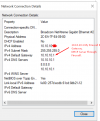
Greetings Support Member, I am Trying to Update my 3CX to 16.0.8.16 Version. But it is Showing me Update Fail from my Management Console. My details of the 3CX Windows Hosted Server are. I have DHCP Server Running through the Firewall.
Update Page 3CX.jpg3CX Server Interface Details.png
 
As mentioned in my previous reply, the upgrade to v16.0.8.16 would have to be performed yesterday the latest. Since you have not upgraded your only option now would be to re-install and restore a backup in which case I recommend taking this opportunity to go straight to 3CX v18 as you would need to do this anyway at some point.

All you need to do is:

1. Take a full backup and copy it away from the machine.
2. Uninstall 3CX v16.
3. Optional: Here I suggest performing any maintenance work on the machine, updates, reboot, etc.
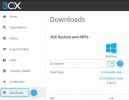
4. Download the latest 3CX v18 installer for windows from our customer portal:
1648033033801.png
5. Install and use the backup you took previously to restore the config.


Note: We recommend undertaking the above task during out of office hours since downtime is inevitable.


EDIT: Before you doin anything, first thing I recommend is making sure your machine's primary dns is set to Google's 8.8.8.8
 
Thank you . Mr. Chris. my issue has been resolved by upgrading.
 
  • Like
Reactions: ChrisC_3CX
You're very welcome! Glad to see you got this sorted!

Do feel free to start a new thread should anything else come up!
 
Status
Not open for further replies.

Forum statistics

Threads
111,974
Messages
590,081
Members
164,899
Latest member
mazet