


- Joined
- Feb 14, 2023
- Messages
- 8
- Reaction score
- 5
Good day.
I have been working through a trial of 3CX Dedicated Hosted with the intent to purchase Professional this week. The only issue I am having so far is that in the hosted version of 18U6 (which has very poor documentation from what I can tell) there are no options to configure the KEX for a Grandstream GRP2615. The config file downloaded from the hosted instance includes the EXT fields to configure the kex.
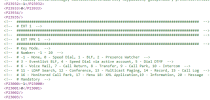
But there isn't a way in the web portal to configure these options.
If I was running on-prem, I could manually edit the xml files. But, I don't see this option in Hosted. If I configure the kex manually on the phone itself, it gets overridden after a short bit.
Any insight into what I may be missing or how I could go about setting these options in a 3CX Hosted environment?
I have been working through a trial of 3CX Dedicated Hosted with the intent to purchase Professional this week. The only issue I am having so far is that in the hosted version of 18U6 (which has very poor documentation from what I can tell) there are no options to configure the KEX for a Grandstream GRP2615. The config file downloaded from the hosted instance includes the EXT fields to configure the kex.
But there isn't a way in the web portal to configure these options.
If I was running on-prem, I could manually edit the xml files. But, I don't see this option in Hosted. If I configure the kex manually on the phone itself, it gets overridden after a short bit.
Any insight into what I may be missing or how I could go about setting these options in a 3CX Hosted environment?


