3cx hosted on 3cx, v20 users complain echo on incoming calls

ronenba

Bronze Partner
Basic Certified
Joined
Nov 16, 2022
Messages
191
Reaction score
8
I am running a 3CX V20 hosted by 3CX. Users complain that, from time to time, incoming calls sound like an echo, or they have an issue hearing the other side

I downloaded the log and uploaded it to ChatGPT to see what I am missing

The results are according to ChatGPT:


  • CPU: 2 cores
  • RAM: 1.9 GB total (only ~700 MB free)
  • Hosting: KVM VM (likely low-tier VPS)
  • 3CX Version: 20.0.8
  • Firewall Check: Passed ✅
  • NTP: ❌ Not configured / missing

1. Server is underpowered (BIGGEST ISSUE)

3CX v20 + multiple concurrent calls + transcoding = your specs are too low.
1.9 GB RAM is not enough → leads to:

  • RTP packet delay

  • Jitter → echo / robotic sound

  • One-way audio intermittently

  • Audio clipping
This exactly matches your users’ complaints:
“sometimes echo”
“sometimes can’t hear other side”

2. No NTP (Time Sync) — VERY IMPORTANT

Your log shows:
ntpstat: The system cannot find the file specified.
This is a major VoIP issue.
Why it matters:

  • RTP streams rely on timing

  • Without sync → jitter buffers break

  • Causes:

    • Echo

    • Delay

    • Audio overlap

3. Likely RTP / network jitter (cloud VPS factor)

You’re on a virtualized host (KVM), which introduces:

  • Variable latency

  • CPU steal time

  • Packet jitter
Even if firewall check passes, real-time audio can still degrade

4. Client-side causes (secondary)

Some users may also:

  • Use WiFi (big contributor to echo)

  • Have double NAT / ISP modem issues

  • Use browser/PWA instead of desktop app

✅ What to do (in order — do NOT skip)​


Step 1 — Upgrade Server (CRITICAL)​

Minimum for your setup:
ComponentRecommended
CPU4 vCPU
RAM4 GB (minimum)
DiskOK
If you want stable audio:
Go 4 GB RAM + 4 CPU — no compromise

Step 2 — Fix NTP immediately
Step 3 — Check jitter/latency from server
Step 4 — Force direct media (reduce server load)
Step 5 — Codec optimization
Step 6 — Users: fix endpoint issues
Step 7 — Disable SIP ALG everywhere


The question is, if the 3CX is hosted on 3CX, how do I address it?

Also, when trying to create this post, I am requested to choose the system, and I do not see it , i do not see some of my PBX, what do i need to do? need to choose a different PBX​

 
In this case, I am using phones; I do not have the password to each extension. If I reset it, will it affect all the phones?

As the password will be changed ( I am not on site is there another way to activate Call Quality Monitoring on all extensions?)
 
Hello ronenba,

Please understand this is a setting on the 3CX server not on the phone, and not local.
You just need access to the 3CX server web-admin and you can set the 'Call Quality Monitoring', if you have the rights.

1776290064107.png
Use the 3 dots menu, to get the list of option, and select the last option (i think) 'Call Quality Monitoring'.
If you do not see this option, you do not have the right to enable this.

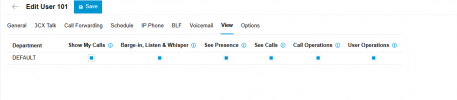
Please goto your own account and set the options for "See Calls, Call Operations, User Operations" to enabled in the correct department.
Than go back to the TEAM page, and set the 'Call Quality Monitoring'.

Paulo
 
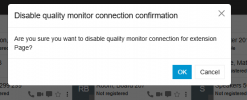
I logged in as admin and did as you said, Monitor connection Quality, will it be to all extensions?

1776290769495.pnglike that?

1776290835563.png

I believe it is active now?
 
Hello ronenba,

It is on a per phone base, you will need to enable this for all the phones, where you want to check the quality.
From the picture, it is already set enabeld/active yes.

After some calls, you can check the quality from the report.
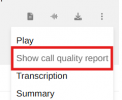
Goto: Admin - Reports - Call Log, select a call... at the right of the screen there is the 3 dots menu, select 'Show call quality report'.

1776291191972.png

Here you should find some information about the call.
If it is gray, there is no information, only if it is dark (black), and you can klik on this.

Paulo
 
Last edited:
Only to understand I need to access each extension through the web (meaning reset the password for each, will I need to reconfigure the extension as they are not on provisioning, the setup was done manually?) Or can it be done from the admin portal?
 
Hello ronenba,

I did already mention that you do not need anything on the phone itself !
You also do not need to access any phone, and for sure you do not do reset anything, please !

Just access the 3CX web Admin, and that is all.

Paulo
 
Sorry, I am asking as you wrote

"It is on a per phone base, you will need to enable this for all the phones, where you want to check the quality.
From the picture, it is already set enabeld/active yes."
 
Okay, yes I do now understand... the word 'Phone' is not correct, I am sorry!
I should have used 'Account', 'Extension' or 'User', it is not about the 'Phones'.

Please read:
It is on a per User base, you will need to enable this for all the Users, where you want to check the quality.

Paulo
 

Forum statistics

Threads
111,952
Messages
589,896
Members
164,845
Latest member
tdzski5