Solved 3CX Hosting in Australia

Status
Not open for further replies.

srt65

Bronze Partner
Joined
Dec 19, 2020
Messages
6
Reaction score
1
Hi,

Have noticed that 3CX is now (again) providing hosting for Australian customer.

Done anyone know geographically where these are hosted, i.e. Australian datacentres or overseas datacentres. I see they mention they use DigitalOcean and Vultr but I can find nothing specific about which and where for Australian customers.

I also believe from reading these forums that 3CX used to previously provide hosting for Australian customers but discontinued it in Aug 2021 forcing existing customer to migrate to another platform.

Have they suddenly decided to re-instate 3CX hosting again for Australian customers?
Does this sort of thing happen often generally with 3CX hosting?

I currently have a few installations hosted in the Azure Australian datacentre and seems like 3CX hosting would be a huge cost saving. However, I really do not want to be messing around with migrating installations at the whim of 3CX hosting policies and do not want hosting outside of Australia (due to potential issues from latency).

Taking these points into account what is the general feeling out there. Is worth migrating to 3CX hosting or should we stay on Azure? Azure has proven pretty rock solid and not much chance of them suddenly shutting down services to Australia. Azure is just expensive compared to current 3CX hosting costs.

Any advice would be greatly appreciated :)
 
  • Like
Reactions: NikosT_3CX
@srt65 yes hosting in Australia came to stay.
Previous hosting we were offering in AU was different, was way much smaller machines and only 1 Datacenter. Now we offer machine sizes based on your license key type and with 2 Datacenters in order to minimize delay to the max for you and for customers.
Of course you can generate a new System and host it in 5 min in our Hosting and make as many tests as you want.
Give it a go and you wont be disappointed, you will see :)
 
Cool, so my assumption is I just take a 3CX backup and "Install" from the partner portal and use the backup I downloaded during the 3CX hosting provisioning stage and that should be it.

Just that the first two installs I want to try do not have the "Switch to hosted" option only the "Install" even though they are already "installed" and running in Azure. A couple of the others have "Switch to Hosted" as on option. Just not sure why some have "Switch to Hosted" and some have "Install" in the partner portal. Mayb, just the way some were installed I guess (on premise or Azure marketplace).
 
@NikosT_3CX Thanks for that. However I have a couple of quick questions related to hosting fees.

1. Does 3CX invoice customers direct for hosting or invoice the relevant partner? or does the Australian distributor we currently order our licences through do the invoicing for hosting.
2. I see hosting is free for first year - does this include existing customers who have been on 3CX self-hosted for more than a year? or is it only new customers?
 
@teenet_au
Cool, so my assumption is I just take a 3CX backup and "Install" from the partner portal and use the backup I downloaded during the 3CX hosting provisioning stage and that should be it.
That is correct.
The migration is simple and hardly takes more than 15 min ( depending on the size of your backup)
Just make sure you read the requirements/limitations first before the migration.
You can find all the hosted information here

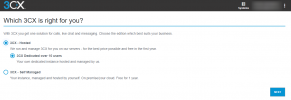
Also at your portal you should be able to see the option to run a Hosted instance when you click on install.

1652669245781.png

@srt65
The free hosting for the first year includes also existing customers as long as it is the first time it is installed as Hosted by 3CX.
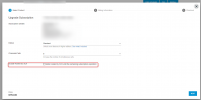
After the first year, you can include Hosted by upgrading the subscription. Just tick the box next to "Include Hosted by 3CX" .
If there is no linked partner to the subscription, then the owner should make the upgrade.

1652670177395.png
 
  • Like
Reactions: StavrosA_3CX
@Dimitris_3CX
Our only problem is that we cannot upgrade/renew via the 3CX partner portal as our licences are purchased via a local distributor and we have to use their portal to upgrade/renew licences. Their licence portal does not have any options for "hosted by 3cx" but I guess they have 12 months to work that out if we get first 12 months free.
 
Hello @srt65,

Regarding Account/Sales related questions or issues it is better to contact one of our Global Offices:
Contact / Global Offices
A sales/account representative will check your account and reply/solve any concerns.
 
@Dimitris_3CX
Well didn't get very far. First client migration I tried I went through process and uploaded the backup and just got to "Creating your system" screen with circle arrows swirling at "Launching" and never went any further even after waiting up to 40 mins so gave up. Tried 3 times using Chrome, Edge and Firefox and same. Think we will just stick with Azure.
 
Hello @teenet_au,

Can you please open a ticket with us?
Thank you in advance.
 
Last edited by a moderator:
  • Like
Reactions: DimitrisL_3CX
Hello @ teenet_au we haven't received a follow up on this issue.
Did you manage to resolve the problem yourself ?

Please update us if not.
 
Hello @ teenet_au we haven't receive a follow up on this issue.
Did you manage to resolve the problem yourself ?

Please update us if not.
Hi @StavrosA_3CX

In light of the issues we faced with getting "Hosted by 3cx" to work (maybe its just teathing problems as Australian hosting is only recent), but I did a but of extra digging around the Internet as well as looking at what to do moving forward for our on-premise customers who did not want to pay Azure prices.

I have decided to take the middle ground for now. Hosting on Vultr directly for these reasons just in case other Australians are reading this thread.
  • far cheaper than Azure - more expensive than "hosted by 3CX" though seeing they also use Vultr in Australia;
    e.g. for one of our 16SC customers - Azure = ~A$1,200p.a., Vultr = ~A$540p.a., 3CX = $300p.a. (not sure if 3CX list price is US$ or A$).
  • has datacenters in Sydney & Melbourne so we can spread across and not have all eggs in one basket;
  • can choose CPU/MEM/DISK resources and not purely determined by what licence we have.
  • still have OS level (SSH/console) access;
  • can upload and use official 3CX debian ISO to our account and boot VM's using it to provision new PBX's.
  • can still use STUN IP phones (although that was not an issue for us yet).
Created a new VM on Vultr with resources I wanted, booted it from my uploaded official 3CX ISO, went through the normal 3CX debian install process using the VM console. Ran the web based 3CX setup wizard and gave it my backup file. Within 15 mins it was all working perfectly.

Now I know this is not as simple as the "hosted by 3cx" click and go wizard (although I never managed to get it to work) but for me this seems like a good middle ground between Azure's expense and complexities and 3CX's click and go with no platform technical knowledge required.

Again this is just my recent experience I thought I would share for others facing the same decision.
 
Last edited:
  • Like
Reactions: konman
@teenet_au thank you for your feedback !!
Yes I agree with you that can also do it yourself but as you said it more complicated and not as simple as the Deployment Wizard but at the end of the day its up to you. Also its kind of more cheap if you want to set it up to your own account but dont forget that now you are responsible to provide support for the machine.
Where with Hosted by 3CX we have a 24 Hours Team monitoring any macine that is in our Hosting and we have the responsibility for this.
So at the end of the day, for sure we are not expensive on this :)
 
Status
Not open for further replies.

Members Online Now

Forum statistics

Threads
111,832
Messages
589,282
Members
164,662
Latest member
DejanMDS