- Joined
- Jul 15, 2019
- Messages
- 3
- Reaction score
- 0
I am trying to test 3CX Debian Version on Oracle virtual machine
I download the Image and I set the network adapter to "bridged Adapter"
I Choose to configure manually my network settings durring installation so i give the settings bellow:
IP is unique on network and DHCP range is 192.168.1.50-254
My router IP is 192.168.1.1
I Choose different name servers, even i try to leave it blank or use my Router as name server
Error:
Installation flaws normaly. I am creating partitions. After first reboot witch trying to connect on Internet error occurs.
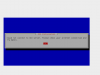
"Could not connect to 3cx Server. Please check your Internet connection and try again."
Eventually I choose to left configuration on automatic and all works fine. Although I need to setup a static IP and I manage to configure it from Debian Terminal but this cause other issues like giving wrong IP on QR Codes.
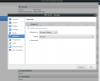
Oracle VM Network Adapter Settings:
Error:
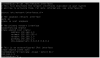
settings of another Ubuntu server that works normally on network ( Apache, Samba and more)
I download the Image and I set the network adapter to "bridged Adapter"
I Choose to configure manually my network settings durring installation so i give the settings bellow:
- IP: 192.168.1.3
- Gateway: 192.168.1.1
- Name Server: 8.8.8.8
IP is unique on network and DHCP range is 192.168.1.50-254
My router IP is 192.168.1.1
I Choose different name servers, even i try to leave it blank or use my Router as name server
Error:
Installation flaws normaly. I am creating partitions. After first reboot witch trying to connect on Internet error occurs.
"Could not connect to 3cx Server. Please check your Internet connection and try again."
Eventually I choose to left configuration on automatic and all works fine. Although I need to setup a static IP and I manage to configure it from Debian Terminal but this cause other issues like giving wrong IP on QR Codes.
Oracle VM Network Adapter Settings:
Error:
settings of another Ubuntu server that works normally on network ( Apache, Samba and more)
Bash:
$ cat /etc/network/interfaces
# This file describes the network interfaces available on your system
# and how to activate them. For more information, see interfaces(5).

source /etc/network/interfaces.d/*

# The loopback network interface
auto lo
iface lo inet loopback

# The primary network interface
auto enp2s0
iface enp2s0 inet static
    address 192.168.1.2
    netmast 255.255.255.0
    network 192.168.1.0
    gateway 192.168.1.1
    dns-nameservers 8.8.8.8 8.8.8.4