3cx integration with Bitrix24

Status
Not open for further replies.

Enna

Forum User
Joined
Aug 27, 2020
Messages
16
Reaction score
1
Hi,

I have integrated 3cx with bitrix using this link

https://www.3cx.com/docs/bitrix24-crm-integration/


when you click the phone number ( click to call) , the call is going which is fine.

But the details of the call is not getting recorded ( as call journal ) in the Bitrix24CRM.

Kindly check and advice.

Thanks
 
In order to troubleshoot why calls are not being registered in Bitrix, you need to enable verbose logs from the 3CX Console > Dashboard > Activity Log > Settings, then reproduce the issue, and finally check the 3cxSystemService.log file. There you will see all the interactions between 3CX and Bitrix.

It is important to note that you need to define the extension of your agents, as described here, otherwise calls are not registered.
 
Thanks for the reply

We are making outbound calls from Bitirx via 3cx. When we click on number using click to call , the number goes to the 3cx dallier , and when I hit the call button the call connects

This action is not recorded in Bitirix

Kindly help me.

Thanks
 
Please check my previous response. There you have instructions on how to troubleshoot this case.
 
Please check with log


09/02/2020 9:18:27 PM - Updating device Dev(1532327008):[sip:[email protected]:5063;rinstance=49694a613d04ffef / 90000] by
message: DevUpd Recv Req REGISTER from 127.0.0.1:5063 tid=734d153edb217201 Call-
ID=w5eETGcg4bhozIpiQXLMZw..: REGISTER sip:127.0.0.1:5060 SIP/2.0 Via: SIP/2.0/UDP
127.0.0.1:5063;branch=z9hG4bK-524287-1---734d153edb217201;rport=5063 Max-
Forwards: 70 Contact: <sip:[email protected]:5063;rinstance=49694a613d04ffef> To:
<sip:[email protected]:5060> From: <sip:[email protected]:5060>;tag=176ca436 Call-ID:
w5eETGcg4bhozIpiQXLMZw.. CSeq: 3958 REGISTER Expires: 60 Allow: INVITE, ACK,
CANCEL, OPTIONS, BYE, REGISTER, SUBSCRIBE, NOTIFY, REFER, INFO, MESSAGE
Proxy-Authorization: Digest
username="90000",realm="3CXPhoneSystem",nonce="414d535c15604fcb04:95b2914beb07ea3967f3b241c326a5ca",uri="sip:127.0.0.1:5060",response="036f6a3438430e53e40ae32d2f01cede",algorithm=MD5 Supported: replaces User-Agent: 3CX WebRTC proxy Content-Length: 0
 
Please check with log


09/02/2020 9:18:27 PM - Updating device Dev(1532327008):[sip:[email protected]:5063;rinstance=49694a613d04ffef / 90000] by
message: DevUpd Recv Req REGISTER from 127.0.0.1:5063 tid=734d153edb217201 Call-
ID=w5eETGcg4bhozIpiQXLMZw..: REGISTER sip:127.0.0.1:5060 SIP/2.0 Via: SIP/2.0/UDP
127.0.0.1:5063;branch=z9hG4bK-524287-1---734d153edb217201;rport=5063 Max-
Forwards: 70 Contact: <sip:[email protected]:5063;rinstance=49694a613d04ffef> To:
<sip:[email protected]:5060> From: <sip:[email protected]:5060>;tag=176ca436 Call-ID:
w5eETGcg4bhozIpiQXLMZw.. CSeq: 3958 REGISTER Expires: 60 Allow: INVITE, ACK,
CANCEL, OPTIONS, BYE, REGISTER, SUBSCRIBE, NOTIFY, REFER, INFO, MESSAGE
Proxy-Authorization: Digest
username="90000",realm="3CXPhoneSystem",nonce="414d535c15604fcb04:95b2914beb07ea3967f3b241c326a5ca",uri="sip:127.0.0.1:5060",response="036f6a3438430e53e40ae32d2f01cede",algorithm=MD5 Supported: replaces User-Agent: 3CX WebRTC proxy Content-Length: 0
Not that log.
 
3cxSystemService.log file where i can see this
 
3cxSystemService.log file where i can see this
From the 3CX Console > Dashboard > Activity Log > Logs button > Instance folder > 3cxSystemService.log
 
I have found the issue,Now i can able to see logs.

One more question is it possible to get logs on deal section instead of contacts section

1599125699348.png

Thanks
 
Calls are registered as activities for the contact. If you need something different, you would need to create a custom template, editing the one we provide... You will need to read the Bitrix API documentation to understand what you need to do.
 
In order to troubleshoot why calls are not being registered in Bitrix, you need to enable verbose logs from the 3CX Console > Dashboard > Activity Log > Settings, then reproduce the issue, and finally check the 3cxSystemService.log file. There you will see all the interactions between 3CX and Bitrix.

It is important to note that you need to define the extension of your agents, as described here, otherwise calls are not registered.
[/QUOTE]

From the 3CX Console > Dashboard > Activity Log > Logs button > Instance folder >


Kindly Check with log

I have attached the file
 

Attachments

  • Like
Reactions: Evolute IT
Maybe the integration is not properly configured, because the server is returning HTML with an error message instead of JSON:
<html>
<head><title>502 Bad Gateway</title></head>
<body>
<center><h1>502 Bad Gateway</h1></center>
<hr><center>nginx/1.16.1</center>
</body>
</html>

So, probably the Web Hook URL and Domain are not properly configured in 3CX. Please check this guide:
https://www.3cx.com/docs/bitrix24-crm-integration/
 
  • Like
Reactions: Evolute IT
I have configured correctly Web hook URL and Domain still having issue
What issue do you have now? Can you paste the error message you get or any log? Can you show us how you're configuring the integration?
 
What issue do you have now? Can you paste the error message you get or any log? Can you show us how you're configuring the integration?


error message
Please check with attached file.
 

Attachments

You need to enable verbose logs, so we can see the full information. For sure you have a configuration issue, because Bitrix is answering an HTML page, and not JSON:
<html>
<head><title>502 Bad Gateway</title></head>
<body>
<center><h1>502 Bad Gateway</h1></center>
<hr><center>nginx/1.16.1</center>
</body>
</html>

That means that the Web Hook URL is not properly configured, and you're pointing it to a standard page which returns HTML. You should be pointing to the web service instead. Please check this guide:
https://www.3cx.com/docs/bitrix24-crm-integration/
 
That means that the Web Hook URL is not properly configured, and you're pointing it to a standard page which returns HTML. You should be pointing to the web service instead. Please check this guide:
https://www.3cx.com/docs/bitrix24-crm-integration/


As i changed some settings now i am getting below error


2020/10/09 11:53:16.848|16020|0043|Erro|Exception during number processing: System.Exception: Server returned a non successful status code - HTTPStatusCode=Unauthorized - Reason=Unauthorized - Content={"error":"insufficient_scope","error_description":"The request requires higher privileges than provided by the webhook token"}
at CrmIntegration.ScenarioProcessorBase.ProcessRequest(ScenarioRequest request, IValueManager customManager, HttpClient client, CancellationToken token)
at CrmIntegration.ScenarioProcessorBase.ProcessScenario(ProtocolScenario scenario, IValueManager customManager, CancellationToken token)
at CrmIntegration.ScenarioProcessorBase.Execute(ProtocolScenario scenario, CancellationToken token)
at CrmIntegration.CrmProcessor.GetContactInfoFromCrm(String contactNumber, String destinationEmail, Boolean createIfNotFound, CancellationToken token)
2020/10/09 11:53:52.488|16020|0089|Erro|Exception during number processing: System.Exception: Server returned a non successful status code - HTTPStatusCode=Unauthorized - Reason=Unauthorized - Content={"error":"insufficient_scope","error_description":"The request requires higher privileges than provided by the webhook token"}
at CrmIntegration.ScenarioProcessorBase.ProcessRequest(ScenarioRequest request, IValueManager customManager, HttpClient client, CancellationToken token)
at CrmIntegration.ScenarioProcessorBase.ProcessScenario(ProtocolScenario scenario, IValueManager customManager, CancellationToken token)
at CrmIntegration.ScenarioProcessorBase.Execute(ProtocolScenario scenario, CancellationToken token)
at CrmIntegration.CrmProcessor.GetContactInfoFromCrm(String contactNumber, String destinationEmail, Boolean createIfNotFound, CancellationToken token)
 
Please follow to the letter these instructions:
https://www.3cx.com/docs/bitrix24-crm-integration/
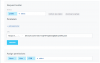
The error you're getting now ("insufficient_scope"), means that you didn't enable all the required permissions when creating the web hook. As explained in that document:
Enter a name and description for the web hook, from the access permissions options enable “CRM”, “Users” and “Lists”
 
Please follow to the letter these instructions:
https://www.3cx.com/docs/bitrix24-crm-integration/

1602766755963.png

Please check with screenshot

But in log having same issue


2020/10/15 08:33:50.746|6416|0067|Erro|CHR: Call type is invalid or not specified Unknown
2020/10/15 11:03:07.656|6416|0022|Erro|Exception during contact creation: An error occurred while sending the request.


2020/10/15 15:24:31.136|6416|0080|Erro|Exception during number processing: System.Threading.Tasks.TaskCanceledException: The operation was canceled.
---> System.IO.IOException: Unable to read data from the transport connection: The I/O operation has been aborted because of either a thread exit or an application request..
---> System.Net.Sockets.SocketException (995): The I/O operation has been aborted because of either a thread exit or an application request.
--- End of inner exception stack trace ---
at System.Net.Sockets.Socket.AwaitableSocketAsyncEventArgs.ThrowException(SocketError error, CancellationToken cancellationToken)
at System.Net.Sockets.Socket.AwaitableSocketAsyncEventArgs.GetResult(Int16 token)
at System.Net.Security.SslStream.<FillBufferAsync>g__InternalFillBufferAsync|215_0[TReadAdapter](TReadAdapter adap, ValueTask`1 task, Int32 min, Int32 initial)
at System.Net.Security.SslStream.ReadAsyncInternal[TReadAdapter](TReadAdapter adapter, Memory`1 buffer)
at System.Net.Http.HttpConnection.SendAsyncCore(HttpRequestMessage request, CancellationToken cancellationToken)
--- End of inner exception stack trace ---
at System.Net.Http.HttpConnection.SendAsyncCore(HttpRequestMessage request, CancellationToken cancellationToken)
at System.Net.Http.HttpConnectionPool.SendWithNtConnectionAuthAsync(HttpConnection connection, HttpRequestMessage request, Boolean doRequestAuth, CancellationToken cancellationToken)
at System.Net.Http.HttpConnectionPool.SendWithRetryAsync(HttpRequestMessage request, Boolean doRequestAuth, CancellationToken cancellationToken)
at System.Net.Http.RedirectHandler.SendAsync(HttpRequestMessage request, CancellationToken cancellationToken)
at Microsoft.Extensions.Http.Logging.LoggingHttpMessageHandler.SendAsync(HttpRequestMessage request, CancellationToken cancellationToken)
at Microsoft.Extensions.Http.Logging.LoggingScopeHttpMessageHandler.SendAsync(HttpRequestMessage request, CancellationToken cancellationToken)
at System.Net.Http.HttpClient.FinishSendAsyncBuffered(Task`1 sendTask, HttpRequestMessage request, CancellationTokenSource cts, Boolean disposeCts)
at CrmIntegration.ScenarioProcessorBase.ProcessRequest(ScenarioRequest request, IValueManager customManager, HttpClient client, CancellationToken token)
at CrmIntegration.ScenarioProcessorBase.ProcessScenario(ProtocolScenario scenario, IValueManager customManager, CancellationToken token)
at CrmIntegration.ScenarioProcessorBase.Execute(ProtocolScenario scenario, CancellationToken token)
at CrmIntegration.CrmProcessor.GetContactInfoFromCrm(String contactNumber, String destinationEmail, Boolean createIfNotFound, CancellationToken token)
 
This is a different error, and without a verbose log it's not possible to make a proper diagnosis of the issue.
 
Status
Not open for further replies.

Latest Posts

Forum statistics

Threads
112,324
Messages
591,897
Members
165,476
Latest member
awan05