- Joined
- Mar 17, 2025
- Messages
- 1
- Reaction score
- 0
Howdy,
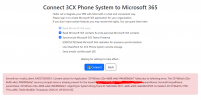
Got an ongoing issue when trying to connect 3CX Version 20.0 Update 7 on-prem debian ISO to our M365 tenant. Running the "Connect 3CX Phone System to Microsoft 365" Wizard constantly results in an error like the following
ServerError: invalid_client: AADSTS650051: Consent action for Application '3374b5ed-c32e-4b88-a4e2-ff4bf808e0e7' failed due to following error: The 3374b5ed-c32e-4b88-a4e2-ff4bf808e0e7 service principal name is already present for the tenant REDACTED paramName: ServicePrincipalName, paramValue: 3374b5ed-c32e-4b88-a4e2-ff4bf808e0e7, objectType: System.String Trace ID: 9e8c9dcb-9611-4a96-a38d-4aa646c62500 Correlation ID: 019ba01b-f799-791a-a966-70e3b18c402b Timestamp: 2026-01-09 00:16:10Z
There's a few other posts in here that give good advice that we've already tired, such as
1. Delete all of the 3CX* App Registrations and Enterprise Apps from the 365 Tenant and retry
2. Set the value of Advanced Parameter "OFFICE365_CONFIG_RESET_CACHE" to 1 and restart 3CX Services, change back to NULL after
3. Delete the value of Advanced Parameter "OFFICE365_CONFIG" and re-run the Wizard
4. Confirm that the Time Sync is accurate.
But all of these have resulted in the same problem. Greatly appreciate any suggestions or advice on how to resolve.
Got an ongoing issue when trying to connect 3CX Version 20.0 Update 7 on-prem debian ISO to our M365 tenant. Running the "Connect 3CX Phone System to Microsoft 365" Wizard constantly results in an error like the following
ServerError: invalid_client: AADSTS650051: Consent action for Application '3374b5ed-c32e-4b88-a4e2-ff4bf808e0e7' failed due to following error: The 3374b5ed-c32e-4b88-a4e2-ff4bf808e0e7 service principal name is already present for the tenant REDACTED paramName: ServicePrincipalName, paramValue: 3374b5ed-c32e-4b88-a4e2-ff4bf808e0e7, objectType: System.String Trace ID: 9e8c9dcb-9611-4a96-a38d-4aa646c62500 Correlation ID: 019ba01b-f799-791a-a966-70e3b18c402b Timestamp: 2026-01-09 00:16:10Z
There's a few other posts in here that give good advice that we've already tired, such as
1. Delete all of the 3CX* App Registrations and Enterprise Apps from the 365 Tenant and retry
2. Set the value of Advanced Parameter "OFFICE365_CONFIG_RESET_CACHE" to 1 and restart 3CX Services, change back to NULL after
3. Delete the value of Advanced Parameter "OFFICE365_CONFIG" and re-run the Wizard
4. Confirm that the Time Sync is accurate.
But all of these have resulted in the same problem. Greatly appreciate any suggestions or advice on how to resolve.