3CX MSIX App – Expired Code Signing Certificate since 29.03.2026

Chrisss

Premier Customer
Joined
Mar 30, 2026
Messages
6
Reaction score
0
Hi everyone,

we are currently experiencing an issue with the **3CX Desktop App (MSIX)** that started today across all of our systems.

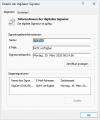
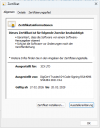
The MSIX package is signed with a **code signing certificate that has expired**:

* Publisher: 3CX Ltd
* Issuer: SSL.com Code Signing Intermediate CA RSA R1
* Validity: **30.03.2023 – 29.03.2026**
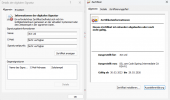
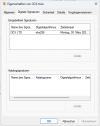
1774857368852.png

We are deploying the app via SCCM using the official download URL:
https://downloads-global.3cx.com/downloads/3cxsoftphone/3CX.msix

The package available at this URL is also affected and contains the expired certificate.

The AppLocker blocks the app immediately after certificate expiration...

Best regards,
Chris
 
  • Sad
Reactions: sir116
@Chrisss try again now please. We have updated the msix to the latest/

Might require some time to rotate
 
@Chrisss try again now please. We have updated the msix to the latest/

Might require some time to rotate
We have deployed the new MSIX package (version 20.0.1098.0) via our Microsoft System Center Configuration Manager.

However, the new MSIX does not update the existing application (version 20.0.1076.0).

Could you please clarify why the update is not being applied?
Is it necessary to uninstall the previous version (20.0.1076.0) before deploying the new one?

Additionally, with the new version, the 3CX application must be fully reconfigured, which is a significant concern given that we have over 200 clients.

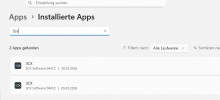
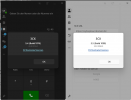
1774865826914.png

1774865791155.png
 
@Chrisss try again now please. We have updated the msix to the latest/

Might require some time to rotate
Downloading the MSIX package from 3cx.com and manually installing we have the same issue:

This app package’s publisher certificate could not be verified. Contact your system administrator or the app developer to obtain a new app package with verified certificates. The root certificate and all immediate certificates of the signature in the app package must be verified (0x800B010A)
 
Hello,

we are currently experiencing the same issue. We are not able to install new clients and we urgently need a solution, as we are currently replacing several devices.

At the moment, I cannot hand over the new computers to the users without the phone software installed.

Could you please provide us with an update or any new information regarding this issue?
 
@ThomB_3CX Where can I download the updated MSIX? The common link still pulls the old version with the expired certificate.
Thanks

 
  • Like
Reactions: sir116
Please check thomB. Where is the problem?
I need it for some customers.
 
@Chrisss Thank you for not reading my message. It still contains the old certificate!!! Looking for the updated version!
@ThomB_3CX Any update? It is very urgent - customers can not use their AVD envirment to call
 
@Chrisss Thank you for not reading my message. It still contains the old certificate!!! Looking for the updated version!
@ThomB_3CX Any update? It is very urgent - customers can not use their AVD envirment to call
1774958694756.png 1774958703861.png 1774958713002.png 1774958770969.png

Probably 3CX has removed the new MSIX from their servers again :)

The new MSIX with version 20.0.1098.0 caused every employee to have to set up their 3CX again—we ended up having 3CX installed twice....... look my post from yesterday at 11:21 AM ....

Additionally, we had to uninstall the old version......
 
I have this same issue, we got the duplicates first, then I noticed our deployment script was not working. I pulled the MSIX locally and checked it.

"UnknownError A required certificate is not within its validity period when verifying against the current system clock or the timestamp in the signed file"

Please let us know where we can obtain a working MSIX.

Thanks,
 
@Chrisss try again now please. We have updated the msix to the latest/

Might require some time to rotate
Hello ThomB_3CX, is there any official statement from 3CX regarding the issue?
Is there an investigation underway?
Is work being done on the problem, as well as on the related issues described in my post?
No communication is bad communication.
Should we open a case for this?
 
Hey ThomB_3CX, can someone let us know what to do, we can't complete our normal device provisions until we have a working MSIX. How long should the rotate take? can someone let us know if there is a reason this is being held or if we should be contacting support, I'd rather not use a support voucher for a global issue but will if there is a solution. - I've tested again today and the file is still broken.
 
  • Like
Reactions: rleslie
@ThomB_3CX We are having same issue. Can you please update the app ? We need the MSIX to deploy to our environment. They are not able to using the Window Store app version. I had been submit ticket for 3days, no reply at all. The File still broken with old version. No any official statement, No update , No communication !
 
  • Sad
Reactions: sir116
Same here - Ticket and 2 Forum posts. No reaction at all. Customer threatens to cancel all contracts already.
 
@Chrisss try again now please. We have updated the msix to the latest/

Might require some time to rotate
Can we please get an update on this? It has been over a week. We cannot use the Windows store version with AVD. This is incredibly unprofessional to not respond to tickets, posts on forums, etc for this duration. We all have customers we are supporting.

Very disappointed at the blatant disrespect to your customers.
 
Downloaded again just now, ran the same tests and can confirm it is still broken.
 
@ThomB_3CX can you please provide us all with an update on this issue. I can see that I am not alone in the need for this to be resolved asap, and pressure on our client base is now growing. It would be greatly appreciated if you could acknowledge that the problem is being actively worked on and provide an ETA. Many thanks.
 
Same issue here.
 

Forum statistics

Threads
112,069
Messages
590,611
Members
165,024
Latest member
JLDSP