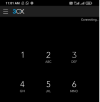
perez.koh Bronze Partner Joined Sep 23, 2019 Messages 46 Reaction score 0 Nov 17, 2021 #1 Hi, 3cx is working well on desktop, but not working in android and IOS, it shows "connecting" as attached, but never connects, could anyone advise on this? Attachments screenshot-app.slack.com-2021.11.17-11_03_03.png 20.7 KB · Views: 13
Hi, 3cx is working well on desktop, but not working in android and IOS, it shows "connecting" as attached, but never connects, could anyone advise on this?
JosIPVG Silver Partner Joined Mar 25, 2021 Messages 205 Reaction score 66 Nov 17, 2021 #2 A bit more information on which system you are running and how you configured stuff would be helpfull with troubleshooting.
A bit more information on which system you are running and how you configured stuff would be helpfull with troubleshooting.
perez.koh Bronze Partner Joined Sep 23, 2019 Messages 46 Reaction score 0 Nov 17, 2021 #3 HI, The 3cx is running in a Debian server, also, I have configured the APP by scanning QR from the 3cx web portal Please advise what are the possibilities that could cause this issue Thank you
HI, The 3cx is running in a Debian server, also, I have configured the APP by scanning QR from the 3cx web portal Please advise what are the possibilities that could cause this issue Thank you
GiannosI_3CX Nov 17, 2021 #4 Hi @perez.koh , Is the PBX installed on premise? Did you try it with WiFi? Could you open WC from the same device?
Hi @perez.koh , Is the PBX installed on premise? Did you try it with WiFi? Could you open WC from the same device?
perez.koh Bronze Partner Joined Sep 23, 2019 Messages 46 Reaction score 0 Nov 17, 2021 #5 Hi, >>Is the PBX installed on premise? Yes, it is our own server >>Did you try it with WiFi? Yes, tried with IP >>Could you open WC from the same device? Yes, web client working from the device, it is android device Thank you
Hi, >>Is the PBX installed on premise? Yes, it is our own server >>Did you try it with WiFi? Yes, tried with IP >>Could you open WC from the same device? Yes, web client working from the device, it is android device Thank you
GiannosI_3CX Nov 17, 2021 #6 Could you please send me app's log (verbose) in PM? Enabling Verbose Logs : Android App Settings (Three horizontal bars top left) >> Settings >> Advanced >>Troubleshooting>>Verbose Logging
Could you please send me app's log (verbose) in PM? Enabling Verbose Logs : Android App Settings (Three horizontal bars top left) >> Settings >> Advanced >>Troubleshooting>>Verbose Logging
perez.koh Bronze Partner Joined Sep 23, 2019 Messages 46 Reaction score 0 Nov 17, 2021 #7 I have sent you the attachment Thank you in advance