3CX On Premise Pi 4 - FQDN or Public IP not working

Status
Not open for further replies.

Drohps

Forum User
Joined
Oct 24, 2020
Messages
21
Reaction score
1
Hello Everyone,

I have just set up 3CX on a Raspberry Pi 4 a few days ago but I am having some problems.
Version Number 16.0.930

Firstly I cannot access the management console outside of my network. I have opened all the required ports and checked that they are open. This is the case both for FQDN and Public IP (Static). With or without port 5001 at the end.
I have checked and the IP behind the FQDN is correct.
I have deleted and re-installed 3CX from scratch and received a new certificate too.
SIP ALG Disabled too on the Edgerouter.
I think I have read every post I can find regarding FQDN not resolving but haven't managed to sort it so any help with be much appreciated.

In addition to the above, but most probably related, iOS clients do not receive notifications. When within the network or from Wifi, 3CX App clients can make calls but cannot receive calls - status changes to "In a call" when ringing nothing comes through to iOS. When in a different WiFi, then iOS app not connecting at all. I am mentioning this in case it helps.

Thank you in advance and I hope the information I have provided is sufficient.
 
Yes I had the push problem prior to the update. Currently running 16.0.7.930. I updated to see if this would solve the push problem, but no luck.
 
What is your router?

As advised, check those links. You need to open those ports in your NAT 1:1

1603986411116.png
 
Thank you for your response. Shouldn't I be able to remotely access the management platform from my FQDN without the port number?

You need to add the https port number to the web fqdn - i.e. https://fred.3cx.co.uk:5001

Without the port number you will not access the management console
 
  • Like
Reactions: Drohps
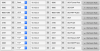
Thank you kieferschild. I have all correct ports open. See screenshot attached. My router is an EdgerouterX
 

Attachments

  • Screenshot 2020-10-29 at 17.57.13.png
    Screenshot 2020-10-29 at 17.57.13.png
    70.2 KB · Views: 15
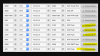
If those are port forwarding (inbound) then you have rules in there you don't need. You don't port forward outbound traffic. You can eliminate the rules that are highlighted below:

1603988478499.png
 
Can the edgerouter ping the 3CX server ?
 
Hello again. So still haven't managed to find a solution.
I have noticed that locally FQDN doesn't resolve. So xyz.3cx.xx does not resolve and it should. So not sure if this may be a host problem with the Pi? As the static IP changed after original installation? Remote FQDN with port works fine though.


If those are port forwarding (inbound) then you have rules in there you don't need. You don't port forward outbound traffic. You can eliminate the rules that are highlighted below:

View attachment 18878
Removed these ports - thank you!

Can the edgerouter ping the 3CX server ?
Yes I can.
 
I suggest you look at your local DNS server for local DNS resolution.

perform an NSLOOKUP on your local FQDN. You may need to create a zone file in your DNS for your local FQDN record if you have a Windows DNS server or similar.
 
@Drohps if you run nslookup yourfqdn.3cx.xyz 8.8.8.8 it should return your public IP address. Does this work? Please confirm

Regarding no access even when using https://publicIP:5001 I would say it is a network/firewall issue, but please don't attempt to connect to it from the same network. Try using your mobile on 4G (WiFi = OFF) and see if it makes a difference. Some routers will not allow hairpin traffic and this may be blocking you.
 
I suggest you look at your local DNS server for local DNS resolution.

perform an NSLOOKUP on your local FQDN. You may need to create a zone file in your DNS for your local FQDN record if you have a Windows DNS server or similar.
Thank you for your reply.
I dont have a local DNS server and an NSLOOKUP on the local FQDN returns the correct public IP.
I am just using the default FQDN by 3CX.

I think I will release the FQDN, backup 3CX without FQDN and license, un-install and re-install 3cx, restore from back up, assign new FQDN and take it from there. I will post further updates when I try this tomorrow.
 
No need to release your FQDN, just try to access it via a different external connection as I suggested, and in case it fails I can tell you how to see if it is a firewall issue.
 
No need to release your FQDN, just try to access it via a different external connection as I suggested, and in case it fails I can tell you how to see if it is a firewall issue.

Hello JohnS, thank you for joining to help out.

nslookup yourfqdn.3cx.xyz 8.8.8.8 Returns:
Server: 8.8.8.8
Address: 8.8.8.8#53
Non-authoritative answer:
here I see the correct public IP address.

When using https://publicIP:5001, I can access the network, both externally and internally as I have setup hairpin NAT. I can also access https://fqdn.3cx.xyz:5001 without a problem.

I believe firewall is setup correctly as I can see the ports open and from other forums I have read on EdgeOS and 3CX it seems that everything is set up correctly.

The problem is that 3CX Soft-phones:
A - do not receive push notifications. So when I call an extension that is on a soft phone, it does not ring. Status changes but app doesn't ring. I tried soft phone on a Mac and iOS without any luck. I can make calls from the soft phone but not receive.

B - connect either from internal LAN or from 3G / LTE. With other external wifi networks it doesn't connect. This is just to make outbound calls. I cannot receive calls irregardless of internal/external network.

And I am not sure if it is related to the fact that I cannot access fqdn.3cx.xyz internally.

I hope this helps?
 
Ok regarding PUSH, you can see whether the connection is made to say GoogleFCM or AppleAPN.

The PBX will make an outgoing TLS connection and attempt to send it to the servers which deliver the messages. If you run a capture and see that failing, you can at least have some starting point to look at.

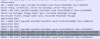
Here is a typical conversation between the PBX and GoogleFCM that would appear to be healthy:
1604495206672.png
 
Ok regarding PUSH, you can see whether the connection is made to say GoogleFCM or AppleAPN.

The PBX will make an outgoing TLS connection and attempt to send it to the servers which deliver the messages. If you run a capture and see that failing, you can at least have some starting point to look at.

Here is a typical conversation between the PBX and GoogleFCM that would appear to be healthy:
View attachment 18964

I get the following two from Events and Activity Logs

Failed to send APNS PUSH to device iPhone10,6F❗✖️(Ext.1004). Internal exception occured: The SSL connection could not be established, see inner exception.

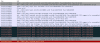
Call(C:63): Call to <sip:[email protected]:0> has failed; Cause: 487 Request Terminated/INVITE from 127.0.0.1:5483

If it helps, I do not recognise the IP 127.0.0.1:0.
 
That would comport with what I was suspecting.

This could be happening due to a number of reasons. If you go to Activity Log you can hit Capture, then while the capture is running call one of the mobile extensions, and shortly after end the capture.

When analyzing it in Wireshark you should see a number of things happening

  1. a DNS request for either api.push.apple.com OR fcm.googleapis.com
  2. Then a handshake to the resolved IP, similar to my previous screenshot
If DNS fails, or if the handshake fails, you will at least know where to look. In both cases I suspect the firewall is involved
 
Thank you for your help so far John. I have followed your instructions above but I am not sure I can spot the problem and I dont know if this should be posted here too so will just post a small screenshot?

Screenshot 2020-11-04 at 15.48.49.png
 
If you like you can upload the capture somewhere and send me a link to download it in a private conversation so I may filter it. just tell me the LAN IP of the PBX
 
So now I'm feeling confident the issue is upstream from the PBX, possibly the firewall
We see the PBX sending ACK retransmissions to the last reply it got form Apple APN, but it appears Apple never got your ACK. If you follow the time, you will notice that they timeout eventually after 30 sec and send a FIN ACK to close the connection.
1604504124839.png

Always keep in mind that since the firewall stands between you and Apple, the PBX capture effectively only shows what interchange took place between itself and whatever the firewall wanted to pass through.

If you repeat the exact same test, but this time you also run a capture on your firewall, I'm fairly confident that you will not see your PBX packets ever leaving the firewall when comparing against the PBX capture.
 
So now I'm feeling confident the issue is upstream from the PBX, possibly the firewall
We see the PBX sending ACK retransmissions to the last reply it got form Apple APN, but it appears Apple never got your ACK. If you follow the time, you will notice that they timeout eventually after 30 sec and send a FIN ACK to close the connection.
View attachment 18966

Always keep in mind that since the firewall stands between you and Apple, the PBX capture effectively only shows what interchange took place between itself and whatever the firewall wanted to pass through.

If you repeat the exact same test, but this time you also run a capture on your firewall, I'm fairly confident that you will not see your PBX packets ever leaving the firewall when comparing against the PBX capture.

I have reconfigured my Firewall and VLANs but still the same problem.

iOS notifications do not come through. However this time I tried on an Android, and push notifications on an Android work just fine. Both Mac and Android Apps work. Its only the iOS push notifications that do not work and I have tried with three different devices. So I believe it cant be a firewall problem?
 
It's good that they work, but the rest of those services are not related in any way with iOS PUSH so they are effectively irrelevant to the issue.

I still think you should look into what I said above, repeat the iOS test but run captures both on the PBX and the Firewall WAN interface this time.

If you don't run a capture on the firewall WAN, there is no way of truly knowing whether the message from the PBX even left the network or reached the Apple APN server.
 
Status
Not open for further replies.

Forum statistics

Threads
111,990
Messages
590,165
Members
164,928
Latest member
blackacoustic