3CX on premise V20 U3 & Gigaset 870 IP PRO

Status
Not open for further replies.

Alle CTEC

Silver Partner
Advanced Certified
Joined
Sep 11, 2023
Messages
360
Reaction score
45
I migrated an on premise control panel from V18 to V20 but by doing a clean installation and loading a full backup I also updated the firmware of the dect cells to 2.5.9 everything works but the cells are seen in red? in the control panels where the firmware 2.5.7 is in green
 
Have also Problem with new gigaset n870 Firmware 2.5.9 and new installed v20 linux. Config file for Provisioning not working. So no connection
 
@Brenni
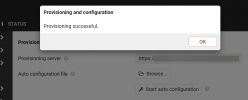
It may say provisioning failed, but if you press again a second time it shows successful

1732524335694.png
 
@Brenni
It may say provisioning failed, but if you press again a second time it shows successful

View attachment 45299
Thanks for answer...after one day i have found the solution...in my Backup ther were passwords for the SIP-Accounts that has special characters in it (&, $...). These characters made the provisioning-file unuseable. I had to delete the phones from those accounts and gave them a new phone. So the passwords were new and without characters. Now the provisioning is working fine.

@JohnS_3CX Also the password for the Gigaset Webconfig that is generated in 3CX is without special characters...but Gigaset will have special characters if you set the password manually.
 
  • Like
Reactions: JohnS_3CX
Thats correct, Gigaset uses XML so if you put specific characters that break the XML tags the config file becomes invalid.
 
Status
Not open for further replies.

Forum statistics

Threads
111,958
Messages
589,934
Members
164,861
Latest member
LewisJC