3CX over 4G. Cannot provision with QR Scan

Status
Not open for further replies.

shaneemery

Free User
Joined
Feb 12, 2020
Messages
4
Reaction score
0
Hi i hope some one can help. I have just run up a trail licence to learn more about 3CX.
I have installed it onto my Windows PC.
I have got SIP trunks working as well as webclients Iphone and Ipad. I have also got a Yealink handset registered.
I did have the app working on the mobile and the Ipad yesterday via 4G
This morning however once my external IP refreshed it all stopped.
I have put in the new static ip in the system page on the interface.
Now my FQDN address does not work in order to get the web client remotely working. I have to put the https://xxx.xxx.xxx.xxx:5001/webclient and it all works ok.

The problem im having is unless iam connected to the local LAN the QR scan doesn't register the app. I have to be on wifi to work. It comes up with a message saying can not reach provisioning server.

Once i have done this it registers and works locally. If i disconnect from WiFi is shows waiting for network and no green light. However i can make a cll from it.

I have also set my PC as a DMZ to test.

Any help would be appreciated.
 
Hi,
do you mean you use a 4G router with no public static IP, if this is the case then each time IP change your local pbx can't be reached until DNS is updated so it can be from few hours to 24h waiting.

Not related to your problem but is your PBX installed on a dedicated computer?
 
Hi Thankyou for your reply.

Its a home NBN connection and the mobile is trying to connect over 4G.

The DNS part makes sense as the app started working later in the day.

I deleted the app and reinstalled it but still couldn't do the QR Scan from 4G but once i had connected to the local lan it registered.

After that i disconnected the WIFI and the app continued to work ok.

Ive created a user for the Manager at work to have a look and and he is in another state so i cant get his phone on my local Lan

Its says the provisioning server cannot be found. Could this just be because its a temporary licence im learning with.

Thanks again
 
Hi @shaneemery and welcome to the community

You cannot do the QR scan over 4G for 2 reasons usually:

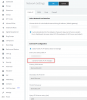
1.) Your FQDN was pointing to the old IP: The code includes a full internet address that needs to resolve to your IP, so if this is not resolving (due to a recent change) then you will have to wait for the DNS update before you can reach it again. We recommend using a static WAN IP to avoid these issues, but you can set 3CX to "Dynamic" when there is no other choice. It will auto update its DNS entry when it realizes the IP has changed and this will either take a few minutes (on Enterprise License) or up to 6 hours.
1581495006178.png

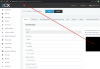
2.) You scanned it from the management console while logged in using the local IP: The scanned QR URL will include the local IP of your server, and as you realize, this is not accessible from a public 4G network. You should log into the management console via FQDN so it will generate an FQDN-based QR code. The QR generator is dynamic in this way, but as an exception, the QR included in the Welcome Email will include the FQDN.
1581495392785.png

If you have any more questions, feel free to ask!
 
Hi @shaneemery and welcome to the community

You cannot do the QR scan over 4G for 2 reasons usually:

1.) Your FQDN was pointing to the old IP: The code includes a full internet address that needs to resolve to your IP, so if this is not resolving (due to a recent change) then you will have to wait for the DNS update before you can reach it again. We recommend using a static WAN IP to avoid these issues, but you can set 3CX to "Dynamic" when there is no other choice. It will auto update its DNS entry when it realizes the IP has changed and this will either take a few minutes (on Enterprise License) or up to 6 hours.
View attachment 14356

2.) You scanned it from the management console while logged in using the local IP: The scanned QR URL will include the local IP of your server, and as you realize, this is not accessible from a public 4G network. You should log into the management console via FQDN so it will generate an FQDN-based QR code. The QR generator is dynamic in this way, but as an exception, the QR included in the Welcome Email will include the FQDN.
View attachment 14357

If you have any more questions, feel free to ask!

Thanks heaps, The FQDN had resolved now and ive done exactly as you said. The QR code worked. Id been using extenal IP address :5001/ etc as the FQDN wasnt resolving.

Ive worked as a tech on Avaya and many other PABX over the years and must say this system has really impressed so far. More so the tech help everyone seems to give each other on here is great.

Thanksagain
 
Sorry , what is NBN? is it the ISP Brand or acronym of something as a French guy I don't understand?

NBN is our new Fibre internet which is replacing ADSL
 
With fiber you don't have Static public IP given ?
 
Status
Not open for further replies.

Latest Posts

Forum statistics

Threads
111,937
Messages
589,831
Members
164,818
Latest member
Guriqbal Singh