Hi
@FerryMiddelkoop ,
Just to make sure you are following the correct guide, this is the one you are following right?
https://www.3cx.com/docs/3cx-tunnel-session-border-controller/
One more thing you could try is, to check if indeed the SBC cannot contact your 3CX Server, from the command line of the SBC type the following command:
Bash:
wget -O- https://<your FQDN>:<HTTPS Port>/sbc/<Authentication KEY ID>
So if your FQDN was my3cx.contoso.com running on port 5001 and my Authentication KEY ID was pfWSSCkkp6wX, I'd type this:
Bash:
wget -O- https://my3cx.contoso.com:5001/sbc/pfWSSCkkp6wX
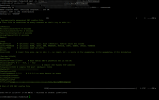
This should show an output similar to this:
View attachment 23681
Also, where is the 3CX Server installed, in the Hosting Provider or on-prem? The SBC, is it in a different location or on the same LAN as the 3CX?