- Joined
- Oct 28, 2020
- Messages
- 2
- Reaction score
- 0
Good evening,
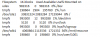
I am running a 3CX deployment in Microsoft Azure. This is a Linux appliance deployed from the 3CX template. I have logged into the Linux virtual machine, and found that system 3CXSystemService01.service is failing to start.
3CXSystemService01.service - 3CX PhoneSystem 01 System Server
Loaded: loaded (/lib/systemd/system/3CXSystemService01.service; enabled; vendor preset: enabled)
Active: failed (Result: timeout) since Mon 2020-10-26 19:21:27 UTC; 2 days ago
Process: 2339 ExecStart=/usr/lib/3cxpbx/3cxSystemService -p /var/run/phonesystem/3CXSystemService01.pid /var/lib/3cxpbx/Bin (code=killed, signal=KILL)
Main PID: 2339 (code=killed, signal=KILL)
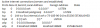
Several other services are failing to start as well, but I assume its a result of the main service failing to start.
3CXQueueManager01.service, 3CXCallFlow01.service
Any direction on where I can check for what is stopping the service from starting? I have already tried rebooting the VM a few times with no positive results.
I am running a 3CX deployment in Microsoft Azure. This is a Linux appliance deployed from the 3CX template. I have logged into the Linux virtual machine, and found that system 3CXSystemService01.service is failing to start.
3CXSystemService01.service - 3CX PhoneSystem 01 System Server
Loaded: loaded (/lib/systemd/system/3CXSystemService01.service; enabled; vendor preset: enabled)
Active: failed (Result: timeout) since Mon 2020-10-26 19:21:27 UTC; 2 days ago
Process: 2339 ExecStart=/usr/lib/3cxpbx/3cxSystemService -p /var/run/phonesystem/3CXSystemService01.pid /var/lib/3cxpbx/Bin (code=killed, signal=KILL)
Main PID: 2339 (code=killed, signal=KILL)
Several other services are failing to start as well, but I assume its a result of the main service failing to start.
3CXQueueManager01.service, 3CXCallFlow01.service
Any direction on where I can check for what is stopping the service from starting? I have already tried rebooting the VM a few times with no positive results.