3cx Startup Fanvil X3SP provisioning

Status
Not open for further replies.

afmjc

New User
Joined
Feb 12, 2023
Messages
6
Reaction score
2
I have a Fanvil X3SP that is working fine in an on-premise 3cx system. Now I want to try to move it to a Startup. I first reset it to default then enter its MAC as a normal phone. Select the existing working router phone Yealink T53. Save and reboot it. I have been trying the above step for sometime but still couldn't get it to provisioned. I have tried to select Fanvil X3S, X3SP(Lite) and X3SP(pro) but none is getting its provision. Fanvil's webpage show the
System Information
Model:X3S/X3SP
Hardware:3.1/1
Software:2.14.0.7387

I login to Fanvil's web page and see the correct server and link are under system->auto provision->static provisioning server. What else do you guys suggest I should try?

Thank you!
 
No, I still have issue with it. I can login locally and access the phone using default admin/admin. I don't have any special characters in extensions.

My solution is use a Yealink phone and it registered right away.

I moved the Fanvil back to on-premise and it also has no problem being provisioned.
 
Is it being picked up by pnp/sbc if deleted from 3cx / factory reset / booted?

Has it ever been provisioned by STUN?
 
After factory reset, I still can't see the phone from a local 3cx system. So I just login to fanvil and mannual set its SIP PNP server to my local 3cx server. After that, it show up there. As for the startup instant, I just use Yealink and it works very well.

I still don't know why Fanvil can't get registered in the Startup even I can see all the right info are in the "Static Provision Server" setting. I will test it again when I have time.
 
Just checked this model, same firmware and was able to auto-provision it successfully behind a router phone.

Assuming the MAC was entered correctly it should be able to work just fine.
 
Ignore my previous post, I've just read the guide and noticed that pnp isn't mentioned.

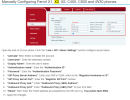
Did you follow the guide, particular attention to 8 and 9?

1684939085961.png
 
Just checked this model, same firmware and was able to auto-provision it successfully behind a router phone.

Assuming the MAC was entered correctly it should be able to work just fine.
I have checked a few time to make sure MAC is correct. But glad to know it works for you! I have tried selecting X3S, X3SP lite, X3SP pro with same result. Curious which model do you chose when adding this phone.
 
Officially you have the X3S model and you should select it as such.

The P in X3SP variant stands for PoE (power over ethernet) as seen in their product page
https://www.fanvil.com/products/p1/x/20220413/7342.html
Other than the PoE it's exactly the same phone, and even reports itself to 3CX as a "X3S"

So avoid selecting other models since they are different hardware and their configuration data will be different than your model. It may contain variables that the X3S doesn't know how to handle.

Regardless, I don't think this is the reason it doesn't provision. I've seen a few cases where a Fanvil phone will not provision itself unless certain criteria are met (none that we set, this comes down to the manufacturer). One of those reasons could* be related to your network and the way it handles some protocols. I can't get into any specifics here I'm afraid, but feel free to contact Fanvil if you need any additional support.

To be very clear - not saying it's the network environment, but it would be my first go to.
 
  • Like
Reactions: Lee Cramman
Status
Not open for further replies.

Members Online Now

Forum statistics

Threads
111,831
Messages
589,277
Members
164,660
Latest member
RJenkinsROCK