


- Joined
- Jun 8, 2017
- Messages
- 87
- Reaction score
- 19
Recently, I have been having random issues with my v16 (16.0.8.9) system connecting to gw2 and having calls fail. It seems to reconnect to GW1 eventually, but there have been times where I have had to unregister and reregister the trunks to force it from GW2 to GW1 again. I have the default settings for the trunks and have used the SIPTRUNK.com guide to setup the trunks. Numerous cases with SIPTRUNK.com results in nothing wrong with the setup or their services, so am picking through anything else which might have changed. SIPTRUNK verified the configuration of my trunks in 3CX and reported everything was setup properly and it's been running this way for years without any issues.
I have green all around for the services, firewall, trunks, phones and service extensions and nothing, other than the reported failures (screenshot as an example). I have verified the DNS servers used are the ones SIPTRUNK recommends, but I'm not sure if those are any better than the standard ISP server or 8.8.8.8, 1.1.1.1
I saw an article posted: https://www.3cx.com/community/threa...h-siptrunk-com-and-their-3cx-v18-alpha.82311/ however, they were discussing version 18 and I don't think this was a confirmed solution. I have not removed GW2 from the configuration, as that article suggests.
One last thing to add here is I was having an issue with a firmware update to our router which enabled UDP Flood protection. While the result was similar, these two issues are not the same since that issue has resolved. This is different since the system will disconnect from GW1 and register with GW2 - which, for some reason, causes calls to fail.
Any further suggestions from anyone else who might have experienced this? Thank you!
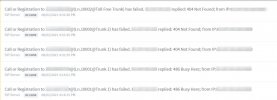
I have green all around for the services, firewall, trunks, phones and service extensions and nothing, other than the reported failures (screenshot as an example). I have verified the DNS servers used are the ones SIPTRUNK recommends, but I'm not sure if those are any better than the standard ISP server or 8.8.8.8, 1.1.1.1
I saw an article posted: https://www.3cx.com/community/threa...h-siptrunk-com-and-their-3cx-v18-alpha.82311/ however, they were discussing version 18 and I don't think this was a confirmed solution. I have not removed GW2 from the configuration, as that article suggests.
One last thing to add here is I was having an issue with a firmware update to our router which enabled UDP Flood protection. While the result was similar, these two issues are not the same since that issue has resolved. This is different since the system will disconnect from GW1 and register with GW2 - which, for some reason, causes calls to fail.
Any further suggestions from anyone else who might have experienced this? Thank you!

 Thank you for removing it.


