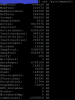
3CX v16A2 memory usage at 92%

Status
Not open for further replies.

Marari

Silver Partner
Advanced Certified
Joined
Sep 16, 2007
Messages
340
Reaction score
90
Running 3CX v16A2 (16.0.0.1110) on on-premise test box.

Memory usage is at 92%. I have not rebooted the box yet.

Processor: Intel Core i3 4150
Memory: 8 GB
OS:
Linux 4.9.0-8-amd64 #1 SMP Debian 4.9.130-2 (2018-10-27) x86_64 GNU/Linux


3CX V16A2 Console - Mem Usage.PNG

3CX V16A2 Services.PNG

3CX V16A2 Debian CPUInfo.PNG

3CX V16A2 Debian MemInfo.PNG
 
After a full reboot (sudo reboot):

3CX 16A2 Console after reboot.PNG

3CX 16A2 Services after reboot.PNG

3CX 16A2 Meminfo after reboot.PNG
 
Hello @Marari and thank you for reporting

From the provided screenshots i can see 2 things:
  1. The 3CX Dashboard reports memory consumption of the system correctly.
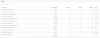
  2. It is not the 3CX system that was using up the memory as the services were using a pretty reasonable amount.
I believe that something else on the system was using the memory. I would recommend keeping an eye on the issue and see what is using the memory if the issue replicates it self.
 
@YiannisH_3CX

Hi Yiannis!

Just thought I should mention that the system was installed from the 3CX V16A1 iso and it was a cherry install without any additional modifications.

The last set of updates (after the upgrade to V16A2) showed a bunch of packages that were no longer required so I did an apt-get autoremove to clean them up.

I'm not sure when the memory usage creeped up to 92% but I certainly noticed it after that.

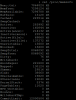
The biggest discrepancy in the output of /proc/meminfo is the active(anon) statistic. On the high memory usage, active(anon) was reporting 6.7 GB of memory in use. After the reboot, the number went down to 217KB.

From what I recall, that can be a signal for a memory leak. I don't enough about programming beyond that to offer anything that may help source it.
 
  • Like
Reactions: craigreilly
@YiannisH_3CX

Memory usage is still sitting at 4% after the reboot (a little over 24 hours ago).

That tends to make me think that the upgrade from A1 to A2 may have caused the memory spike however I have no further evidence to substantiate it.
 
Glad to see the system is stable now. Without any data i am afraid we cannot determine what caused the memory spike but as more systems are updated we will see if anyone else experiences this issue.
 
@YiannisH_3CX

And now a week later, memory usage is sitting at 7%. Still very good.

I wonder if it has anything to do with update.
 
And now a week later, memory usage is sitting at 7%. Still very good.
Glad to see the system is stable.

I wonder if it has anything to do with update.
Not sure what might have caused the spike but we had no similar reports so far. Also from your screenshots it does not seem that any 3CX services are consuming the resources.
 
@YiannisH_3CX

Maybe what I'll do is load up a VM with 3CX V16A1 and do the upgrade to V16A2. See if I can replicate the memory spike.
 
Maybe what I'll do is load up a VM with 3CX V16A1 and do the upgrade to V16A2. See if I can replicate the memory spike.
Let us know of the results. I upgraded a Debian PBX to Alpha 2 today btw and saw no memory issues. It would be good to know of your results however.
 
@YiannisH_3CX

All I remember about the upgrade is that after the upgrade to V16A2 I did a sudo apt-get update followed by sudo apt-get upgrade after the upgrade wound up showing a massive list of deprecated packages. I did a sudo apt-get autoremove to clean them up and that's when I noticed the memory spike.

I'll give that a try again and see if it happens and post the results shortly.
 
Status
Not open for further replies.

Forum statistics

Threads
111,908
Messages
589,684
Members
164,773
Latest member
ccocala.org