3CX V18 Update 1 Now Available on Windows

I did everything as described and I couldn't access the website. Everything is installed on Windows Server 2019. I removed v16, reinstalled v18 and restored the backup.
I tried Firefox and Edge Chrome. Both showed me that there are no overlapping ssl ciphers.
I removed two lines in the config for now so that it works.

Code:
##ssl_ciphers 'TLS_AES_256_GCM_SHA384:TLS_CHACHA20_POLY1305_SHA256:TLS_AES_128_GCM_SHA256HE-RSA-AES256-GCM-SHA384HE-RSA-AES128-GCM-SHA256:ECDHE-RSA-AES256-GCM-SHA384:ECDHE-RSA-AES128-GCM-SHA256HE-RSA-AES256-SHA256HE-RSA-AES128-SHA256:ECDHE-RSA-AES256-SHA384:ECDHE-RSA-AES128-SHA256:ECDHE-RSA-AES256-SHA:ECDHE-RSA-AES128-SHAHE-RSA-AES256-SHAHE-RSA-AES128-SHA';
##ssl_prefer_server_ciphers  on;

The error from Firefox was SSL_ERROR_NO_CYPHER_OVERLAP

But I don't know why. I have to check tonight what's wrong.
 
Well are you using a 3CX FQDN? If its a custom FQDN you have to sort out your SSL cert issues
 
Hello Nick, Thank you for your fast answer.
I'm using a custom FQDN since a long time and I'm using Let's Encrypt certificates and they were working fine.
I checked it again and I don't have a problem with my certificates but with the ciphers in the default config.
 
I've tested again and Edge Chrome tells me: ERR_SSL_VERSION_OR_CIPHER_MISMATCH when I only enable the ssl_ciphers config.
I replaced it with
ssl_ciphers HIGH:!aNULL:!MD5;
and it's working.
 
Hi, thanks for the upgrade.

Can you consider these ideas, please ! I'm begging and I'm not the only one :

https://www.3cx.com/community/threads/full-icons-display-instead-of-hidding-with-the-icons.83666/

https://www.3cx.com/community/threads/give-the-choice-to-give-o365-permisions-to-extensions.83818/

Still a huge problem for many, need to give Super-admin access for admins customers to give access to O365 management...

This idea isn't check "Implemented" : https://www.3cx.com/community/threads/bring-back-the-custom-message-status-edit-on-v18.83598/

It's also an issue for screen reader software, the "..." menu, as well as other buttons:

https://www.3cx.com/community/threads/v18-video-conferencing-screen-readers.84950/
 
@Optical Illusions - Is it a Raspberry PI4? Did you make any changes to the OS on the Raspberry PI?
@jofer - Yes should be no problem
Yes a RI4
No I did not make any changes.


I can do a fresh install and restore backup if that's recommended.
 
@Optical Conclusions - No let us check.... We will PM you, if you could send us the log file....
 
@Nick Galea , great news !
At this moment i have only one question , old 3CX Desktop App ( v16 ) will be work with new Server , or Desktop App detect version upgrade and propose users to update their applications ?
Or i need to manually remove old Desktop app and install a new version
 
  • Like
Reactions: N_G
Old v16 desktop still works with V18
 
  • Like
Reactions: N_G
@Knight! Thank you for the headsup. For now you can still use the old one so you have to remove and install the new one if you want to move to the new desktop app. The old one still have a few features, notably TAPI support, that are still required.....
 
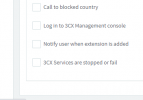
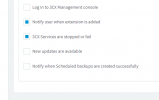
I have two v18 systems running in 3CX hosted cloud, both were updated to 18.0 Update 1 (Build 234) this week. Under Email-Notifications, one system has had the newer v18 alert option "Notify when Scheduled backups are created successfully" completely removed from the list of available alert options; we had that setting enabled prior to the update and we stopped receiving the successful backup alerts for that system the same day SP1 was installed. This system with the enabled feature removed was born and created native in the 3CX cloud, if that matters.

The second system still has this alert option available after the SP1 update was applied, however it was not previously enabled or used. This system had been migrated into 3CX cloud from an on-prem deployment a long while back, if that matters.

This seems to indicate some inconsistent SP1 update behavior and it is a problem for me because I utilize the successful backup notification on most of our systems.

Wondering how to get the feature back on the first system described above, and wondering how this problem will translate to non-3cx-hosted debian and windows deployments.
 

Attachments

  • v18SP1-alert option system1 now missing.PNG
    v18SP1-alert option system1 now missing.PNG
    5.6 KB · Views: 5
  • v18SP1-alert option system2 still available.PNG
    v18SP1-alert option system2 still available.PNG
    7.9 KB · Views: 6
I have two v18 systems running in 3CX hosted cloud, both were updated to 18.0 Update 1 (Build 234) this week. Under Email-Notifications, one system has had the newer v18 alert option "Notify when Scheduled backups are created successfully" completely removed from the list of available alert options; we had that setting enabled prior to the update and we stopped receiving the successful backup alerts for that system the same day SP1 was installed. This system with the enabled feature removed was born and created native in the 3CX cloud, if that matters.

The second system still has this alert option available after the SP1 update was applied, however it was not previously enabled or used. This system had been migrated into 3CX cloud from an on-prem deployment a long while back, if that matters.

This seems to indicate some inconsistent SP1 update behavior and it is a problem for me because I utilize the successful backup notification on most of our systems.

Wondering how to get the feature back on the first system described above, and wondering how this problem will translate to non-3cx-hosted debian and windows deployments.
Hi!

On "Hosted by 3CX" systems, this option shouldn't be available. The is that, apart from you, we also take encrypted security backups which would also trigger by this, causing potential confusion.

Given this, the first system is correct by not showing it, so I am wondering about your second system that does show it....
Are you sure it is "Hosted by 3CX" and you are not hosting it on some other Hosting Provider?

If possible, can you please send me the FQDNs of both machines to double-check and get things sorted out?
 
  • Like
Reactions: Evolute IT
well my system is still on 16 - it isn't showing any upgrades to v18 !!
 
well my system is still on 16 - it isn't showing any upgrades to v18 !!
If you're on Windows, it won't.

You need to backup, uninstall v16, install v18 and restore the backup during setup. It's explained in the blog post.
 
  • Like
Reactions: [email protected]
If you're on Windows, it won't.

You need to backup, uninstall v16, install v18 and restore the backup during setup. It's explained in the blog post.
Sorry quite right - will teach me to read lol - all done :)
 
  • Like
Reactions: Evolute IT
Does the SBC need to be uninstalled and reinstalled or will v18 update it when it connects?
 
Hi!

On "Hosted by 3CX" systems, this option shouldn't be available. The is that, apart from you, we also take encrypted security backups which would also trigger by this, causing potential confusion.

Given this, the first system is correct by not showing it, so I am wondering about your second system that does show it....
Are you sure it is "Hosted by 3CX" and you are not hosting it on some other Hosting Provider?

If possible, can you please send me the FQDNs of both machines to double-check and get things sorted out?
Hi Nick,

I am positive that both systems are "Hosted by 3CX" -- I built them both and I maintain them. What is the best way for me to send you the FQDNs? I don't want to post them publicly.

It seems the removal of the backup alert notification feature, if intentional, happened when SP1 was applied, because I was receiving backup alerts from that system without issue up until that point. Didn't see anything written about this change in the SP1 release notes.

Wondering why you would choose to omit notification options for scheduled backups on the hosted system. I understand that you recommend we maintain backups of our data in addition to the backups you take, so naturally we would want to leverage related backup alert features:

"We are strong believers that you should always maintain access to your personal data without the involvement of 3CX. Therefore we advise that you create your own backup plan and save it outside of the instance. We recommend using a location such as Google storage, SFTP or FTP."
https://www.3cx.com/ordering/pricing/hosted-info/
 
  • Like
Reactions: [email protected]
Really nice 3CX Video Conference REST API feature (not that we have a need about that atm). This arouses high expectations for the future and all other 3CX REST API ;)
 
  • Like
Reactions: hvs and Evolute IT
Does the SBC need to be uninstalled and reinstalled or will v18 update it when it connects?
No. Once you upgrade your 3CX server to V18, if you go to to the SIP Trunk node in the Management Console, you will see an update for your SBCs.
At that point, just select it and hit the "Upgrade" button.
 

Forum statistics

Threads
111,993
Messages
590,175
Members
164,931
Latest member
admintest