3CX V20 on premise to Cloud 3CX

Alle CTEC

Silver Partner
Advanced Certified
Joined
Sep 11, 2023
Messages
358
Reaction score
44
Hi everyone, I currently have an on-premise 3CX V20 that I need to migrate to 3CX Cloud hosted by 3CX. My idea is this: I create my own SBC, connect it to the current 3CX, and move all the extensions to it. Then I back up the configuration, clean the DNS, create the cloud PBX, and import the on-premise configuration. I have one question: Does the current V20 PBX use HTTP 5000 and HTTPS 5001 ports? Are they accepted on the cloud PBX? Thanks.
 
No, the hosted 3CX will use the default https port, custom ports (5000, 5001) will likely be changed during import but 3CX should be able to confirm this.
 
@Alle CTEC if the local PBX uses port 5001 then your URL will be https://fqdn:5001/#/login
Check this as a first step as if the port 5001 is not there then you use 443 port.

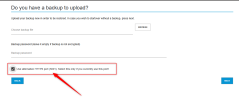
Also port 5001 is allowed on the Hosted by 3CX as long as the option is enabled during the installation, check the screenshot.
This is to make a smooth transition from local PBXs to Hosted by 3CX without having to re-provision the 3cx clients, etc...
@Alphabetic FYI also :)


1787735059720.png
 
@Alle CTEC if the local PBX uses port 5001 then your URL will be https://fqdn:5001/#/login
Check this as a first step as if the port 5001 is not there then you use 443 port.

Also port 5001 is allowed on the Hosted by 3CX as long as the option is enabled during the installation, check the screenshot.
This is to make a smooth transition from local PBXs to Hosted by 3CX without having to re-provision the 3cx clients, etc...
@Alphabetic FYI also :)


View attachment 52324
ah thats cool, ive never done a hosted install :)
 
@NikosT_3CX humour me then - if you left it unchecked and uploaded with 5001, would it change to 443?
 
@Alphabetic yeappppp the installer is by default on 443.
The option for 5001 is optional as you saw and its in the " Backup " section.
The idea is that if you had a local PBX on port 5001 and you want to migrate to Hosted by 3CX, of course you will
have a backup to restore. Then yes you also have the option to select port 5001 and have a smooth transition as the
URL of the PBX to login remains the same. Also all the 3CX clients will connect directly when the A Record updates
after installation.
If you have a local PBX on port 443, just upload the backup and go on port 443.
Or if you make a new installation, just skip this step and deploy on port 443.
I think its simple and logical as is :)
 
@Alle CTEC if the local PBX uses port 5001 then your URL will be https://fqdn:5001/#/login
Check this as a first step as if the port 5001 is not there then you use 443 port.

Also port 5001 is allowed on the Hosted by 3CX as long as the option is enabled during the installation, check the screenshot.
This is to make a smooth transition from local PBXs to Hosted by 3CX without having to re-provision the 3cx clients, etc...
@Alphabetic FYI also :)


View attachment 52324
Thank you very much for your reply
 

Forum statistics

Threads
111,906
Messages
589,661
Members
164,771
Latest member
mjwhyman