3CX V20 Update 6 RC Now Available

Are we expecting a RC3 here 3CX Team, or is the U6 round the corner now?
 
Hi.

I hope there'll be a fixing about the Snom SP800 integration.
DTMF Tones won't work now, so the SP800 is not ready to use it.
 
Hi guys,
Please forgive me if this is not the correct spot, and I will move it under SMB.

I have a question regarding the Reports on this v20 U6 RC version.

On v18, in Detailed Queue Statistics, I can select specific Call Queues Extension (multiple) that I would like the report for.
But on this version, I do not have that ability.
All the CQ in the department are showing on the report. I can only change the "Range" and "Exclude calls dropped before".

For example, we have a total of 20 CQs and would like to generate the "Detailed Queue Statistics" report for only 5 CQs.
Yes, I can download the CSV and delete the 15 CQs that I don't need, but that's an extra step that I don't need to take on the previous version 18.
Would you be able to re-add the ability to only select multiple CQ, please, to the next update?

Greatly appreciate the help.
 
Hi Dear @cpe90

Can you clear your cache or launch 3CX in incognito to be safe from any old cache interfering.
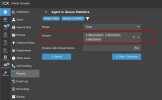
All reports have a filter now and you can select the queues you want.

Example:
1749455106893.png

Let me know if this is what you meant..
Thanks for reporting
 
Hi Dear @cpe90

Can you clear your cache or launch 3CX in incognito to be safe from any old cache interfering.
All reports have a filter now and you can select the queues you want.

Example:
View attachment 48186

Let me know if this is what you meant..
Thanks for reporting
Thank you for the reply.

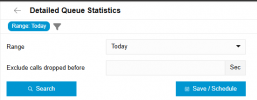
You are in the "Agent in Queue Statistics" section, not the "Detailed Queue Statistics" section.

There is no option to select multiple individual queues as shown below.

1749476955311.png


We have multiple sets of call queue groups, and we are trying to track the "Total Calls" and "Total Abandoned Calls" for each group.
Yes, we can still get the numbers by downloading the CSV and splitting them up in Excel after, but we didn't have to do that with v18. We would like that feature to be re-added in v20, please.

Thank you.
 
Hello Dear @cpe90
Thank you for reporting and duly noted.
Looks like an oversight. We think that all filters should be the same as much as possible in all reports so yes, this one for some reason misses the queue filter.

Thanks so much - We will see what we can do.
 
The above also occurs in the 'Queue Performance Overview' report, you cannot limit it down to individual Call Queues.
 
HI @jebsworth
Noted - Yes there are a number of reports which do not have this filter.
We are addressing it as we speak. Thanks for reporting.
 
HI @jebsworth
Noted - Yes there are a number of reports which do not have this filter.
We are addressing it as we speak. Thanks for reporting.
Little request: when searching in the Inbound Calls report, it'd be nice if it would search in the DID column too lol right now it doesn't :(
 
HI team
@ConceptsWeb
Agreed - makes total sense.
Change has been approved. We will make this.
Thanks for reporting and keep up the great work
 
Hello Dear @cpe90
Thank you for reporting and duly noted.
Looks like an oversight. We think that all filters should be the same as much as possible in all reports so yes, this one for some reason misses the queue filter.

Thanks so much - We will see what we can do.

Awesome!
That's great, and thank you.

With that said, may I request one more addition?

3CX v18 had Inbound Parameter settings that could be configured to have the 3CX read off of the Request URI header. In 3CX v20, that option is not available in the GUI Admin Console and can only be configured from the trunk configuration file, which means I have to delete the trunk and recreate it.
I did open a ticket with 3CX support (Case 2208355) and was told the same thing.
It seems like a simple solution, but we have approximately 200 DID numbers, and recreating the trunk will require a significant amount of man-hours to minimize downtime.

I hope you will add this feature back in moving forward, as I've seen others on the forum experiencing the same issue.
https://www.3cx.com/community/threa...er-not-working-with-flowroute-3cx-v20.126354/

Much appreciated, guys.
 

Forum statistics

Threads
111,990
Messages
590,165
Members
164,929
Latest member
Cloudstar