- Joined
- Jul 3, 2025
- Messages
- 1
- Reaction score
- 1
Hello everyone,
I hope you’re doing well.
We need to migrate from an old PBX to 3CX, each user has a specific phone extension.
We’ve successfully deployed 3CX v20 Enterprise on Azure with Microsoft 365 integration.
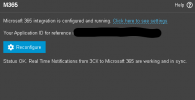
The 3CX dashboard reports that the firewall configuration is OK, and M365 sync with message: “Status OK. Real Time Notifications from 3CX to Microsoft 365 are working and in sync.”
What we’ve done:
What isn’t working:
How we’re creating users:
In 3CX Management Console → Extensions → Add New Extension:
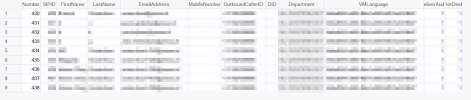
We have also tried to cross-check differences between a successfully synced user from m365 and a user that was first created on 3cx
"/xapi/v1/$metadata#Users(Greetings(),ForwardingProfiles(),ForwardingExceptions(),Phones(),Groups())/$entity"
What we need:
Thank you in advance for your insights!
I hope you’re doing well.
We need to migrate from an old PBX to 3CX, each user has a specific phone extension.
We’ve successfully deployed 3CX v20 Enterprise on Azure with Microsoft 365 integration.
The 3CX dashboard reports that the firewall configuration is OK, and M365 sync with message: “Status OK. Real Time Notifications from 3CX to Microsoft 365 are working and in sync.”
What we’ve done:
- Installed 3CX v20.
- Verified firewall checks
- Enabled M365 integration (UPN matches exactly).
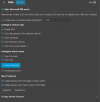
- Using selected Users on 3CX / Admin / Users / M365 with
- Enable SSO
- Sync user photo
- Sync Personal Contacts
- Sync user account details (also tried without)
- Account Enabled -> Disable Extension
- GivenName -> First Name
- Surname -> Last Name
- Mail -> Email
- MobilePhone -> Mobile
- Business Phones -> Outbound Caller ID
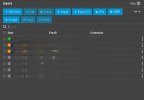
- If we select a user from 3CX / Admin / Users / M365, the user is successfully added on 3CX / Admin / Users with elements such as photo, presence sync, etc
What isn’t working:
- We cannot assign a custom extension to a new user and have it synchronize to Azure Entra ID/M365.
- We cannot return a deleted user on 3cx / Admin / Users from m365
How we’re creating users:
In 3CX Management Console → Extensions → Add New Extension:
- Extension: Custom (e.g. 1501)
- First Name, Last Name
- Email = Azure Entra UPN (exact match)
We have also tried to cross-check differences between a successfully synced user from m365 and a user that was first created on 3cx
"/xapi/v1/$metadata#Users(Greetings(),ForwardingProfiles(),ForwardingExceptions(),Phones(),Groups())/$entity"
- User A: Originated in M365 → JSON includes "Tags": ["MS"]
- User B: Originated in 3CX → JSON includes "Tags": []
What we need:
- Guidance on configuring 3CX so that custom extension assignments push correctly into M365 contacts/users.
- How do we return a deleted user?
- Are there any specific permissions, policies, or mapping steps required?
Thank you in advance for your insights!
Attachments
Last edited: