- Joined
- Feb 28, 2022
- Messages
- 96
- Reaction score
- 23
See attached screen capture.
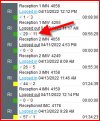
When I log into my 3CX webclient and select panel and use the drop down arrow in the upper right hand corner to view a specific call queue, the upper right side of the window shows a panel containing the agents in that queue. For each agent extension, there is a "green" arrows and it is "Answered calls" and there is a "red" arrow that is "Abandoned calls".
I am aware that the queue itself provide reporting on "abandoned calls" being calls in which the CALLING party hung up and also queue calls which exceeded the "destination if no answer" timer and were routed to voicemail, for example.
For both of those types of "abandoned" calls - they were never delivered to an agent. But it appears that for the "red" arrow value for each agent, these are "abandoned" by the agent.
How exactly would an agent do that - that results in this "red" arrow value to increment? How can an agent "abandon" the queue call?
TIA
When I log into my 3CX webclient and select panel and use the drop down arrow in the upper right hand corner to view a specific call queue, the upper right side of the window shows a panel containing the agents in that queue. For each agent extension, there is a "green" arrows and it is "Answered calls" and there is a "red" arrow that is "Abandoned calls".
I am aware that the queue itself provide reporting on "abandoned calls" being calls in which the CALLING party hung up and also queue calls which exceeded the "destination if no answer" timer and were routed to voicemail, for example.
For both of those types of "abandoned" calls - they were never delivered to an agent. But it appears that for the "red" arrow value for each agent, these are "abandoned" by the agent.
How exactly would an agent do that - that results in this "red" arrow value to increment? How can an agent "abandon" the queue call?
TIA