Solved 3CX Webinars Wordpress Plugin

Status
Not open for further replies.

xPaZzy

New User
Joined
Apr 3, 2023
Messages
3
Reaction score
3
Hello everyone,

I would love to use the 3CX Webinar Wordpress plugin on my website. However there seems to be an issue in the code of the plugin itself.

This is what it looks like when I click on an webinar to register:
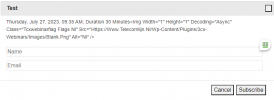
1690445409476.png

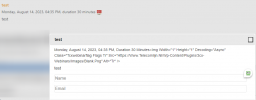
The normal part on the website also doesn't look quite right:
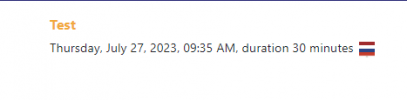
1690445440332.png

Anyone know what's wrong here? Thanks in advance for the reply and for trying to help. I appreciate you all.
 
Hello,

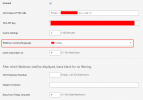
This is how my wordpress settings are, your problem is that it can't import an image file. You can try to change the flag and save and try again, or you can try to uninstall and reinstall the plugin.
1692012049600.png
 
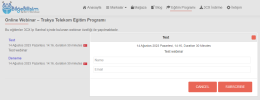
that's how it looks on the website, there's no problem here.

1692012225042.png
 
that's how it looks on the website, there's no problem here.

View attachment 36791


Thanks for your answer. I have deleted the plugin and reinstalled it, I even tried to choose Turkey as the flag but I get the same results every time.

msedge_4fLxam2BKg.png

Anyone has any idea what's happening here?
 
Hello @xPaZzy , sorry for this issue, I'll contact you in private for some details on your website so we can troubleshoot.
 
Hi,

Is the problem solved?
 
There is a compatibility issue with Elementor (wrong image height for flag) and with LazyLoad plugin (noscript tags added by the plugin break the dialog, also wrong image size for flag)
We released an improved version, 18.2.4, that should fix both issues.
Let me know if this works for you.
 
There is a compatibility issue with Elementor (wrong image height for flag) and with LazyLoad plugin (noscript tags added by the plugin break the dialog, also wrong image size for flag)
We released an improved version, 18.2.4, that should fix both issues.
Let me know if this works for you.
There was no problem with my webinar plugin, I was wondering if your friend's problem was solved. :) but I will also test in the new version.
 
  • Like
Reactions: MarcelloV
There was no problem with my webinar plugin, I was wondering if your friend's problem was solved. :) but I will also test in the new version.
The issue has indeed been fixed with this new update!

Thanks for the fast support, and for taking my request serious. We are going to love using this plugin on our website.
 
I'm glad the fix worked for you. Feel free to share any feedback to improve the plugin! Have a nice day!
 
  • Like
Reactions: NatalyS_3CX
Status
Not open for further replies.

Latest Posts

Forum statistics

Threads
111,973
Messages
590,075
Members
164,895
Latest member
jasonkkrause