Solved 3CX weird forwarding behavior for all extension

Status
Not open for further replies.

Stijn_DC

Silver Partner
Basic Certified
Joined
May 18, 2021
Messages
68
Reaction score
20
Hello Everyone,

I've got a real headscratcher here that I cannot seem to make head or tales from.

1) Users have reported that when being called, the calleé is not hearing any progress tone. I've checked this and indeed, there is no sound until somebody picks up their phone and answers it.

2) When setting external calls to forward to voicemail after 20 seconds or when unregistered, the 3CX app (Android and iOS) will vibrate or ring only once, even with the app open and ready, and then forward the call directly to voicemail.
When changing this behavior to "End Call" It will ring for 20 seconds, after 20 seconds it will end the call on the app and then try again for another 20 seconds.

I created a new extension with default settings and it's the same story there.
I also checked the internal clock of the VM's where 3CX is running on and the NTP is nicely in sync. (as was a recommended check from an older forum post)

at first I thought it was a firewall issue but i've re-ran the Firewall checker and everything looks okay.
 
Hi!

First some more information about your system would be useful:
https://www.3cx.com/community/threads/information-to-provide-when-requesting-help.67558/

1) Users have reported that when being called, the calleé is not hearing any progress tone. I've checked this and indeed, there is no sound until somebody picks up their phone and answers it.
I'm assuming you mean the Caller, not Callee. So when A calls B, A hears nothing until B answers right?

Assuming this is the case, does this happen when A is another 3CX User AND when A is External Number calling into your 3CX? If it happens to 3CX Users as well, what are they using to make the call, Mobile app, deskphone, WebClient?


2) When setting external calls to forward to voicemail after 20 seconds or when unregistered, the 3CX app (Android and iOS) will vibrate or ring only once, even with the app open and ready, and then forward the call directly to voicemail.
When changing this behavior to "End Call" It will ring for 20 seconds, after 20 seconds it will end the call on the app and then try again for another 20 seconds.
Again, is this happening when other Extensions call internally AND when External Callers call into your system via your SIP Trunk provider?


I first thought, if both symptoms occur only from External Callers, is it possible that your SIP Trunk is registered on 2 different 3CX Systems and both are "competing" over which one gets the call? Maybe you had a "failover" server that has become active suddenly?
Might sound strange, but we have had such cases....
 
Hello NickD,
Sorry for the late response.

  • 3CX Version, Enterprise Annual 16.0.9
  • Server OS, Windows 10 uptodate
  • Is the 3CX Server Hosted and where? Private cloud
  • IP Phone Make/Model/Firmware version, Android 11
  • Provisioning Method: 3CX app
  • Has the Firewall Checker passed: YES
  • Are custom Phone Templates being used: NO

I'm assuming you mean the Caller, not Callee. So when A calls B, A hears nothing until B answers right?

Assuming this is the case, does this happen when A is another 3CX User AND when A is External Number calling into your 3CX? If it happens to 3CX Users as well, what are they using to make the call, Mobile app, deskphone, WebClient?
This only happens when an external caller is calling into the 3CX. The Mobile app, which is remote picks up the phone. But the behaviour is the same for extensions that only have a deskphone.

Again, is this happening when other Extensions call internally AND when External Callers call into your system via your SIP Trunk provider?


I first thought, if both symptoms occur only from External Callers, is it possible that your SIP Trunk is registered on 2 different 3CX Systems and both are "competing" over which one gets the call? Maybe you had a "failover" server that has become active suddenly?
Might sound strange, but we have had such cases....
I checked with the provider, no failover has become active or has taken the call. When disabling the registration the provider failover becomes active and gives a distinctive error message.
So calls are being transfered into the 3CX.

To check i've also checked with different providers, different phones (iOS) behaviour is the same.
Call cannot be picked up, goes to voicemail.

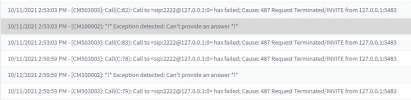
I've checked the logs and I get the following error message
1633956884399.png


EDIT:
I've restarted the Windows Machine completely and at this time the call Flow is being respected (20 seconds, then voicemail)
But when an external number calls into the 3CX there is still no call progress tone.

EDIT again:
Looks like it's an issue with the call flow is back but i've isolated it to the Android app. When changing account from that device it works on the iPhone. I'll wipe all test accounts from the app and reïnstall it.

It stays the same. Call comes into the app, I can't pickup and then it goes straight to voicemail.
 
Last edited:
Hello NickD,
Sorry for the late response.

  • 3CX Version, Enterprise Annual 16.0.9
  • Server OS, Windows 10 uptodate
  • Is the 3CX Server Hosted and where? Private cloud
  • IP Phone Make/Model/Firmware version, Android 11
  • Provisioning Method: 3CX app
  • Has the Firewall Checker passed: YES
  • Are custom Phone Templates being used: NO


This only happens when an external caller is calling into the 3CX. The Mobile app, which is remote picks up the phone. But the behaviour is the same for extensions that only have a deskphone.


I checked with the provider, no failover has become active or has taken the call. When disabling the registration the provider failover becomes active and gives a distinctive error message.
So calls are being transfered into the 3CX.

To check i've also checked with different providers, different phones (iOS) behaviour is the same.
Call cannot be picked up, goes to voicemail.

I've checked the logs and I get the following error message
View attachment 25054


EDIT:
I've restarted the Windows Machine completely and at this time the call Flow is being respected (20 seconds, then voicemail)
But when an external number calls into the 3CX there is still no call progress tone.

EDIT again:
Looks like it's an issue with the call flow is back but i've isolated it to the Android app. When changing account from that device it works on the iPhone. I'll wipe all test accounts from the app and reïnstall it.

It stays the same. Call comes into the app, I can't pickup and then it goes straight to voicemail.
I am a bit confused with your last edit to the post.

So you say this happens only when you answer from the Android app, but not when you answer from the IOS App, even when it is provisioned with the same extension?

How about with IP Phones, does it happen with those?
 
Hello NickD,

When i registered the new extension for testing, I used my android smartphone. When I was troubleshooting I asked a colleague if he wanted to run a similar test but using his iPhone.
When changing the inbound routing no progress tone is heard, but he does have the opportunity to pickup the call and the call rules are respected.
When I then register my colleague's testing extension on my Android phone it's the problematic behavior again. (Can't pickup the call, rings once, goes straight to voicemail).

I've tried calling a phone which is on Site (Snom 720 Hotdesked, logged in and extension show ready) but the call also instantly goes to the extensions voicemail. This user does not have a softphone appliance/ smartphone.

When I call other extensions with desk phones attached (Older SNOM 300) the call goes through, but most users have their 3CX iOS app running so they pick-up the phone like that.
 
I've tried calling a phone which is on Site (Snom 720 Hotdesked, logged in and extension show ready) but the call also instantly goes to the extensions voicemail. This user does not have a softphone appliance/ smartphone.
I am a bit intruged with this behavior. Seems like you have narrowed it down to a point where you always replicate it, so let's go with this scenario, which has the least moving parts. If you could please do this:
  1. Go to Dashboard --> Activity Log --> Settings and set them to "Off"
  2. Now in Dashboard --> Activity Log, press "Purge" to delete the logs
  3. Go back to Dashboard --> Activity Log --> Settings and set them to "Verbose"
  4. Go back to Dashboard --> Services, select all services and press "Restart"
  5. Log back into the Management Console
  6. And replicate the scenario quoted above
  7. Once the call goes to the VMail, in the upper-right corner, select Support and press Generate Support Info.
  8. In the Admin Email inbox, open the email you receive and download the Support Info file, then upload it to a file sharing service of your choice like Dropbox, GDrive, WeTransfer. etc, and send me the download link in a PM.
This should help us determine why the call is being instantly sent to VMail.
 
Hello Nick,
I've re-ran some tests, like, a lot of tests..... looking into the progress tone issue:

looks like the main issue is the softphone that's being used by the caller. All initials tests where done using the Mitel Softphone. For whatever reason it's not passing on the progress tone on the headset/speakers.
When using a smartphone or 3CX softphone from another client and calling any of the number in that 3cx installation a progress tone is heard.


About the android phone:
re-installed the app, reconfigured it. I'll make the logs at this time.
I'm able to reproduce this issue using multiple installations, different trunks and installation types. (Windows, Debian, physical, virtual) So the issue is probably an android based problem.

Edit: checked the phone Provisioning settings and changed the network interface to the outbound FQDN instead of the internal IP and everything started working.
The weird part is, now I'm running these tests again on different installs, and looks like I'm not able to reproduce the issue anymore, it's to say... Our internal number on the clients 3cx forwards to our main number, which at this time is out of service due to a migration. Used a different number and provider and client and when I adjust the network interface to the FQDN it's resolved.

The only reason I can think of that this is happening is that the Android phone always uses the QR code in de administration portal and the iPhone always uses the Welcome e-mail QR Code.
 
Last edited:
First of all, I am glad to hear that you seem to have solved the problems you were facing.

Regarding the QR codes, the one in the Welcome Email should match that in the Management Console when you are accessing it using the FQDN.
It doesn't matter though, because once it's provisioned, it should work regardless.

What could make a different is what you said:
Edit: checked the phone Provisioning settings and changed the network interface to the outbound FQDN instead of the internal IP and everything started working.

Again, that should not make such a big difference, except though in the case that the IP Phone cannot contact the Local IP Address.
 
First of all, I am glad to hear that you seem to have solved the problems you were facing.

Regarding the QR codes, the one in the Welcome Email should match that in the Management Console when you are accessing it using the FQDN.
It doesn't matter though, because once it's provisioned, it should work regardless.

What could make a different is what you said:


Again, that should not make such a big difference, except though in the case that the IP Phone cannot contact the Local IP Address.
I've also found that for that single number I'm using for testing all calls are received twice. Regardless of the provider used by the caller.
We are checking this with our local provider.
 
I've also found that for that single number I'm using for testing all calls are received twice. Regardless of the provider used by the caller.
We are checking this with our local provider
If in 3CX, you see only 1 INVITE message going out to your provider per call, then yes, you need to check with the provider.
 
Just so this topic can be closed.
The issue was with the provider. They had some internal routing between their old and new infrastructure. That caused an internal loop and all call were forwarded twice to the 3CX and then to my demo extension.

Since by default "Accept multiple Calls" is disabled, the first call would go through, the second one would go to voicemail.
Then the providers trunk would do some wonky weird stuff with the RTP streams.
They've cleared it all up and all issues now seem to be resolved.
 
That is excellent to hear!

Hopefully it is all sorted out now.
 
  • Like
Reactions: Stijn_DC
Status
Not open for further replies.

Forum statistics

Threads
111,974
Messages
590,081
Members
164,899
Latest member
mazet