- Joined
- Oct 11, 2021
- Messages
- 10
- Reaction score
- 4
We're configuring 3CX-WhatsApp integration for the 1st time for one of our customers.
We're following the guide on https://www.3cx.com/docs/manual/whatsapp/
We're following the YouTube video on
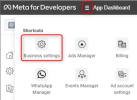
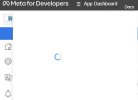
I've completed "Step 1: Create WhatsApp application". For Step 2, it asks to click on Menu Icon & then Business Settings by clicking on 3 lines next to App Dashboard, however, that doesn't bring anything up - just a circle as if it's processing. I've tried different browser & still the same.
This means, I'm not able to continue with Step 2.
Could you please assist?
We're following the guide on https://www.3cx.com/docs/manual/whatsapp/
We're following the YouTube video on
I've completed "Step 1: Create WhatsApp application". For Step 2, it asks to click on Menu Icon & then Business Settings by clicking on 3 lines next to App Dashboard, however, that doesn't bring anything up - just a circle as if it's processing. I've tried different browser & still the same.
This means, I'm not able to continue with Step 2.
Could you please assist?